
FutFilters 设置指南
安装、面板与设置,每一步一张截图.
1. 开始使用
两个助手在 EA FC Web App 中协同工作:FutFilters 面板(狙击筛选、Auto Search、autobuyer 日志)和 FF Webapp Extra(卡片价格、一键上架、Transfer List 和 Club 工具)。
- 在 futfilters.com 创建账户或登录,然后从 "My Account" -> "API code" 复制你的个人 API code。
- 从 Chrome Web Store 安装 Chrome 扩展(见下载页面),或通过 Tampermonkey 安装用户脚本。
- 打开 EA FC Web App,照常登录 EA。左侧菜单中会出现 "FutFilters" 和 "FF Webapp Extra" 两个图标。
- 打开 FutFilters 面板,再点击齿轮图标(Settings),粘贴一次你的 API code("API code" -> 点击编辑 -> Save)。
- 在面板中选择一个筛选并点击:Transfer Market 搜索表单会自动为你填好。
2. FutFilters 面板
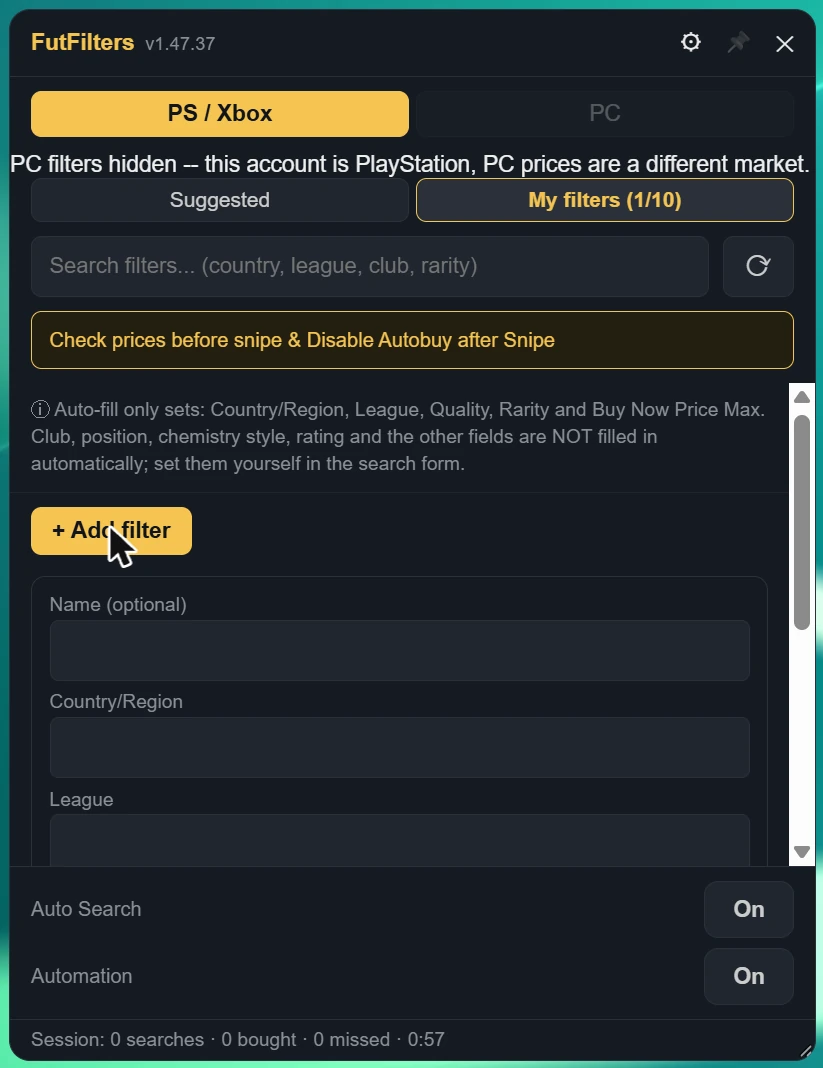
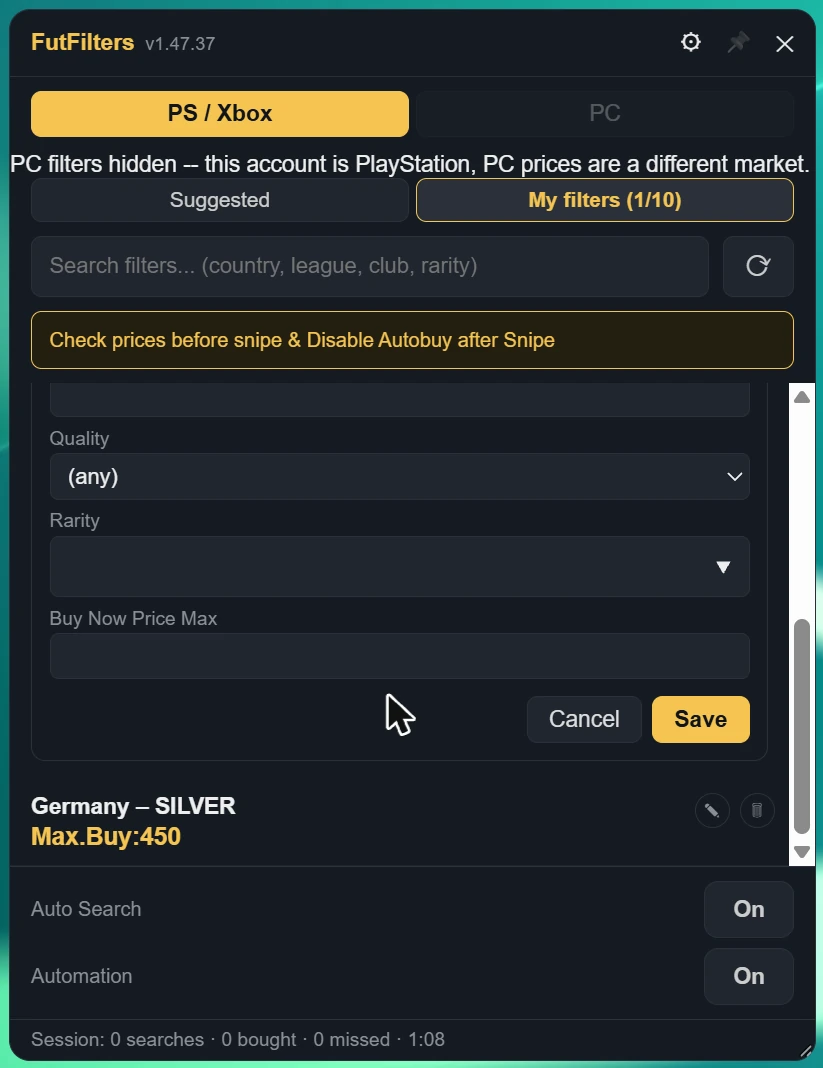
面板列出我们已定价的筛选,显示每个筛选的盈利程度,点击其中一个即可自动填写 Transfer Market 搜索。
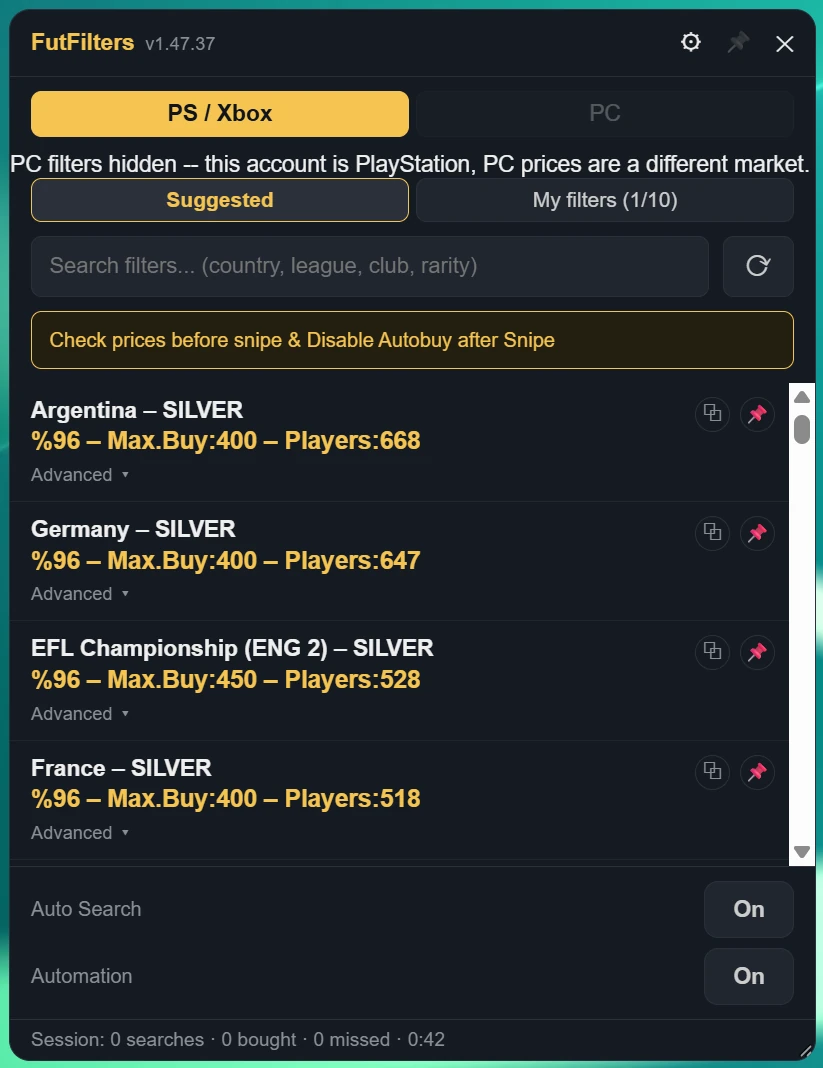
- PS / Xbox 和 PC 是不同的市场。如果你看到 "PC filters hidden",说明你的账号是 PlayStation / Xbox,而 PC 价格属于另一个市场,因此只显示匹配的筛选。
- 搜索框:输入国家、联赛、俱乐部或稀有度来缩小列表;刷新按钮可重新加载。
- Auto Search 和 Automation 开关位于面板底部;其下方的一行是当前会话(搜索、已买、错过、时间)。
- 标题栏中的图钉图标可在你点击页面其他位置时保持面板打开;拖动右下角可调整大小。
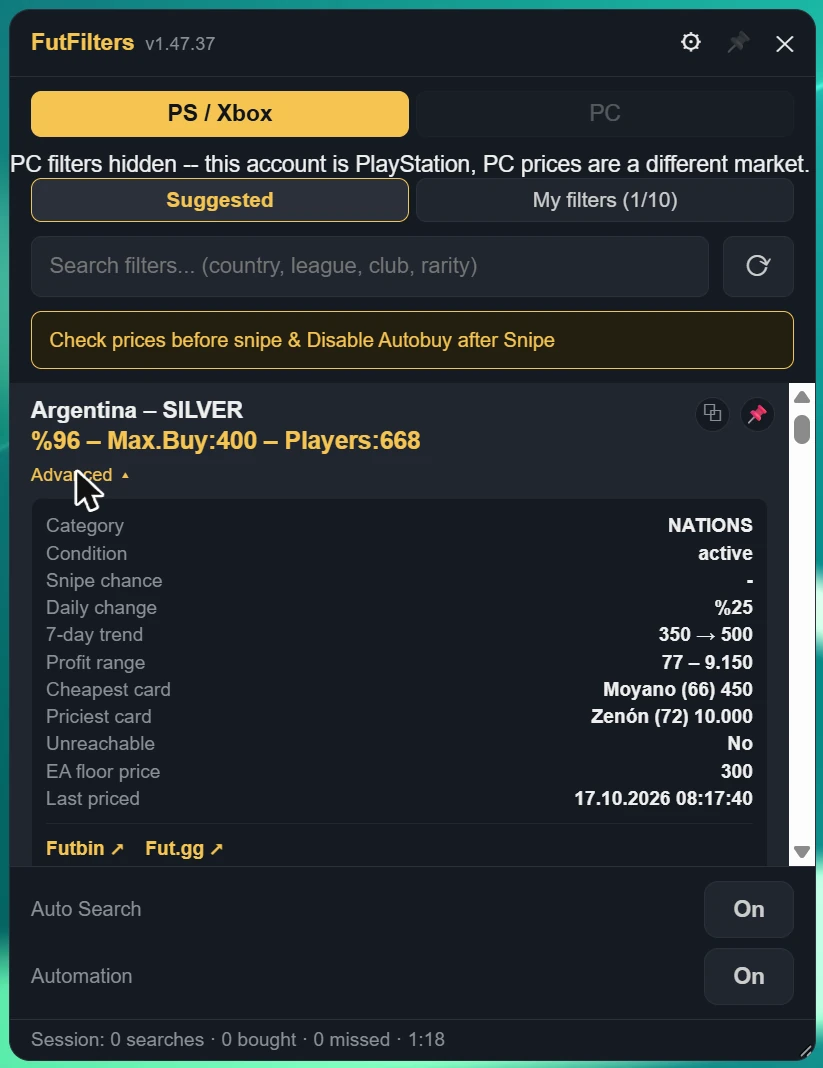
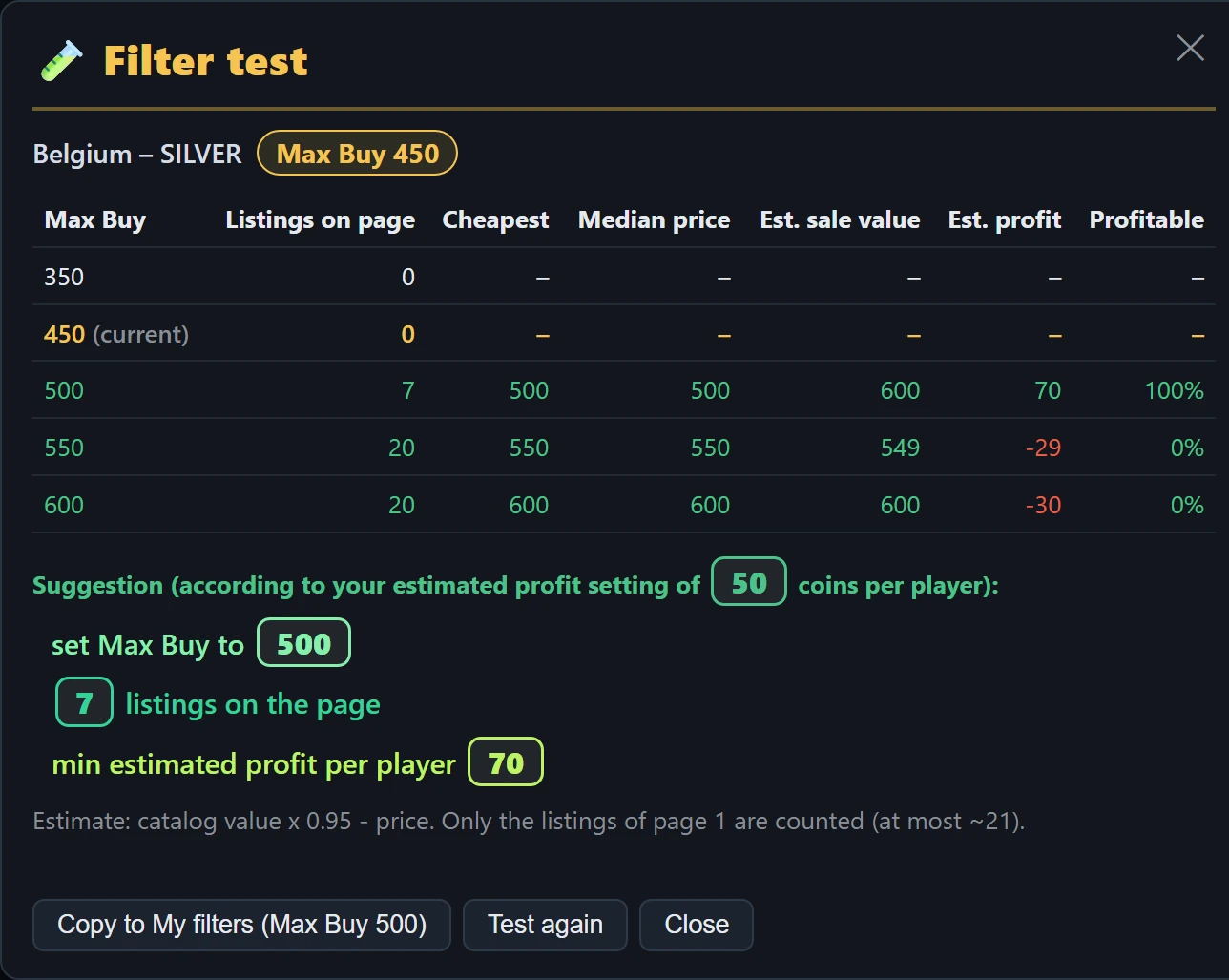
- 表格下方的建议会在市场发生变化时(例如当前价格下没有任何挂牌,但高一档有足够多有利润的挂牌)给出更好的 Max Buy;或者建议保持不变,或暂时放弃该过滤器。
- "Copy to My filters" 会以建议的 Max Buy 把该过滤器加入 My filters。如果测试的是 My filters 中的过滤器,该按钮会改为修改它的 Max Buy。
- 每次完成的测试都会保存在 Tested 标签页中,它位于面板以及网站面板页面里 My filters 的旁边:包含过滤器、测试建议的 Max Buy 以及测试的日期和时间。点击某一行即可按该价格填入过滤器,也可以把它复制到 My filters。
- 测试完成后,其结果会作为匿名市场数据发送给 FutFilters(可在 Settings 中关闭;关闭后测试只保留在你自己的 Tested 列表里)。当多个账号反馈某个过滤器的 Max Buy 已不符合市场时,FutFilters 会把该过滤器的价格调整 24 小时(折扣从 10% 改为 5-10%);被调整的过滤器在其 Max Buy 旁显示齿轮图标。
- 测试运行期间会停止 Auto Search,并屏蔽所有自动购买选项(Auto-click Buy Now、Auto-click Ok、Multi-buy 以及 Webapp Extra 的自动购买开关),因此不会购买任何东西。完成后请重新启动 Auto Search。不要连续做很多次测试:每次测试约 8 次搜索。
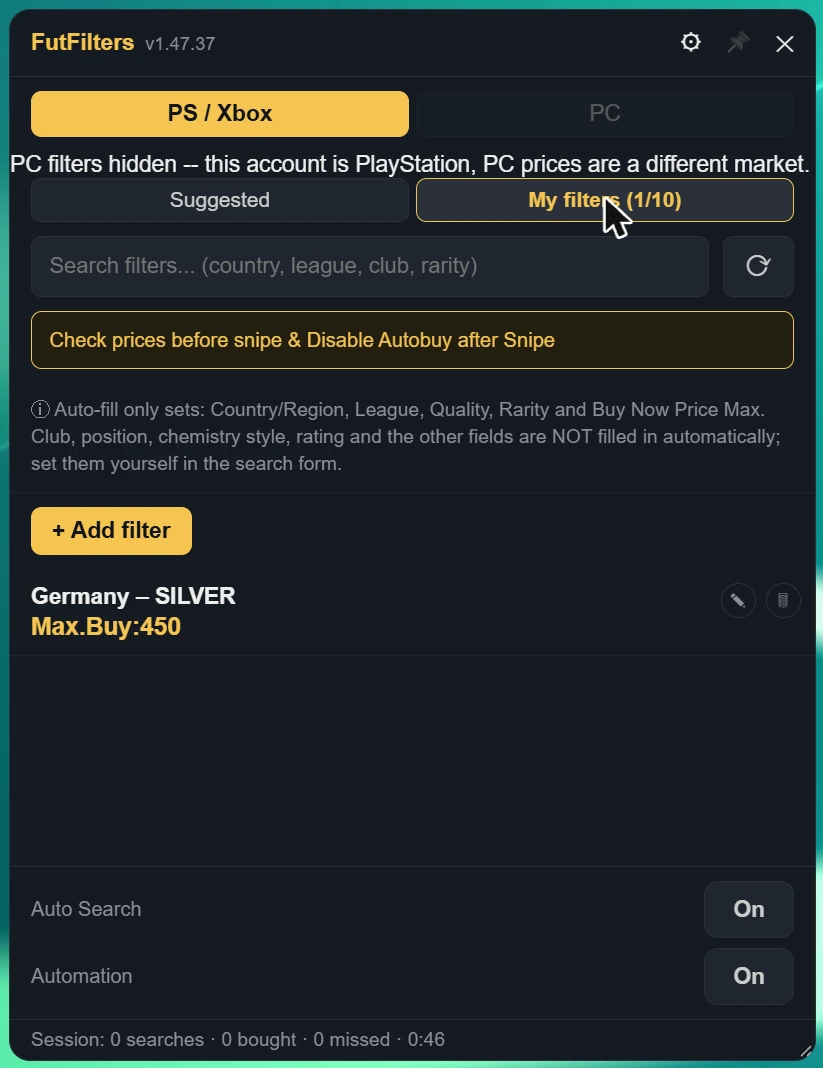
Auto-fill only sets: Country/Region, League, Quality, Rarity, Position and Buy Now Price Max. Club, chemistry style, rating and the other fields are NOT filled in automatically; set them yourself in the search form.
3. FutFilters 设置
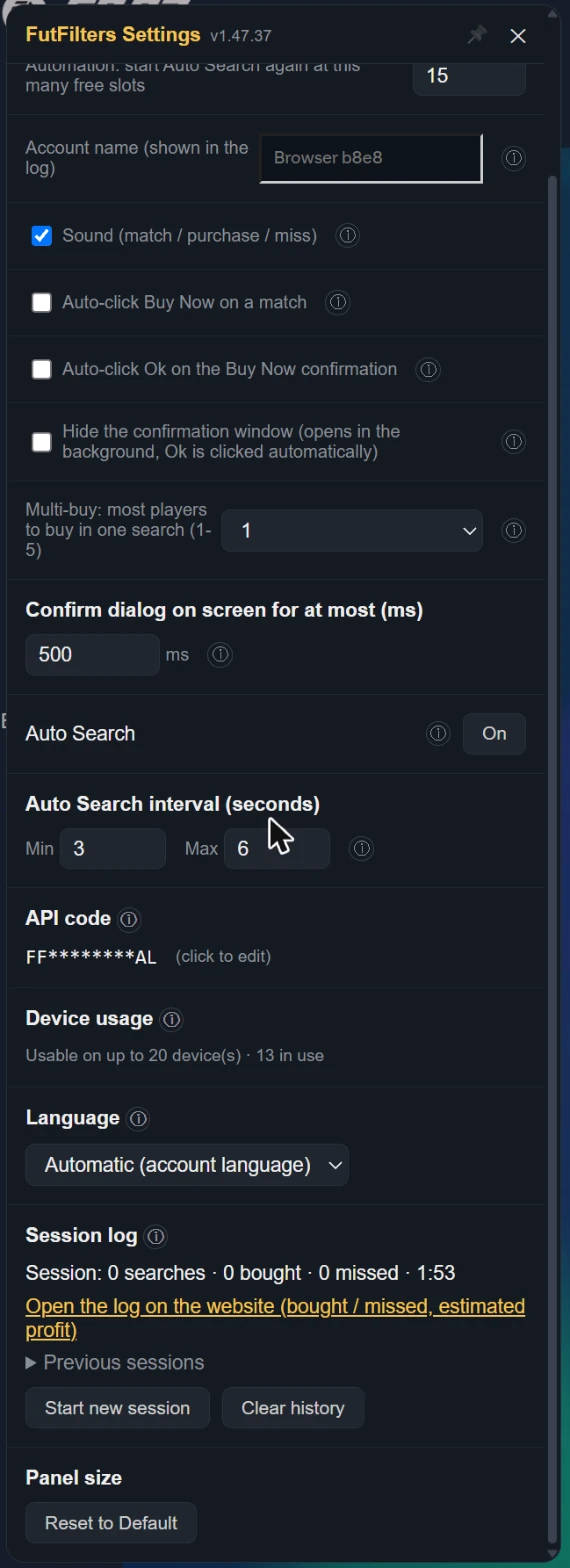
点击面板标题栏中的齿轮图标。把鼠标悬停在面板里设置项旁边的 (i) 上,可以看到与下文相同的说明。
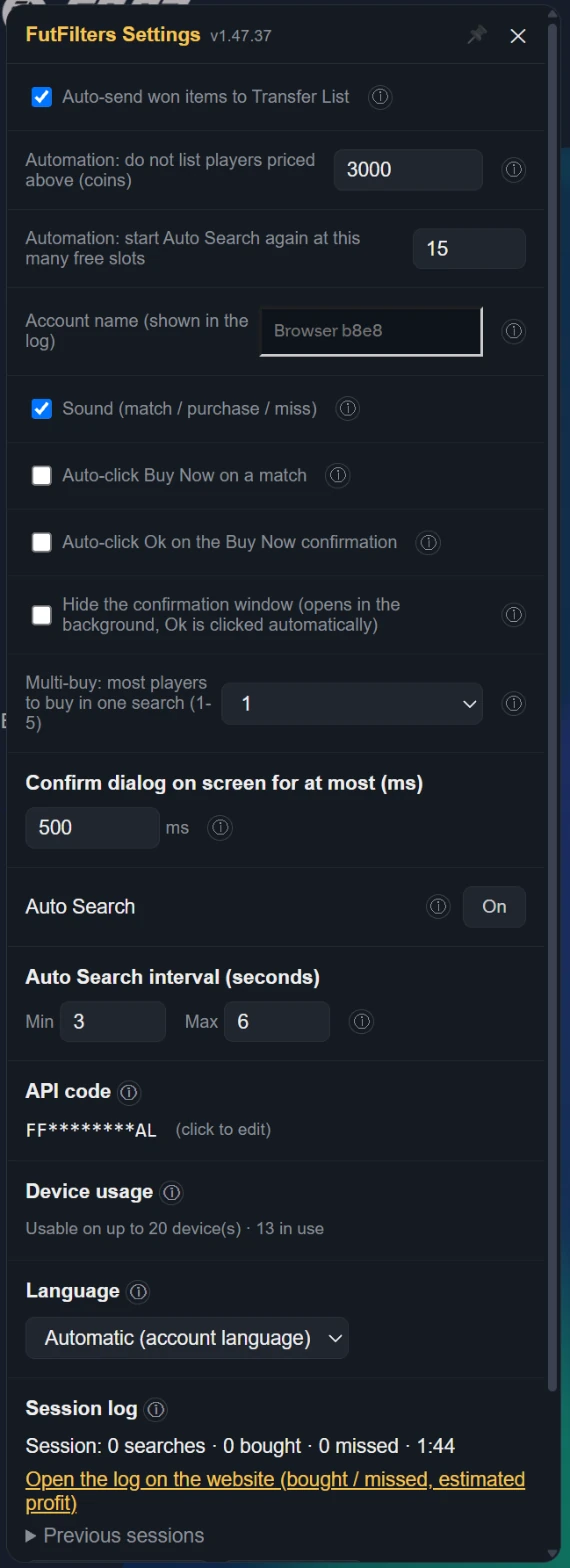
| Auto-send won items to Transfer List | When a purchased/won item shows up on the Club > Unassigned page or the Search Results page, automatically clicks "Send to Transfer List". Only relocates the item to the Transfer List tab -- it does not list it for sale, set a price, or move any coins; only runs while one of those pages is open. Default: on. EA caps the Unassigned pile at 5 items and refuses new purchases when it is full, so on other pages too (Transfers, Transfer List, Club...) purchased items are sent without leaving the page (if the Transfer List is full it retries when space frees). If that method stops working it falls back to opening the Home "Unassigned Items" tile. |
|---|---|
| Automation: do not list players priced above (coins) | WHEN ON: when the Transfer List is 90% full Auto Search stops and the players in it are listed one by one at the FutFilters price for 1 hour (with the Relist % of FF Webapp Extra, +5% if you never set one). When listing is done the sales are checked periodically and sold items are cleared; when the number of free slots set below (default 15) is reached Auto Search starts again with the same filter. WARNING: this is full automation, it lists without anyone looking and is a risky way to use the helper; be careful before leaving it unattended. Players priced above the limit below are never listed automatically. |
| Automation: start Auto Search again at this many free slots | 当 Transfer List 空出这么多位置时(默认 15),Auto Search 会用同一个筛选重新开始。 |
| Account name (shown in the log) | Shown next to this browser's events and warnings in the Autobuyer log, so you can tell your accounts apart when you run several. Left empty it uses the club name shown in the Web App (or a short code for this browser if that cannot be read). The name is sent to futfilters.com with the log events; if you prefer, type a short nickname instead. |
| Sound (match / purchase / miss) | A beep when a listing matches, a "cha-ching" on a successful purchase, a low "thud" on a missed player, and the alert when Auto Search stops. Turn it off for no sound at all. Default: on. |
| When EA keeps answering "Too many actions": pause Auto Search for (minutes, 0 = off) | When too many actions are taken EA answers "Too many actions have been taken…" and switches the Transfer Market off for a while; an Auto Search that keeps going only wastes time and is risky for the account. WHEN ON: if that message is seen more than 5 times within the last 20 searches, Auto Search stops for the number of minutes set here and then carries on by itself with the same filter. 0 = off. Works on an English EA account. |
| Skip cards with an estimated profit below (coins, 0 = off) | Estimated profit = the card's catalog value x 0.95 - price. A low-profit card takes a Transfer List slot for an hour. 0 = buy every match (as before). Cards the catalog does not know are still bought. While on, a card whose value is not cached yet can delay the click by up to 0.45 s. |
| Send filter test results to FutFilters | When a test finishes, its result (listings, prices, estimated profit, suggestion) is sent to FutFilters as anonymous market data. When it is off the result is still saved to your own Tested list, just not shared. When several accounts report that a filter's Max Buy no longer fits the market, the server adjusts that filter's price (a 5-10% discount) for 24 hours; an adjusted filter shows a ⚙ next to it. |
| Auto-click Buy Now on a match | When the watch finds a match, automatically selects the row and clicks "Buy Now for X" -- this opens EA's own "Get Now" confirmation dialog. If "Auto-confirm" below is off, the dialog stays yours to act on. |
|---|---|
| Auto-click Ok on the Buy Now confirmation | WHEN ON, also clicks Ok in the "Get Now" confirmation dialog and completes the purchase. This is full automation -- high EA account ban risk. Default: off. Only meaningful while auto Buy Now is on. |
| Hide the confirmation window (opens in the background, Ok is clicked automatically) | The Buy Now confirmation window (Cancel / Ok) is not shown on screen; EA still opens it and the script clicks Ok in the background. Only works while "Auto-click Ok on the Buy Now confirmation" is on and only for the helper's own attempt: windows you open yourself stay visible. A hidden window that gets stuck is closed with Cancel. Default: off. |
| Multi-buy: most players to buy in one search (1-5) | 1 (default): if a search shows several matches only the most profitable one is bought (profit by the FutFilters price: value x 0.95 - price). 2-5: up to that many players are bought in that search, one after another, most profitable first. The number counts Buy Now attempts and starts again with every new search; with a short Auto Search interval you may not get through all of them before the next search comes. WARNING: multi-buy is a risky way to use the helper; coins are spent on several players at once, you can exceed your budget and fill the Unassigned pile (5 items). Be careful when you use it. |
| Confirm dialog on screen for at most (ms) | Only applies while "Auto-click Ok" is ON. If the "Get Now" dialog is still open this long after it first appeared (the Ok click did not register) it is closed with Cancel, so it cannot sit there and collide with the next search. Default: 500 ms. With Auto-click Ok off the dialog is always shown and left to you. |
| Auto Search | You can also turn Auto Search on/off from here -- does nothing while watch is off. Default: off. |
| Auto Search interval (seconds) | Each cycle waits a random amount of time between these two values -- deliberately variable, since a fixed interval is the most obvious bot tell there is. |
| API code | Changing the code switches to a different futfilters.com account/code -- filters and preferences reload accordingly. |
| Device usage | Switching to a different computer? You can reset it from your futfilters.com panel. |
| Language | The panel's language. "Automatic" follows the language on your futfilters.com account; pin it here to match your EA Web App's language -- no need to visit the website. |
| Session log | Every time you start Auto Search a new session begins (there is also one from when you open the page; you can press "Start new session" yourself too). Stopping Auto Search does not end it: it keeps counting until the next one starts. Searches counts manual and automatic Search clicks; bought counts purchased items that land in the Unassigned pile. The last 30 sessions are kept in this browser. |
4. FF Webapp Extra 设置
打开左侧菜单中的 "FF Webapp Extra" 图标。每个功能都有自己的开关,以及带说明的 (i) 按钮。不用的功能请关闭。
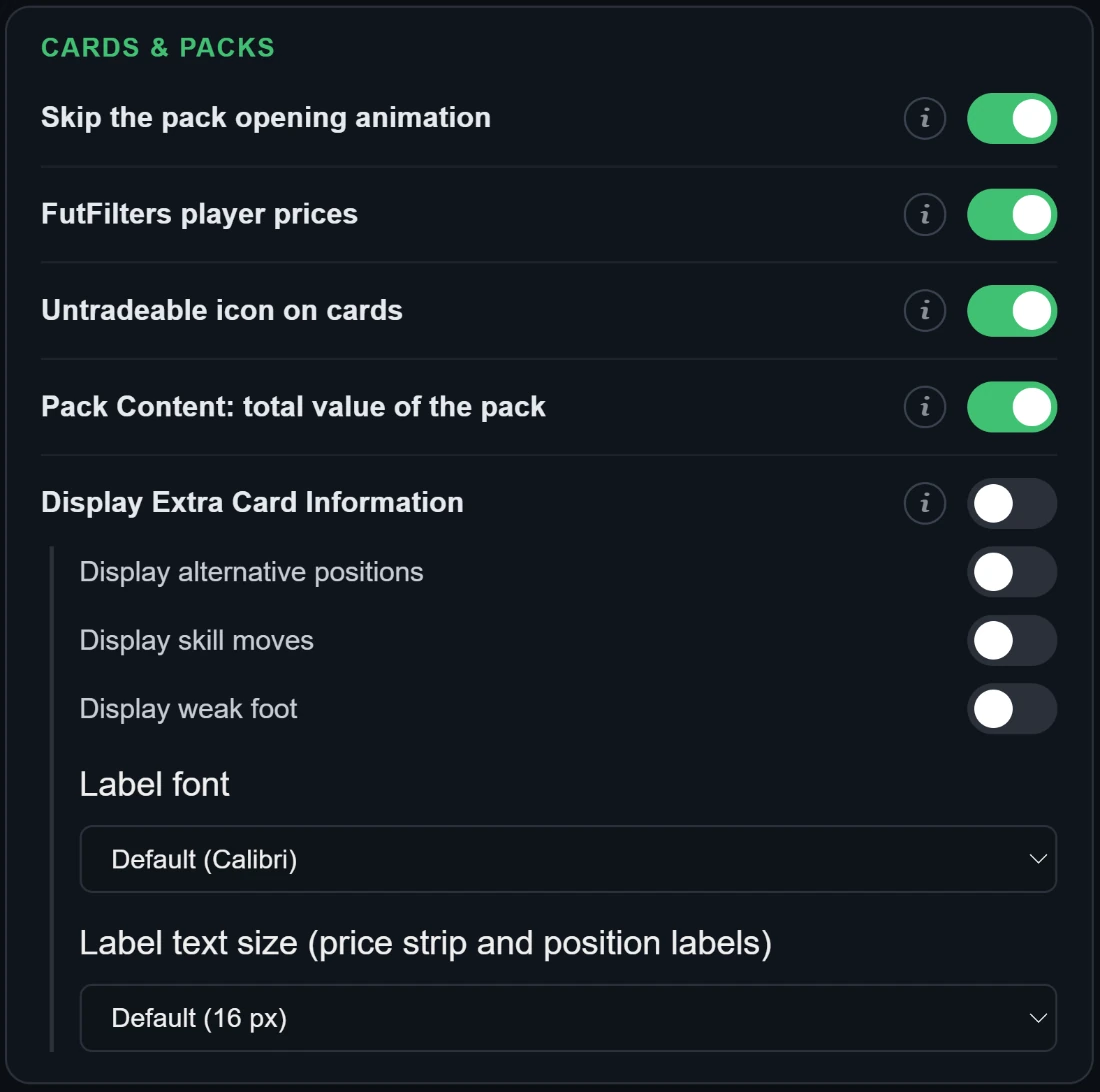
- 跳过开包动画
- 隐藏开包时播放的彩带/烟花动画,直接显示结果。
- FutFilters 球员价格
- 在每张球员卡上方显示 futfilters.com 球员数据库中的最新价格。PlayStation / Xbox 账号只显示 PS 价格,PC 账号只显示 PC 价格(绿色);无法识别平台时两者都显示。颜色变淡的价格已超过 2 天;悬停可看到精确数值、EA 价格下限和日期。仅在开启脚本之后加载的列表中显示。Chemistry Style、教练和 Manager League 也会显示价格(最低挂牌价,来自 fut.gg)。
- 卡片上的不可交易图标
- 在每张不可交易的球员和物品卡片左上角加上清晰的“不可交易”图标(俱乐部、Unassigned、阵容、卡包),一眼就能看出。默认:开启。
- Pack Content:卡包总价值
- 在 Store 的 "Pack Content" 窗口中(你预览或打开的卡包),底部会多一行显示卡包总价值:球员按 FutFilters 价格(你账号对应的 PS / PC 市场);消耗品、教练等其他物品以及没有价格的球员按 Quick Sell 价值。每张卡的价格来自 "FutFilters 球员价格",请同时保持开启。如果卡包价值高于其金币售价,会用绿色一行提示值得开包(数值未扣除 EA 5% 的出售税)。 Store 列表中已预览过的卡包,会在其 "View Pack" 按钮上方显示同样的价值。 卡包中的 Chemistry Style 也按市场价格计算。 金币物品按面值计算。 卡包里开出的卡包(例如 Silver 或 Gold 包)按其在 Store 的金币价格计算,而不是按预期收益。
- 显示卡片额外信息
- 在卡片右侧边缘添加小标签(EA 默认不显示的信息)。
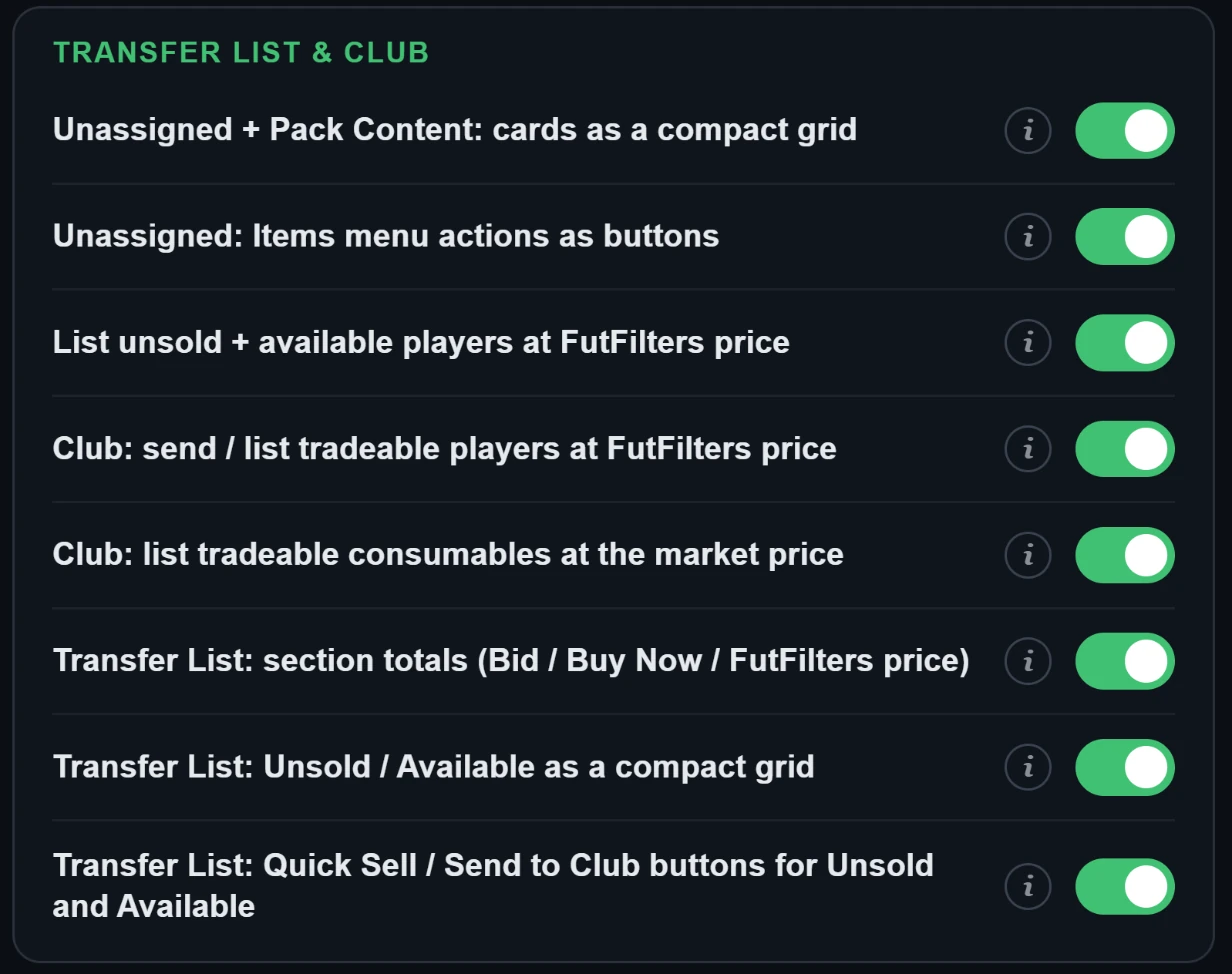
- Unassigned + Pack Content:卡片紧凑网格
- 在 Unassigned 页面(刚从卡包开出的卡片)和商店的 Pack Content 窗口(预览或已打开的卡包)中显示卡片及其下方的物品名称,每行五张并自动换行,不显示属性和箭头。点击卡片照常选中。默认:开启。
- Unassigned:Items 菜单操作变为按钮
- 在 Unassigned 页面,把 Items 菜单(三个点)里的操作作为按钮放在“Items”标题旁:全部存入俱乐部、发送到转会列表,以及带总价值的快速出售。快速出售仍会先显示 EA 自己的确认窗口。默认:开启。另有两个按钮,只把球员(不含消耗品和其他物品)移到俱乐部或转会列表。 Duplicates 中可交易的球员也包含在“发送到转会列表”按钮中。
- 按 FutFilters 价格上架未售出 + 可用的球员
- 在 Transfer List 页面为未售出或未上架的球员添加一个按钮:按 futfilters.com 球员数据库中的价格,加上你选择的百分比(-20 … +20,默认 +5)并取整到 EA 的价格档位,逐个上架。在你按下 "List selected" 之前不会上架任何球员;会先显示一张表格。打开卡包后,Unassigned 页面上也会出现同样的按钮,用于处理那里等待的可交易球员。
- Club:按 FutFilters 价格发送 / 上架可交易球员
- 在 My Club > Players 添加一个按钮:扫描俱乐部中的可交易球员,并连同 FutFilters 价格显示在表格中(可逐个选择,默认一个都不选)。可把所选球员批量发送到 Transfer List,或直接从俱乐部按 FutFilters 价格(含你的百分比)上架。
- Club:按市场价上架可交易消耗品
- 在 My Club > Consumables 页面添加一个按钮:扫描俱乐部的所有消耗品堆叠(Chemistry Styles、Manager Leagues、Healing 等),在表格中显示可交易的项目,包括市场价(Chemistry Styles 和 Manager Leagues 用 futfilters.com 的价格,其余用 Transfer Market 上最低的 Buy Now)、按你的百分比调整后的起拍 / Buy Now 价格,以及每组要上架的数量(默认全部)。点击 "List selected" 之前不会上架任何东西;物品逐件上架,调用的与 EA 的 "List on Transfer Market" 相同。默认:开启。
- Transfer List:各分区合计(Bid / Buy Now / FutFilters 价格)
- 在 Transfer List 每个分区(Sold、Unsold、Available、Active)的标题下添加一行 "TOTAL":该分区球员的 Bid 总和、Buy Now 总和以及 futfilters.com 数据库价格总和。只读,不会移动 EA 的行。
- Transfer List:Unsold / Available 紧凑网格
- 在 Transfer List 页面,把 Unsold Items 和 Available Items 区域显示为卡片网格,每行五张,卡片下方显示物品名称,不显示价格和箭头。点击卡片照常选中。Sold Items 和 Active Transfers 保持原有列表。默认:开启。
- Transfer List:Unsold 和 Available 的 Quick Sell / 存入俱乐部按钮
- 在 Unsold Items 和 Available Items 标题旁添加按钮:"全部 Quick Sell"(EA 会先要求确认;市场价高于 1,000 的球员不会被包含)、"全部存入俱乐部"和"球员存入俱乐部"(仅球员)。它们对整个区域生效,使用 EA 自己的调用和提示;无法移动的重复物品会被跳过。默认:开启。
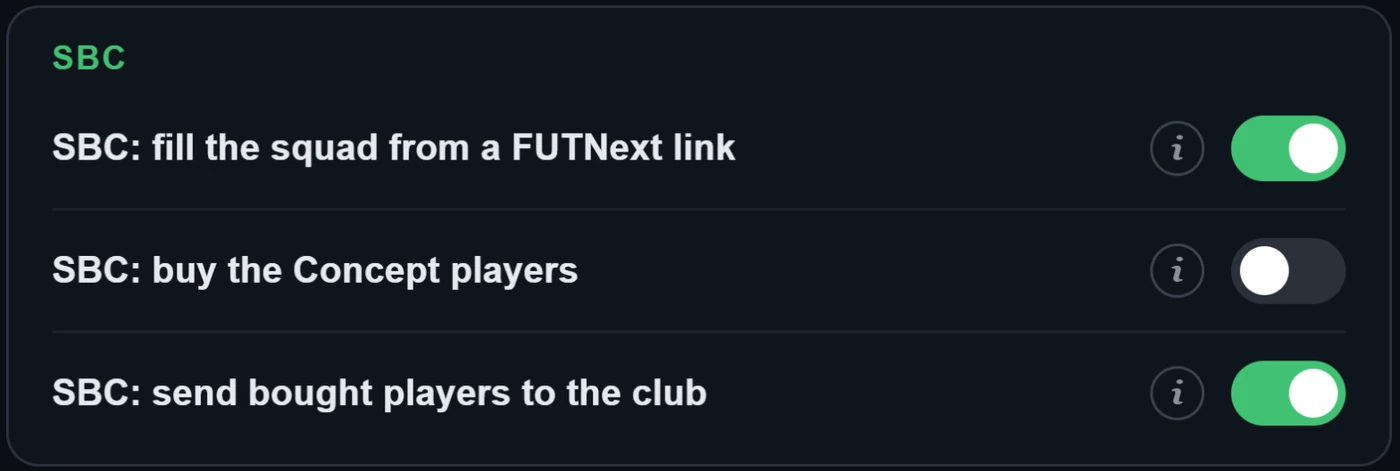
- SBC:根据 FUTNext 链接填充阵容
- 在 SBC 阵容页面的 "Clear Squad" 按钮下方添加一个 "FUTNext" 框。粘贴 FUTNext 链接(futnext.com?sbcId=…&players=…)或只粘贴球员 ID 列表,阵容会立即填满:优先使用你俱乐部里已有的卡,没有的则用 Concept 球员代替(EA 用于规划的占位球员,无法提交)。阵容只会保存,不会提交。找不到的球员会被列出。当 futfilters.com 有该挑战的 FUTNext 最新方案时(每 6 小时收集一次),框下方的下拉列表会显示最新的 5 个方案及其价格和时间:选一个,阵容立即填好。
- SBC:把购买的球员送入俱乐部
- 当你身处 SBC(阵容页面及其球员搜索)时,购买的球员会被移入你的俱乐部(Unassigned -> My Club),而不是 Transfer List。打开 SBC 时已在 Unassigned 中等待的球员不会被动。SBC 期间 Autofill 脚本会退让,避免两者争抢同一名球员。
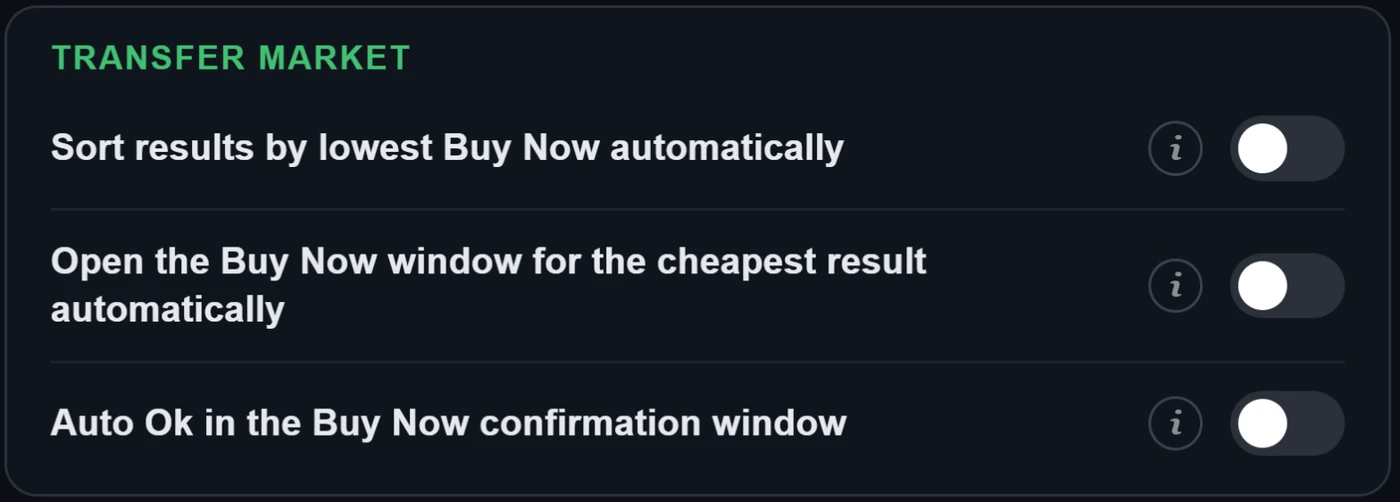
- 自动按最低 Buy Now 排序结果
- 每当搜索结果列表(Transfer Market 或 SBC 球员搜索)出现或变化时,自动运行 "Sort results by lowest Buy Now" 快捷键。
- 自动打开最便宜结果的 Buy Now 窗口
- 选中结果列表最上面的球员(开启自动排序时即真正最便宜的那个),并像 "Buy now" 快捷键一样自动打开 EA 自己的 "Get Now" 确认窗口。如果下面的 "自动 Ok" 关闭,窗口会留给你自己处理。
- Buy Now 确认窗口自动点 Ok
- 开启时还会点击 "Get Now" 确认窗口里的 Ok 并完成购买,对 "Buy now" 快捷键和自动打开的窗口都有效。完全自动化有很高的 EA 账号被封风险。默认:关闭。
5. Transfer List 和 Club 工具
Webapp Extra 在 EA 自带页面上添加的功能。在你确认之前,不会上架或出售任何东西。
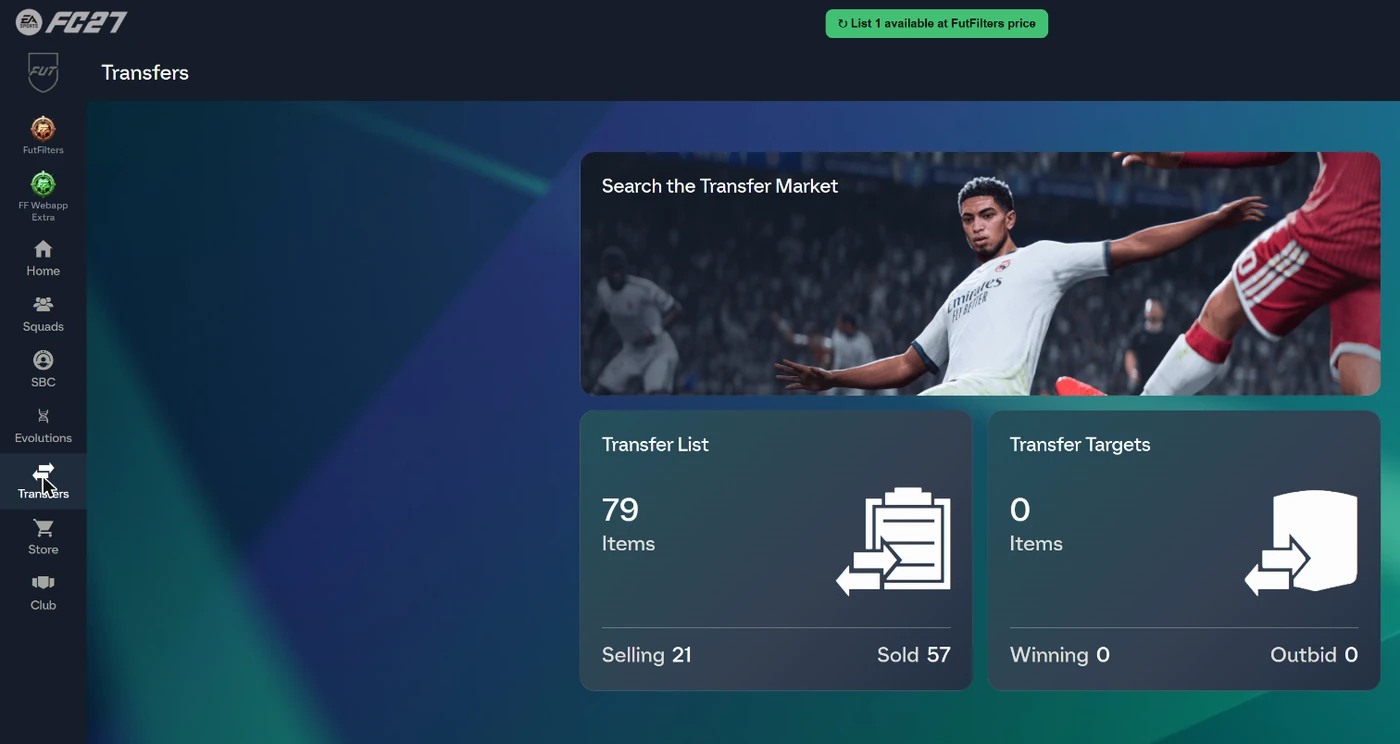
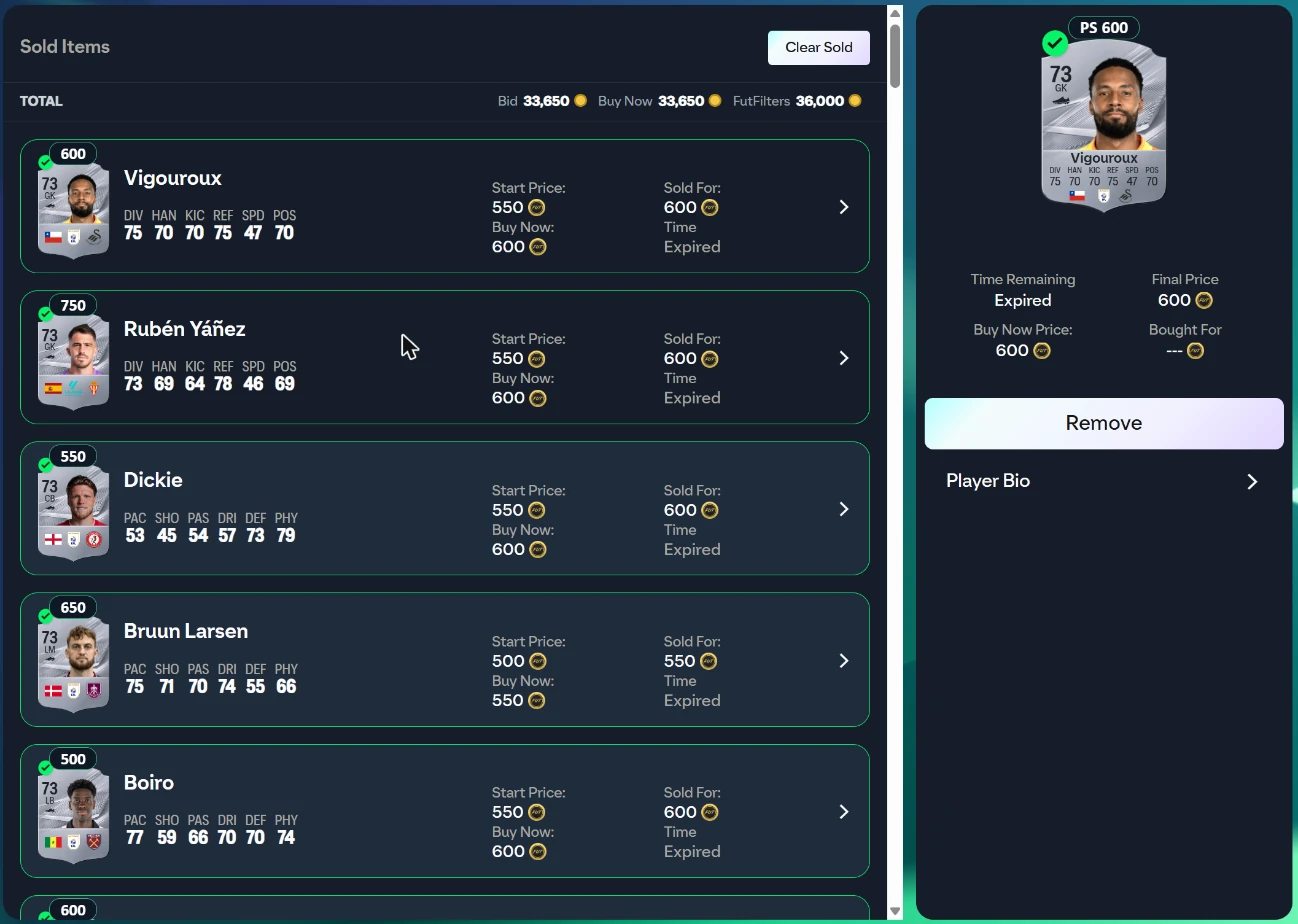
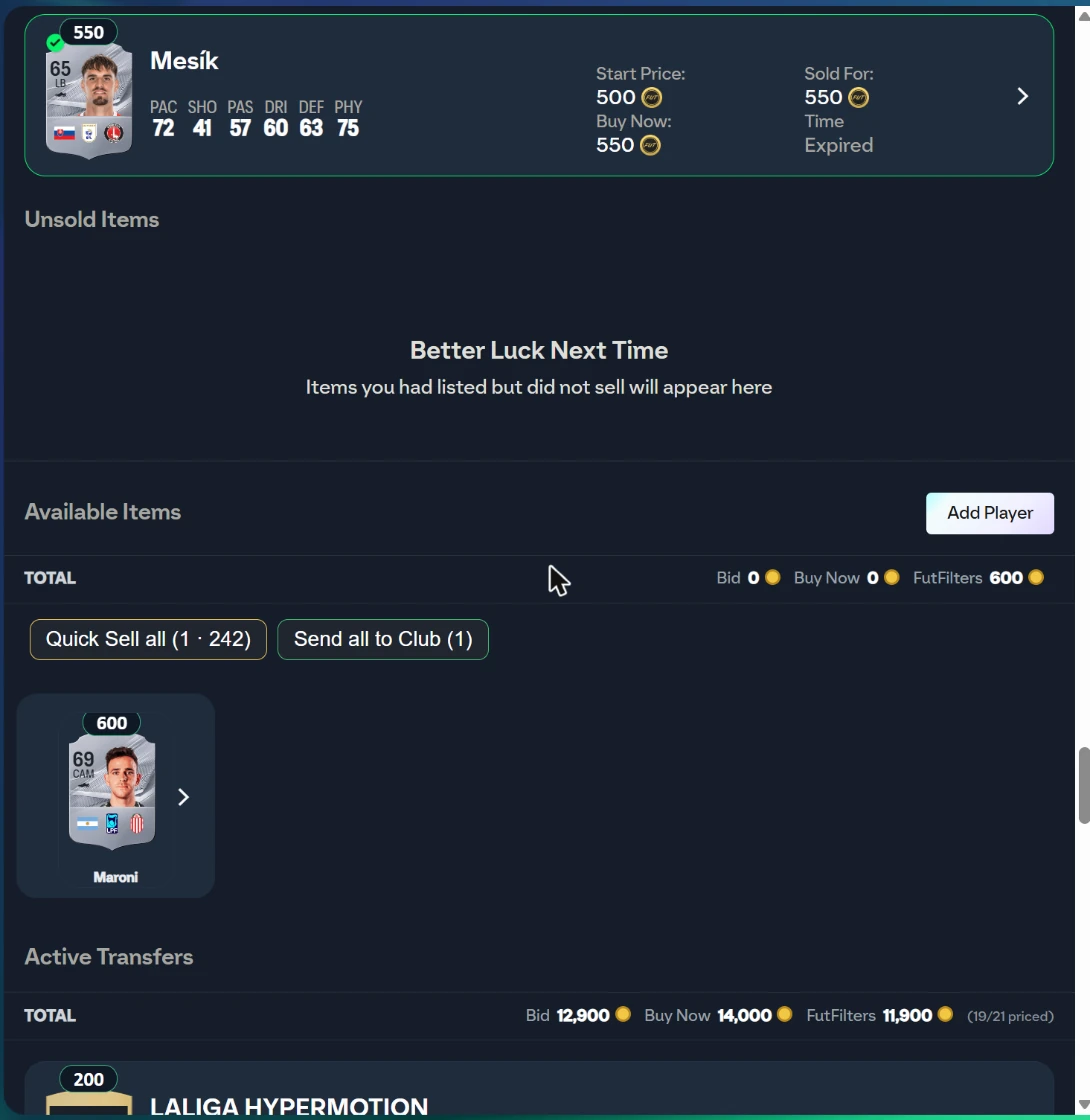
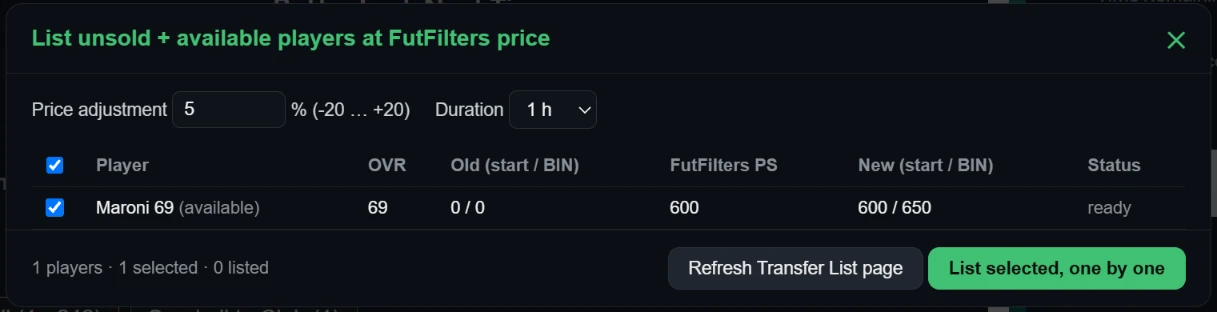
在 Transfer List 页面为未售出或未上架的球员添加一个按钮:按 futfilters.com 球员数据库中的价格,加上你选择的百分比(-20 … +20,默认 +5)并取整到 EA 的价格档位,逐个上架。在你按下 "List selected" 之前不会上架任何球员;会先显示一张表格。打开卡包后,Unassigned 页面上也会出现同样的按钮,用于处理那里等待的可交易球员。
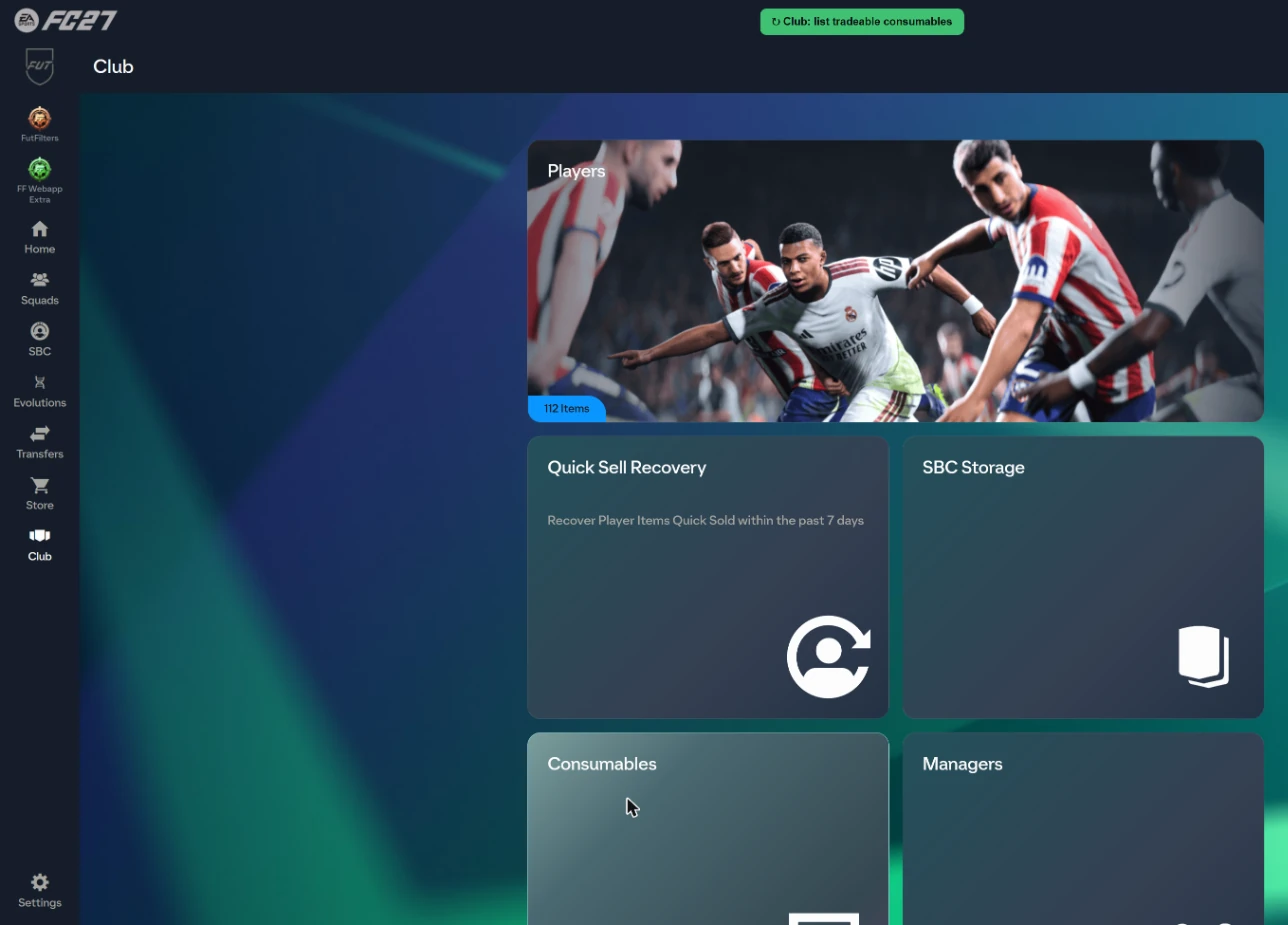

6. autobuyer 日志
每个已买和错过的球员,连同预估利润,都会发送到你在 futfilters.com 的日志。
- 从 Settings 面板打开("Open the log on the website"),或登录后访问 futfilters.com/logs。
- 同时运行多个 EA 账号或浏览器?请在 Settings 中为每个设置一个简短的 "Account name",这样在日志里就能区分它们。
- 会话:每次启动 Auto Search 都会开始一个新会话。浏览器中会保留最近 30 个会话(Settings 中的 "Previous sessions")。
- 错过的购买会把 EA 自己的消息作为原因,例如 "Bid status changed"(别人更快)或 "Too many actions"(EA 的临时限制)。
- 从你的 Transfer List 售出的卡也会被记录。页面在购买的预计利润旁显示 "Sold" 和 "Realised profit"(售价 x 0.95 - 卡的成本,直接从卡上读取)。
常见问题
FutFilters 是什么,两个助手又是什么?
FutFilters (futfilters.com) 是一个带实时价格数据的 Transfer Market 狙击筛选数据库,适用于 EA FC。FutFilters 面板把这些筛选带入 EA FC Web App,并自动填写搜索。FF Webapp Extra 在卡片上添加价格,并在 Transfer List、Club、SBC 和卡包界面提供各种便利工具。
我在哪里找到我的 API code?
登录 futfilters.com 后:"My Account" -> "API code"。在 Web App 中打开 FutFilters 面板,点击齿轮图标,点击 API code 那一行,粘贴代码并点击 Save。
我需要什么浏览器?
桌面版 Chromium 内核浏览器(Chrome 或 Edge)。从 Chrome Web Store 安装 Chrome 扩展,或通过 Tampermonkey 安装用户脚本。两者都在下载页面。
面板显示 "PC filters hidden",为什么?
你的账号是 PlayStation / Xbox,而 PC 价格属于另一个市场,所以助手只显示与你账号平台匹配的筛选。PC 账号则会看到 PC 筛选。
FutFilters 会替我购买球员吗?
默认不会:点击筛选只会填写搜索表单。Auto Search 会重复搜索,"Auto-click Buy Now" 和 "Auto-click Ok" 可以完成购买,但它们都是 Settings 中单独的开关,而且购买类的开关默认关闭。
我会被封号吗?
自动化购买违反 EA 的服务条款,因此始终存在风险,完全自动化(Auto-click Ok、Multi-buy、Automation)时风险会更高。我们无法保证安全。如果不确定,请保持购买类开关关闭,保持 Auto Search 间隔随机(默认即如此),并且不要让账号无人看管。
"Automation" 有什么作用?
WHEN ON: when the Transfer List is 90% full Auto Search stops and the players in it are listed one by one at the FutFilters price for 1 hour (with the Relist % of FF Webapp Extra, +5% if you never set one). When listing is done the sales are checked periodically and sold items are cleared; when the number of free slots set below (default 15) is reached Auto Search starts again with the same filter. WARNING: this is full automation, it lists without anyone looking and is a risky way to use the helper; be careful before leaving it unattended. Players priced above the limit below are never listed automatically.
Transfer List 已满,Auto Search 停止了。
这是预期行为:Transfer List 没有空位时 Auto Search 会停止,这样购买就不会失败。请上架、出售或清理一些物品("List at FutFilters price" 按钮可以帮忙),然后再次启动 Auto Search;开启 Automation 后,当空位达到你设置的数量时,它会自动恢复。
我可以使用多少台设备?
你的账号有设备数量限制(在 Settings 的 "Device usage" 下显示)。Switching to a different computer? You can reset it from your futfilters.com panel.
My filters 会自动填写什么?
Auto-fill only sets: Country/Region, League, Quality, Rarity, Position and Buy Now Price Max. Club, chemistry style, rating and the other fields are NOT filled in automatically; set them yourself in the search form.
卡片上的价格标签是什么?
在每张球员卡上方显示 futfilters.com 球员数据库中的最新价格。PlayStation / Xbox 账号只显示 PS 价格,PC 账号只显示 PC 价格(绿色);无法识别平台时两者都显示。颜色变淡的价格已超过 2 天;悬停可看到精确数值、EA 价格下限和日期。仅在开启脚本之后加载的列表中显示。Chemistry Style、教练和 Manager League 也会显示价格(最低挂牌价,来自 fut.gg)。
"List unsold + available players at FutFilters price" 是如何工作的?
在 Transfer List 页面为未售出或未上架的球员添加一个按钮:按 futfilters.com 球员数据库中的价格,加上你选择的百分比(-20 … +20,默认 +5)并取整到 EA 的价格档位,逐个上架。在你按下 "List selected" 之前不会上架任何球员;会先显示一张表格。打开卡包后,Unassigned 页面上也会出现同样的按钮,用于处理那里等待的可交易球员。
Multi-buy 是什么?
1 (default): if a search shows several matches only the most profitable one is bought (profit by the FutFilters price: value x 0.95 - price). 2-5: up to that many players are bought in that search, one after another, most profitable first. The number counts Buy Now attempts and starts again with every new search; with a short Auto Search interval you may not get through all of them before the next search comes. WARNING: multi-buy is a risky way to use the helper; coins are spent on several players at once, you can exceed your budget and fill the Unassigned pile (5 items). Be careful when you use it.
我可以让 Auto Search 通宵运行吗?
可以,但要让浏览器保持活跃:Chrome 会给被隐藏、最小化或被其他窗口遮住的标签页降速。从 1.47.40 版本起,助手的计时器已防止这种情况,下面的设置也有帮助。1) 在 Chrome 中打开 chrome://settings/performance,关闭 Memory Saver,或把 EA Web App 网站 (www.ea.com) 加入“Always keep these sites active”(笔记本上还要关闭 Energy Saver 并接电源)。2) 不要最小化窗口,也不要用其他窗口遮住它;不要让屏幕或电脑休眠(Windows:设置 > 系统 > 电源)。3) 每个 EA 账号使用一个独立的浏览器配置文件。4) Transfer List 需要有空位(开启 Automation 后它会自动上架并继续)。5) 第二天早上查看会话日志:长时间的会话应显示很多次搜索(默认间隔下约每分钟 10-20 次);只有很少说明标签页被降速了。无人值守的通宵使用会增加封号风险,请参见“我会被封号吗”。
Filter test 有什么作用?
它在不购买任何东西的情况下搜索某个过滤器约 8 次,显示市场在该过滤器的 Max Buy 和相近价格下有多少挂牌、它们的价格和预计利润;如果市场发生变化,还会建议更好的 Max Buy。点击过滤器行上的烧瓶图标;结果里的 "Copy to My filters" 会按建议价格保存该过滤器。
Auto Search 因 "Too many actions" 暂停了。这是什么?
当账号在 Transfer Market 上操作过多时,EA 会回复 "Too many actions have been taken, and use of this feature has been temporarily disabled",并在一段时间内拒绝搜索和购买。你可以在 Settings 中设置分钟数(0 = 关闭):如果在最近 20 次搜索中该消息出现超过 5 次,Auto Search 会停止这么长时间,然后自动用同一个过滤器继续。
日志里的 "Realised profit" 是什么?
从你的 Transfer List 售出的每张卡都会被记录。实际利润是售价 x 0.95(EA 的税)减去卡的成本,助手会在卡还没卖出时直接从卡上读取成本。每笔购买旁边的预计利润是根据我们价格目录得出的估计;实际利润则是真正发生的结果。
为什么过滤器的 Max Buy 会自己变化?
Max Buy 是过滤器的市场价减去 EA 5% 的税和 10% 的利润空间。当多个账号运行 Filter test,并一致认为该价格下找不到挂牌、而略高一点有足够多有利润的挂牌时,FutFilters 会把该过滤器的利润空间在 24 小时内降到 5%-10% 之间,并在过滤器上显示齿轮图标。变化很小(每次两个百分点),只在过滤器仍有利润时应用,如果没有新的测试确认,它会自行失效。如果你在网站的 Snipe profit 选择器里自己选了更小的折扣,则使用较小的那个。
我可以运行多个 EA 账号吗?
可以,每个浏览器配置文件都保存各自的设置。Shown next to this browser's events and warnings in the Autobuyer log, so you can tell your accounts apart when you run several. Left empty it uses the club name shown in the Web App (or a short code for this browser if that cannot be read). The name is sent to futfilters.com with the log events; if you prefer, type a short nickname instead.
更新后面板不工作了。
旧版本会不时被停用。如果面板提示脚本版本不再受支持,请从下载页面重新安装最新版本(Tampermonkey 不会自动更新它)。Chrome 扩展会通过 Web Store 更新。
如何更改面板语言?
The panel's language. "Automatic" follows the language on your futfilters.com account; pin it here to match your EA Web App's language -- no need to visit the website.
SBC FUTNext 框在哪里?
在 SBC 阵容页面的 "Clear Squad" 按钮下方添加一个 "FUTNext" 框。粘贴 FUTNext 链接(futnext.com?sbcId=…&players=…)或只粘贴球员 ID 列表,阵容会立即填满:优先使用你俱乐部里已有的卡,没有的则用 Concept 球员代替(EA 用于规划的占位球员,无法提交)。阵容只会保存,不会提交。找不到的球员会被列出。当 futfilters.com 有该挑战的 FUTNext 最新方案时(每 6 小时收集一次),框下方的下拉列表会显示最新的 5 个方案及其价格和时间:选一个,阵容立即填好。
我还有问题。
打开 futfilters.com/support,或通过网站的“联系我们”部分发送消息。