
Guía de configuración de FutFilters
Instalación, paneles y ajustes, con una captura por paso.
1. Primeros pasos
Dos ayudantes trabajan juntos en la EA FC Web App: el panel FutFilters (filtros de snipe, Auto Search, el registro del autobuyer) y FF Webapp Extra (precios en las cartas, listado con un clic, herramientas de Transfer List y Club).
- Crea tu cuenta o inicia sesión en futfilters.com y copia tu código API personal desde "My Account" -> "API code".
- Instala la extensión de Chrome desde la Chrome Web Store (consulta la página de Descargas), o el userscript con Tampermonkey.
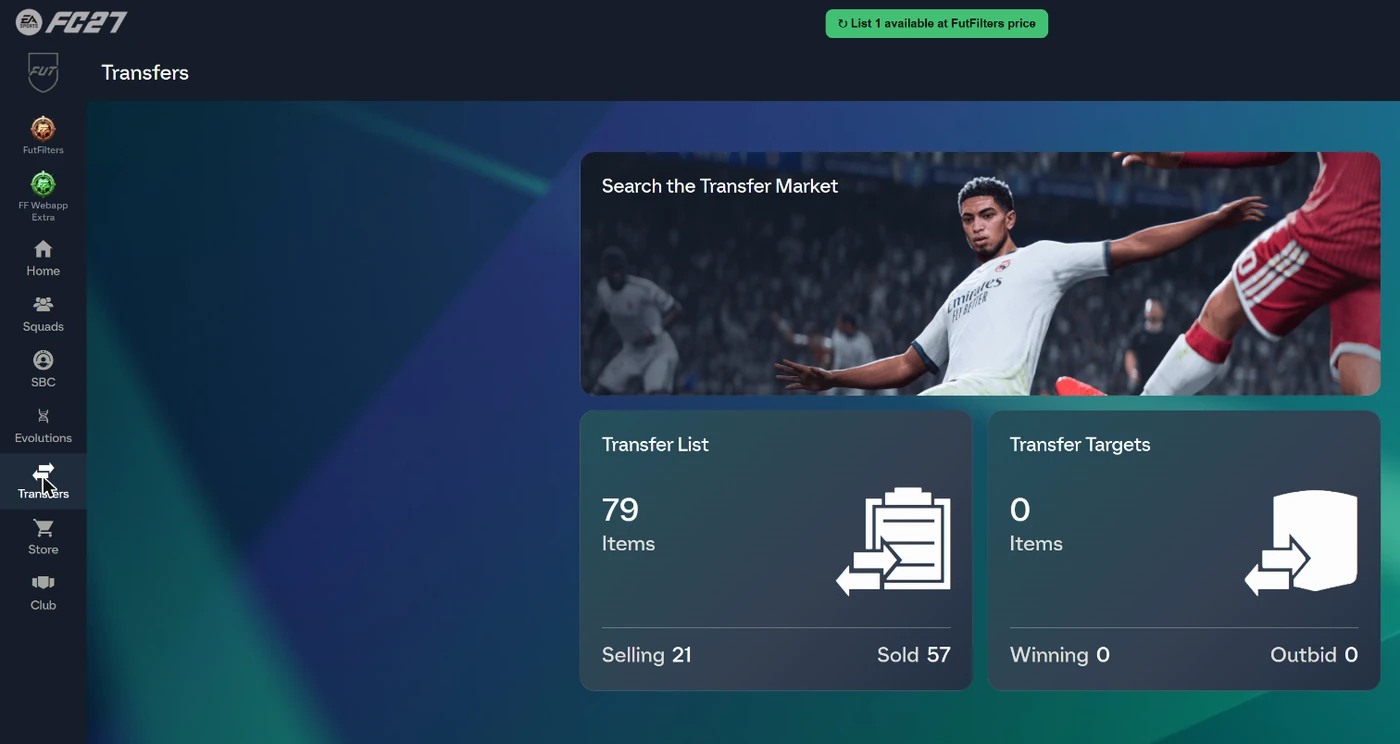
- Abre la EA FC Web App e inicia sesión en EA como siempre. Los dos iconos "FutFilters" y "FF Webapp Extra" aparecen en el menú de la izquierda.
- Abre el panel FutFilters, luego el icono de engranaje (Settings) y pega tu código API una sola vez ("API code" -> clic para editar -> Save).
- Elige un filtro en el panel y haz clic en él: el formulario de búsqueda del Transfer Market se rellena por ti.
2. El panel FutFilters
El panel lista los filtros a los que hemos puesto precio, muestra lo rentable que es cada uno y rellena la búsqueda del Transfer Market cuando haces clic en uno.
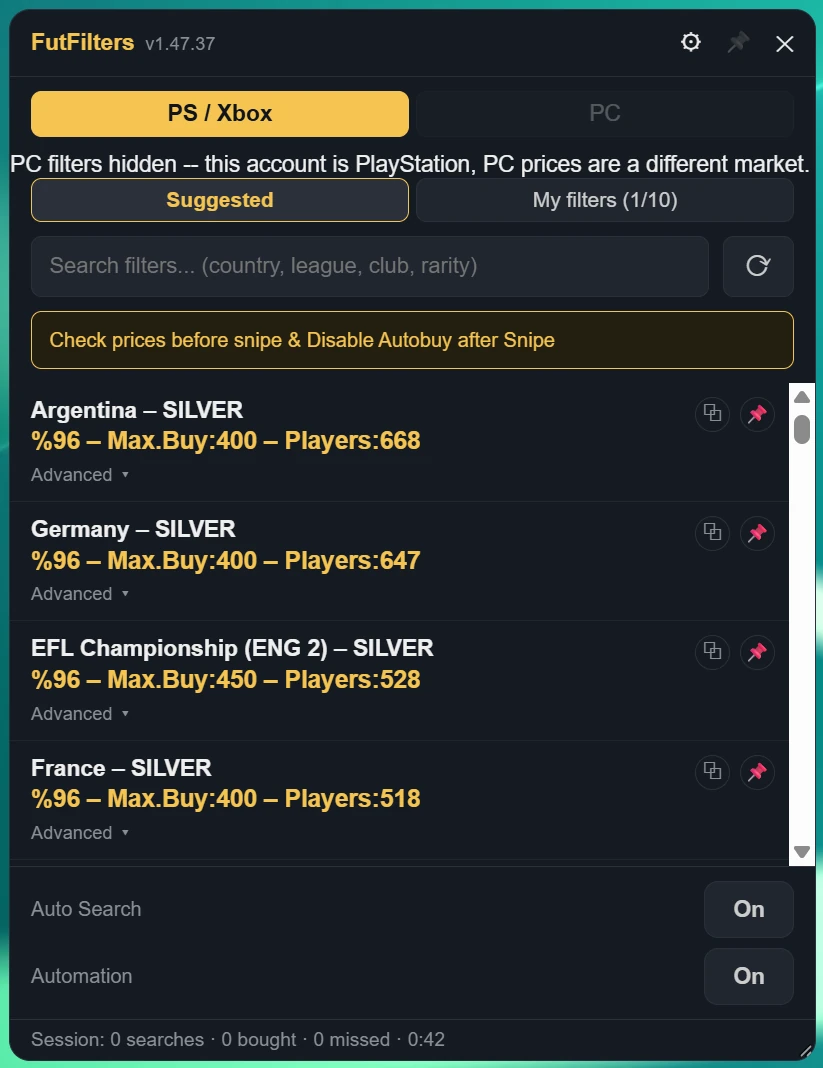
- PS / Xbox y PC son mercados distintos. Si ves "PC filters hidden", tu cuenta es de PlayStation / Xbox y los precios de PC son otro mercado, así que solo se muestran los filtros que coinciden.
- Cuadro de búsqueda: escribe un país, una liga, un club o una rareza para acotar la lista; el botón de actualizar la recarga.
- Los interruptores de Auto Search y Automation están al final del panel; la línea de debajo es la sesión actual (búsquedas, comprados, perdidos, tiempo).
- El icono de la chincheta en la cabecera mantiene el panel abierto cuando haces clic en otra parte de la página; arrastra la esquina inferior derecha para cambiar su tamaño.
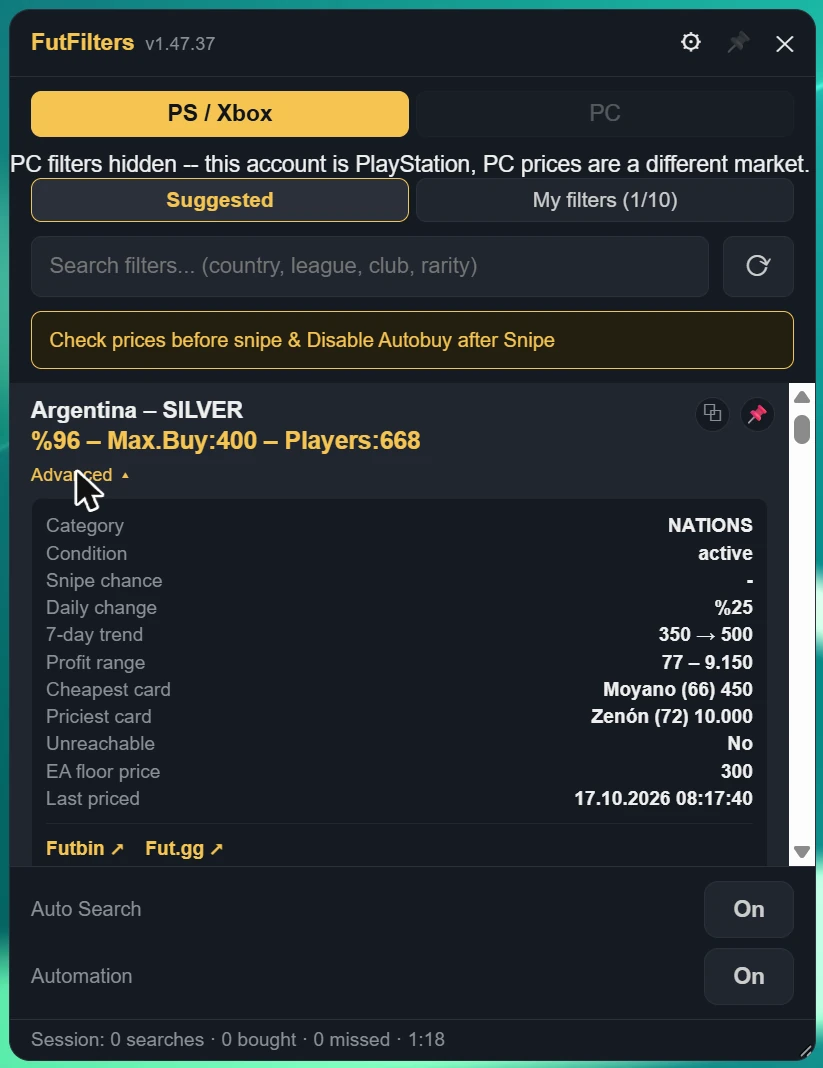
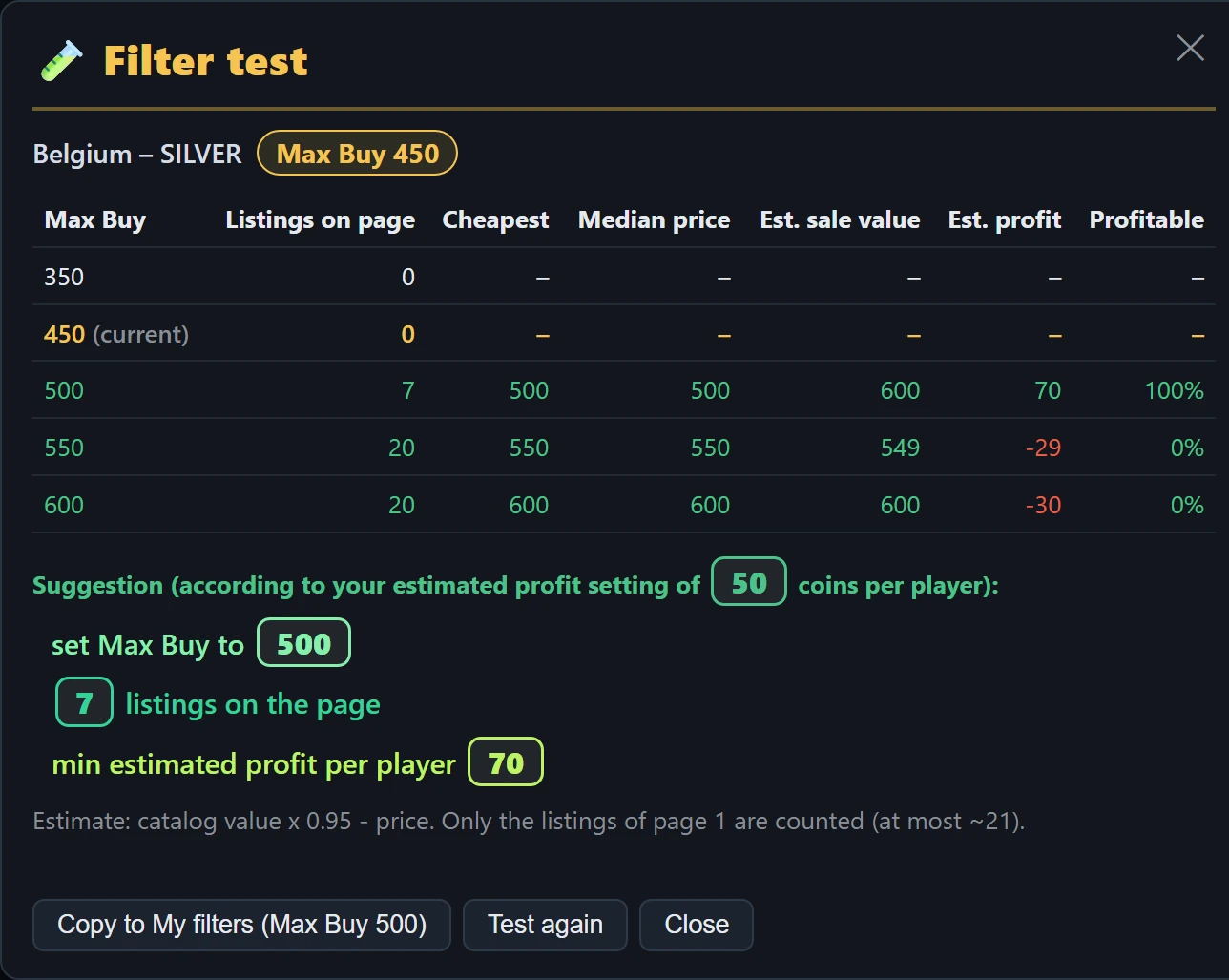
- La sugerencia bajo la tabla propone un Max Buy mejor cuando el mercado se ha movido (por ejemplo, si no hay ningún anuncio al precio actual pero sí suficientes rentables un escalón más arriba), o indica mantenerlo, o dejar el filtro por ahora.
- "Copy to My filters" añade el filtro a My filters con el Max Buy sugerido. Si pruebas un filtro de My filters, el botón cambia su Max Buy.
- Cada prueba terminada se guarda en la pestaña Tested, junto a My filters, en el panel y en la página del panel del sitio: el filtro con el Max Buy que sugirió la prueba y la fecha y hora de la prueba. Haz clic en una fila para rellenar el filtro a ese precio, o cópialo a My filters.
- Cuando termina una prueba, su resultado se envía a FutFilters como datos de mercado anónimos (puedes desactivarlo en Settings; la prueba queda entonces solo en tu propia lista Tested). Cuando varias cuentas informan de que el Max Buy de un filtro ya no encaja con el mercado, FutFilters ajusta el precio de ese filtro durante 24 horas (un descuento del 5-10 % en lugar del 10 %); un filtro ajustado muestra un icono de engranaje junto a su Max Buy.
- Mientras se ejecuta, la prueba detiene Auto Search y bloquea todas las opciones de compra automática (Auto-click Buy Now, Auto-click Ok, Multi-buy y los interruptores de compra automática de Webapp Extra), así que nunca se compra nada. Vuelve a iniciar Auto Search cuando termines. No hagas muchas pruebas seguidas: cada prueba son unas 8 búsquedas.
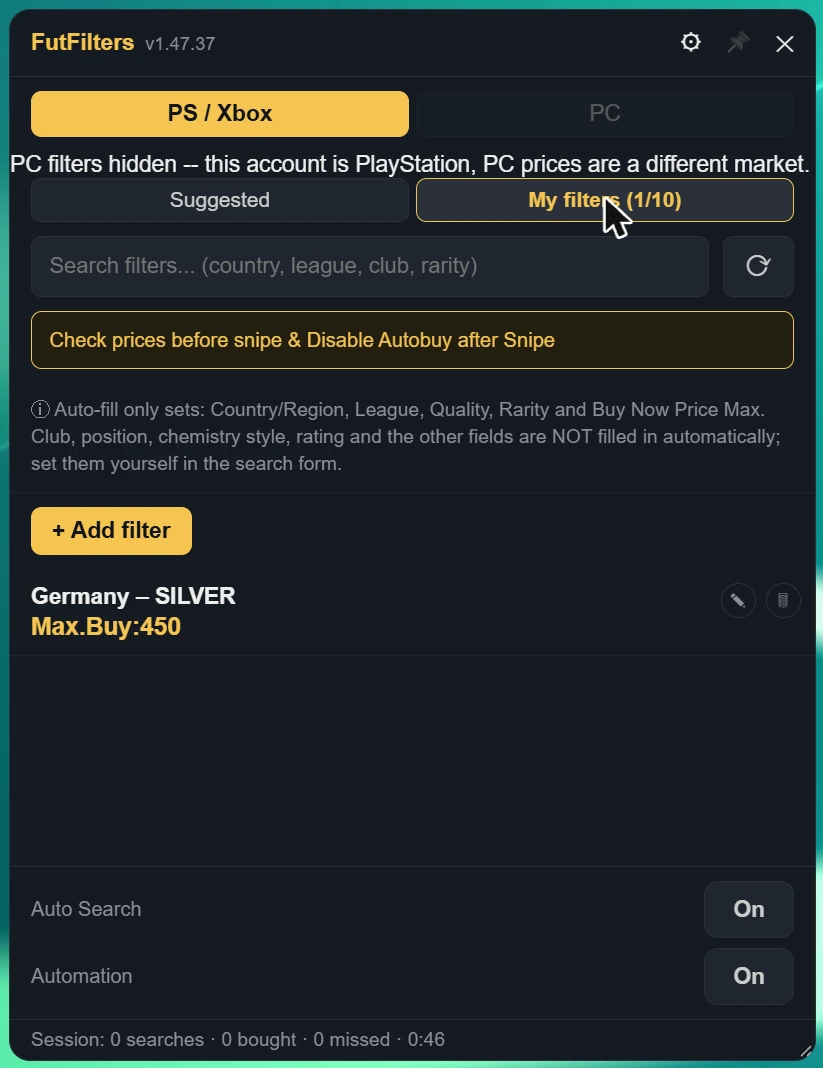
Auto-fill only sets: Country/Region, League, Quality, Rarity, Position and Buy Now Price Max. Club, chemistry style, rating and the other fields are NOT filled in automatically; set them yourself in the search form.
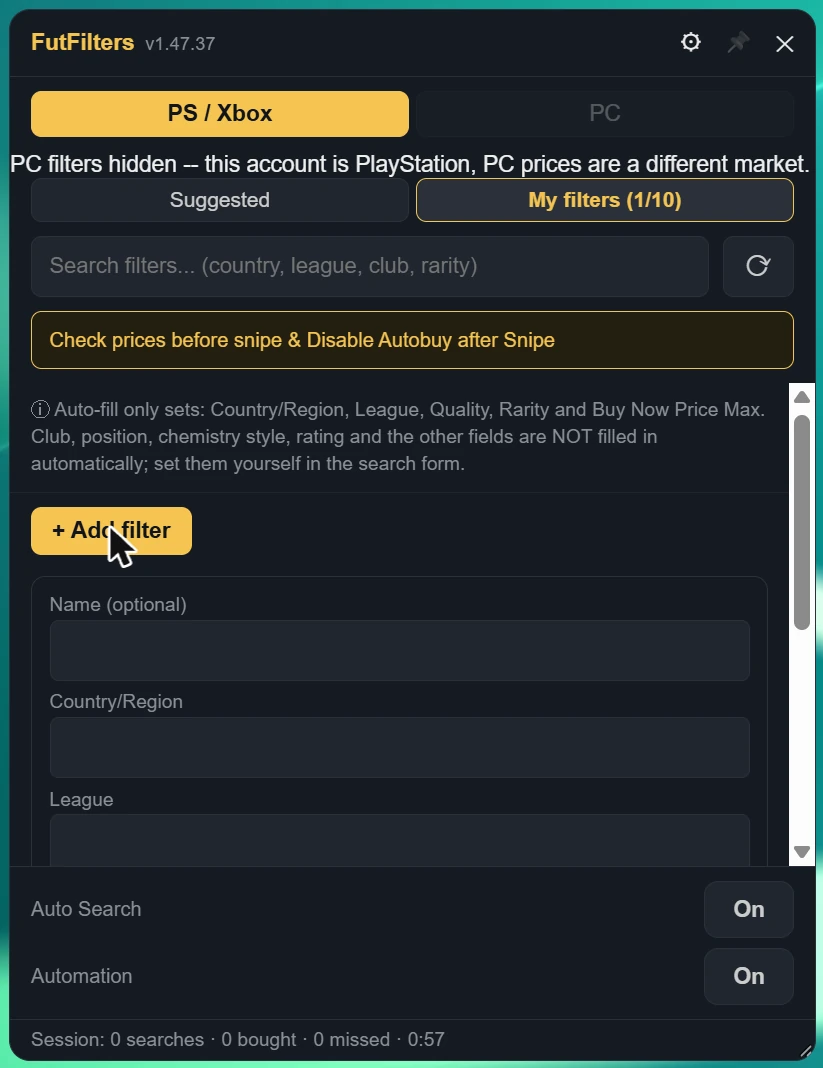
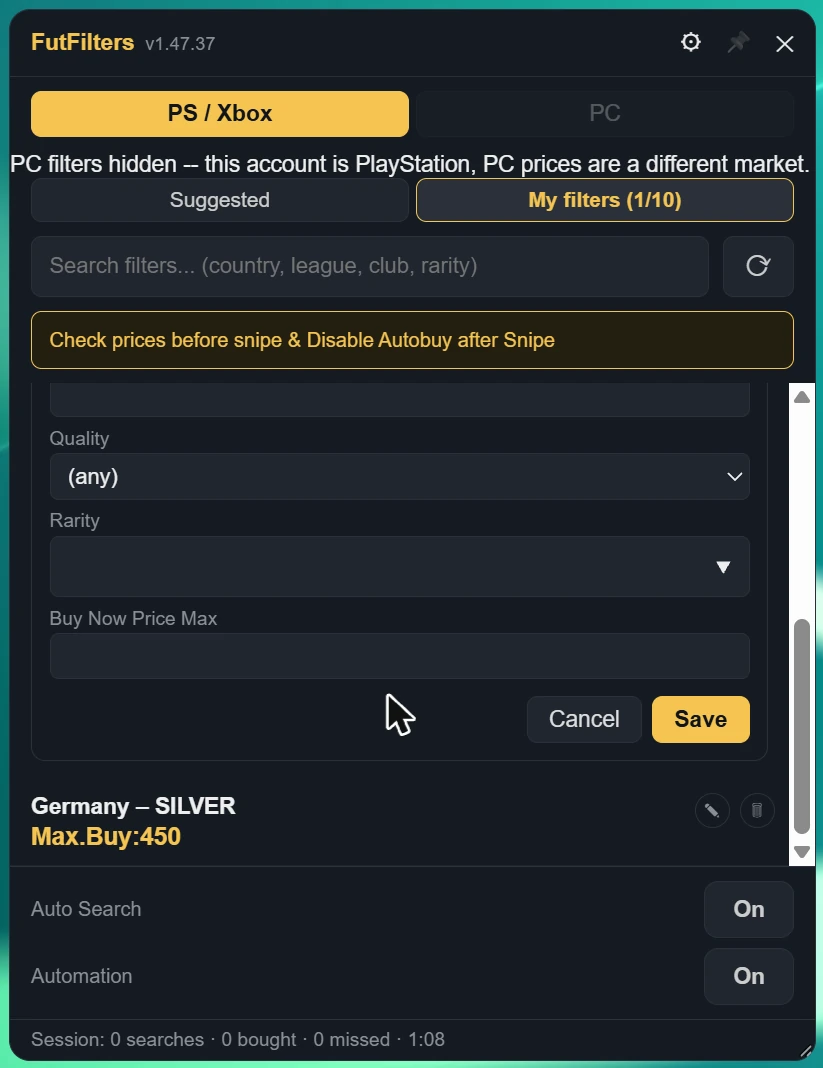
3. Ajustes de FutFilters
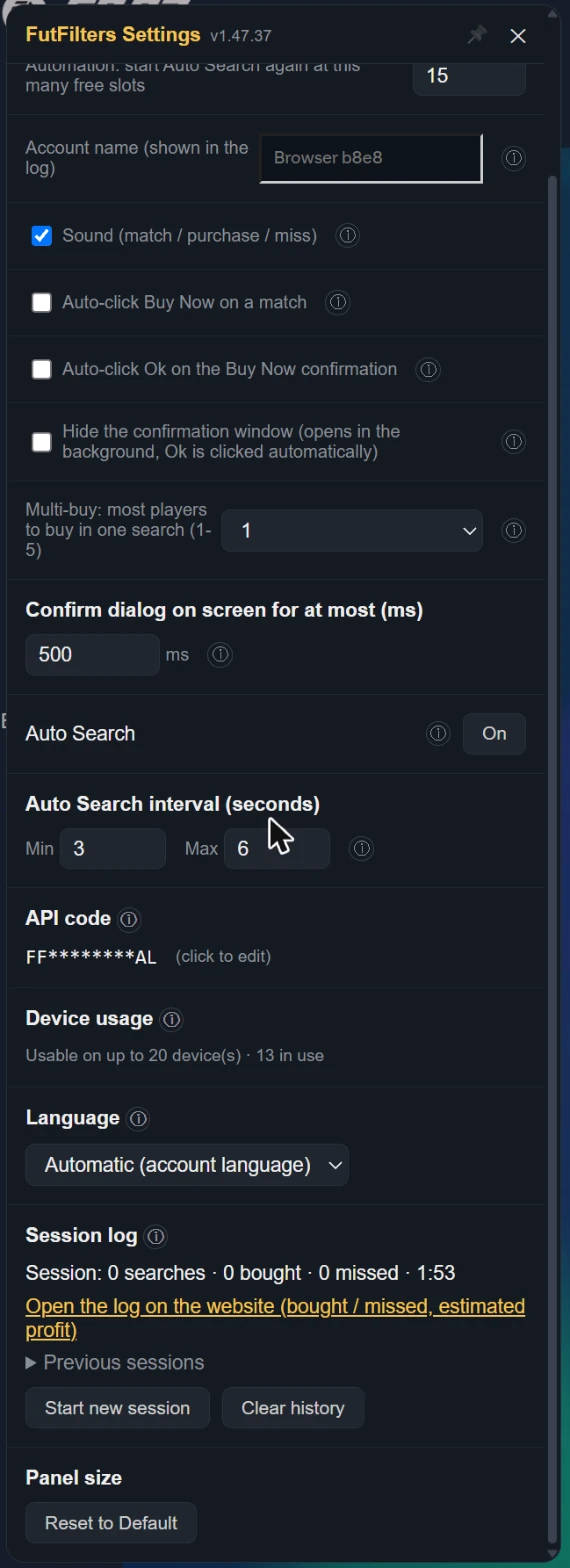
Haz clic en el icono de engranaje de la cabecera del panel. Pasa el cursor sobre (i) junto a un ajuste en el panel para leer la misma descripción que aparece abajo.
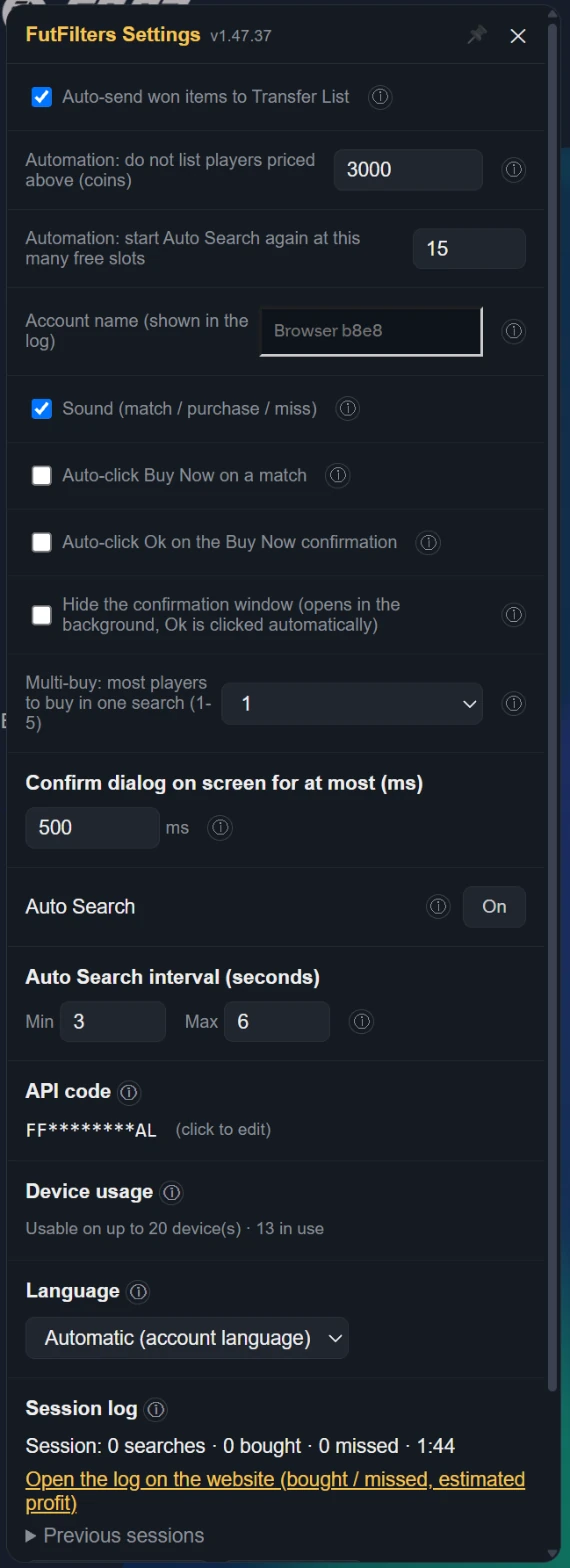
| Auto-send won items to Transfer List | When a purchased/won item shows up on the Club > Unassigned page or the Search Results page, automatically clicks "Send to Transfer List". Only relocates the item to the Transfer List tab -- it does not list it for sale, set a price, or move any coins; only runs while one of those pages is open. Default: on. EA caps the Unassigned pile at 5 items and refuses new purchases when it is full, so on other pages too (Transfers, Transfer List, Club...) purchased items are sent without leaving the page (if the Transfer List is full it retries when space frees). If that method stops working it falls back to opening the Home "Unassigned Items" tile. |
|---|---|
| Automation: do not list players priced above (coins) | WHEN ON: when the Transfer List is 90% full Auto Search stops and the players in it are listed one by one at the FutFilters price for 1 hour (with the Relist % of FF Webapp Extra, +5% if you never set one). When listing is done the sales are checked periodically and sold items are cleared; when the number of free slots set below (default 15) is reached Auto Search starts again with the same filter. WARNING: this is full automation, it lists without anyone looking and is a risky way to use the helper; be careful before leaving it unattended. Players priced above the limit below are never listed automatically. |
| Automation: start Auto Search again at this many free slots | Auto Search vuelve a empezar, con el mismo filtro, cuando hay este número de huecos libres en la Transfer List (por defecto 15). |
| Account name (shown in the log) | Shown next to this browser's events and warnings in the Autobuyer log, so you can tell your accounts apart when you run several. Left empty it uses the club name shown in the Web App (or a short code for this browser if that cannot be read). The name is sent to futfilters.com with the log events; if you prefer, type a short nickname instead. |
| Sound (match / purchase / miss) | A beep when a listing matches, a "cha-ching" on a successful purchase, a low "thud" on a missed player, and the alert when Auto Search stops. Turn it off for no sound at all. Default: on. |
| When EA keeps answering "Too many actions": pause Auto Search for (minutes, 0 = off) | When too many actions are taken EA answers "Too many actions have been taken…" and switches the Transfer Market off for a while; an Auto Search that keeps going only wastes time and is risky for the account. WHEN ON: if that message is seen more than 5 times within the last 20 searches, Auto Search stops for the number of minutes set here and then carries on by itself with the same filter. 0 = off. Works on an English EA account. |
| Skip cards with an estimated profit below (coins, 0 = off) | Estimated profit = the card's catalog value x 0.95 - price. A low-profit card takes a Transfer List slot for an hour. 0 = buy every match (as before). Cards the catalog does not know are still bought. While on, a card whose value is not cached yet can delay the click by up to 0.45 s. |
| Send filter test results to FutFilters | When a test finishes, its result (listings, prices, estimated profit, suggestion) is sent to FutFilters as anonymous market data. When it is off the result is still saved to your own Tested list, just not shared. When several accounts report that a filter's Max Buy no longer fits the market, the server adjusts that filter's price (a 5-10% discount) for 24 hours; an adjusted filter shows a ⚙ next to it. |
| Auto-click Buy Now on a match | When the watch finds a match, automatically selects the row and clicks "Buy Now for X" -- this opens EA's own "Get Now" confirmation dialog. If "Auto-confirm" below is off, the dialog stays yours to act on. |
|---|---|
| Auto-click Ok on the Buy Now confirmation | WHEN ON, also clicks Ok in the "Get Now" confirmation dialog and completes the purchase. This is full automation -- high EA account ban risk. Default: off. Only meaningful while auto Buy Now is on. |
| Hide the confirmation window (opens in the background, Ok is clicked automatically) | The Buy Now confirmation window (Cancel / Ok) is not shown on screen; EA still opens it and the script clicks Ok in the background. Only works while "Auto-click Ok on the Buy Now confirmation" is on and only for the helper's own attempt: windows you open yourself stay visible. A hidden window that gets stuck is closed with Cancel. Default: off. |
| Multi-buy: most players to buy in one search (1-5) | 1 (default): if a search shows several matches only the most profitable one is bought (profit by the FutFilters price: value x 0.95 - price). 2-5: up to that many players are bought in that search, one after another, most profitable first. The number counts Buy Now attempts and starts again with every new search; with a short Auto Search interval you may not get through all of them before the next search comes. WARNING: multi-buy is a risky way to use the helper; coins are spent on several players at once, you can exceed your budget and fill the Unassigned pile (5 items). Be careful when you use it. |
| Confirm dialog on screen for at most (ms) | Only applies while "Auto-click Ok" is ON. If the "Get Now" dialog is still open this long after it first appeared (the Ok click did not register) it is closed with Cancel, so it cannot sit there and collide with the next search. Default: 500 ms. With Auto-click Ok off the dialog is always shown and left to you. |
| Auto Search | You can also turn Auto Search on/off from here -- does nothing while watch is off. Default: off. |
| Auto Search interval (seconds) | Each cycle waits a random amount of time between these two values -- deliberately variable, since a fixed interval is the most obvious bot tell there is. |
| API code | Changing the code switches to a different futfilters.com account/code -- filters and preferences reload accordingly. |
| Device usage | Switching to a different computer? You can reset it from your futfilters.com panel. |
| Language | The panel's language. "Automatic" follows the language on your futfilters.com account; pin it here to match your EA Web App's language -- no need to visit the website. |
| Session log | Every time you start Auto Search a new session begins (there is also one from when you open the page; you can press "Start new session" yourself too). Stopping Auto Search does not end it: it keeps counting until the next one starts. Searches counts manual and automatic Search clicks; bought counts purchased items that land in the Unassigned pile. The last 30 sessions are kept in this browser. |
4. Ajustes de FF Webapp Extra
Abre el icono "FF Webapp Extra" en el menú de la izquierda. Cada función tiene su propio interruptor y un botón (i) con la descripción. Desactiva lo que no uses.
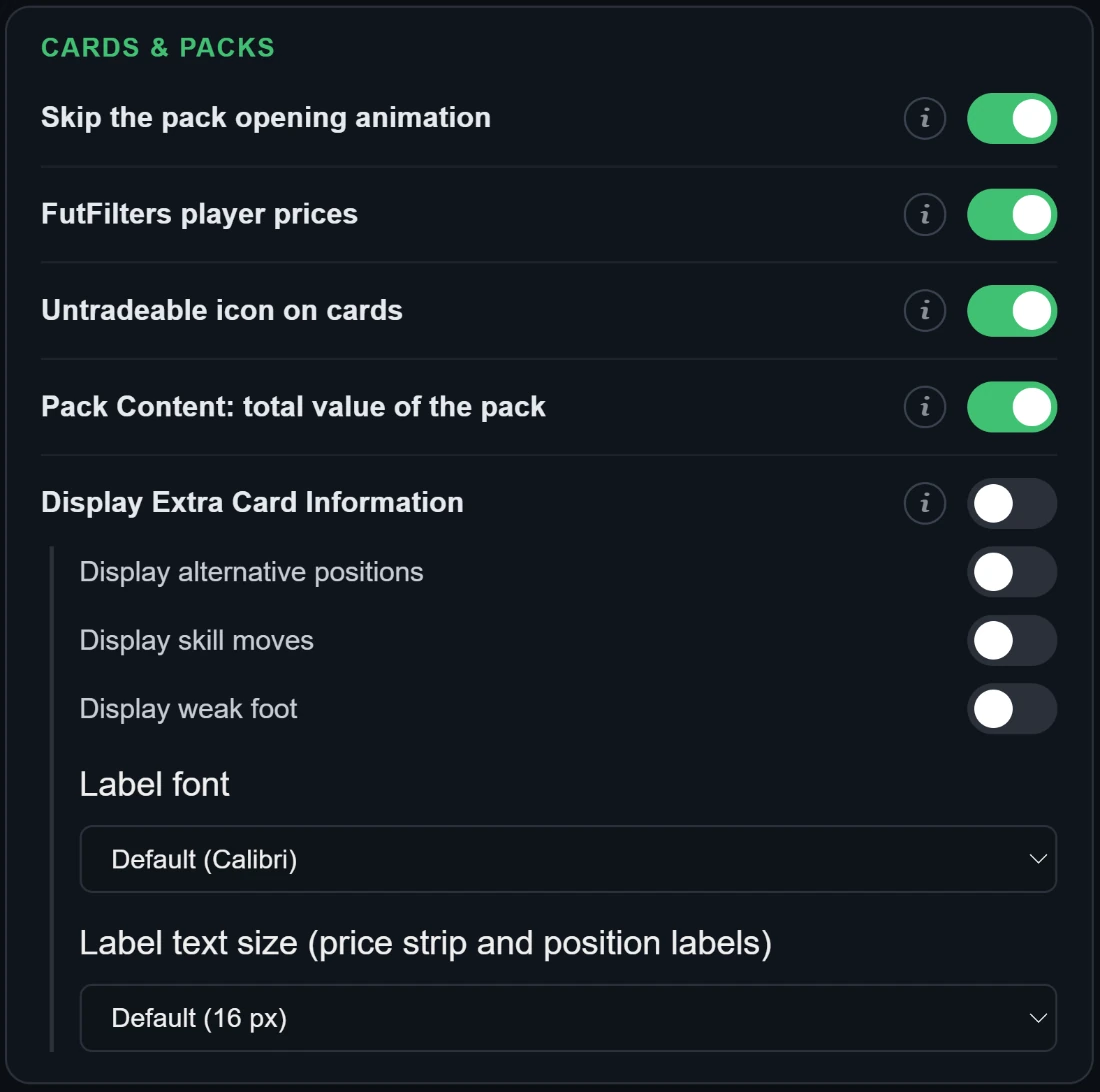
- Saltar la animación de apertura de sobres
- Oculta la animación de confeti/fuegos artificiales al abrir un sobre y pasa directo al resultado.
- Precios de jugadores de FutFilters
- Añade encima de cada carta el último precio de la base de datos de jugadores de futfilters.com. Una cuenta de PlayStation / Xbox muestra solo el precio de PS y una de PC solo el de PC (en verde); si no se puede leer la plataforma, se muestran ambos. Un precio atenuado tiene más de 2 días; al pasar el ratón verás el valor exacto, el mínimo de EA y la fecha. Solo aparece en listas cargadas después de activar el script. Las Chemistry Styles, los entrenadores y las Manager Leagues también muestran su precio (anuncio más barato, de fut.gg).
- Icono de no intercambiable en las cartas
- Pone un icono claro de «no se puede intercambiar» en la esquina superior izquierda de cada carta de jugador u objeto no intercambiable (club, Unassigned, plantillas, sobres), para verlas de un vistazo. Por defecto: activado.
- Pack Content: valor total del sobre
- En la ventana "Pack Content" de la Store (un sobre que previsualizas o abres) añade abajo una línea con el valor total del sobre: los jugadores a precios de FutFilters (el mercado PS / PC de tu cuenta); consumibles, entrenadores y otros objetos, y jugadores sin precio, a su valor de Quick Sell. El precio de cada carta viene de "Precios de jugadores de FutFilters", así que mantén también esa opción activada. Si el sobre vale más que su precio en monedas, una línea verde indica que merece la pena abrirlo (los valores no incluyen el impuesto de venta del 5 % de EA). Un sobre de la lista de la Store que ya previsualizaste muestra el mismo valor sobre su botón "View Pack". Los Chemistry Styles de un sobre también se valoran a su precio de mercado. Los objetos de monedas cuentan por su valor nominal. Un sobre dentro del sobre (por ejemplo uno Silver o Gold) cuenta a su precio en monedas de la Store, no a un retorno esperado.
- Mostrar información extra de la carta
- Añade pequeñas etiquetas en el borde derecho de la carta (información que EA no muestra por defecto).
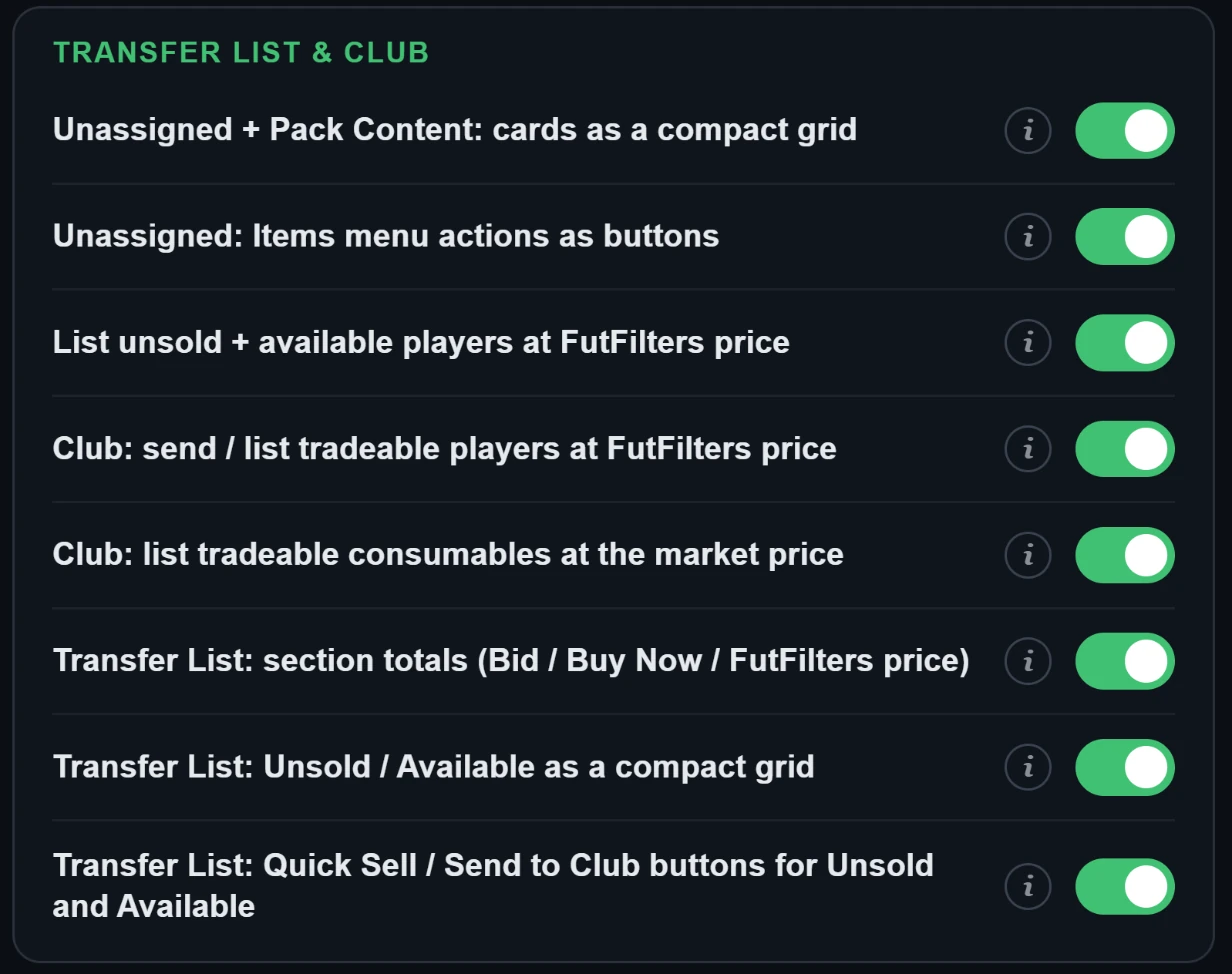
- Unassigned + Pack Content: cartas en cuadrícula compacta
- En la página Unassigned (las cartas recién salidas de un sobre) y en la ventana Pack Content de la Tienda (sobres previsualizados o abiertos) muestra las cartas con solo el nombre del objeto debajo, cinco por fila y pasando a la siguiente, sin estadísticas ni flechas. Pulsa una carta para seleccionarla como siempre. Por defecto: activado.
- Unassigned: acciones del menú Items como botones
- En la página Unassigned, pone las acciones del menú Items (los tres puntos) como botones junto al título «Items»: guardar todo en el club, enviar a la lista de transferencias y Venta rápida con su valor total. La Venta rápida sigue pidiendo antes la confirmación de EA. Por defecto: activado. Otros dos botones mueven solo los JUGADORES (no consumibles ni otros objetos) al club o a la lista de transferencias. Los jugadores negociables que esperan en Duplicates también se incluyen en el botón de la Transfer List.
- Listar jugadores sin vender + disponibles al precio de FutFilters
- Añade un botón en la página Transfer List para los jugadores que no se vendieron o no están listados: los lista uno a uno al precio de la base de datos de futfilters.com, ajustado con el porcentaje que elijas (-20 … +20, por defecto +5) y redondeado al escalón de precios de EA. No se lista nada hasta que pulses "List selected"; antes se muestra una tabla. El mismo botón aparece también en la página Unassigned (tras abrir sobres) para los jugadores negociables que esperan allí.
- Club: enviar / listar jugadores intercambiables al precio de FutFilters
- Añade un botón en My Club > Players: escanea el club en busca de jugadores intercambiables y los muestra en una tabla con el precio de FutFilters (seleccionables por jugador, ninguno seleccionado por defecto). Envía en bloque los seleccionados a la Transfer List o los lista directamente desde el club al precio de FutFilters (con tu porcentaje).
- Club: listar consumibles vendibles al precio de mercado
- Añade un botón en My Club > Consumables: recorre todos los grupos de consumibles del club (Chemistry Styles, Manager Leagues, Healing ...) y muestra los vendibles en una tabla con el precio de mercado (el precio de futfilters.com para Chemistry Styles y Manager Leagues, el Buy Now más bajo del Transfer Market para el resto), el precio inicial / Buy Now tras tu ajuste en % y cuántas unidades de cada grupo listar (todas por defecto). No se lista nada hasta pulsar "List selected"; las unidades se listan una a una con la misma llamada que el "List on Transfer Market" de EA. Por defecto: activado.
- Transfer List: totales por sección (Bid / Buy Now / precio FutFilters)
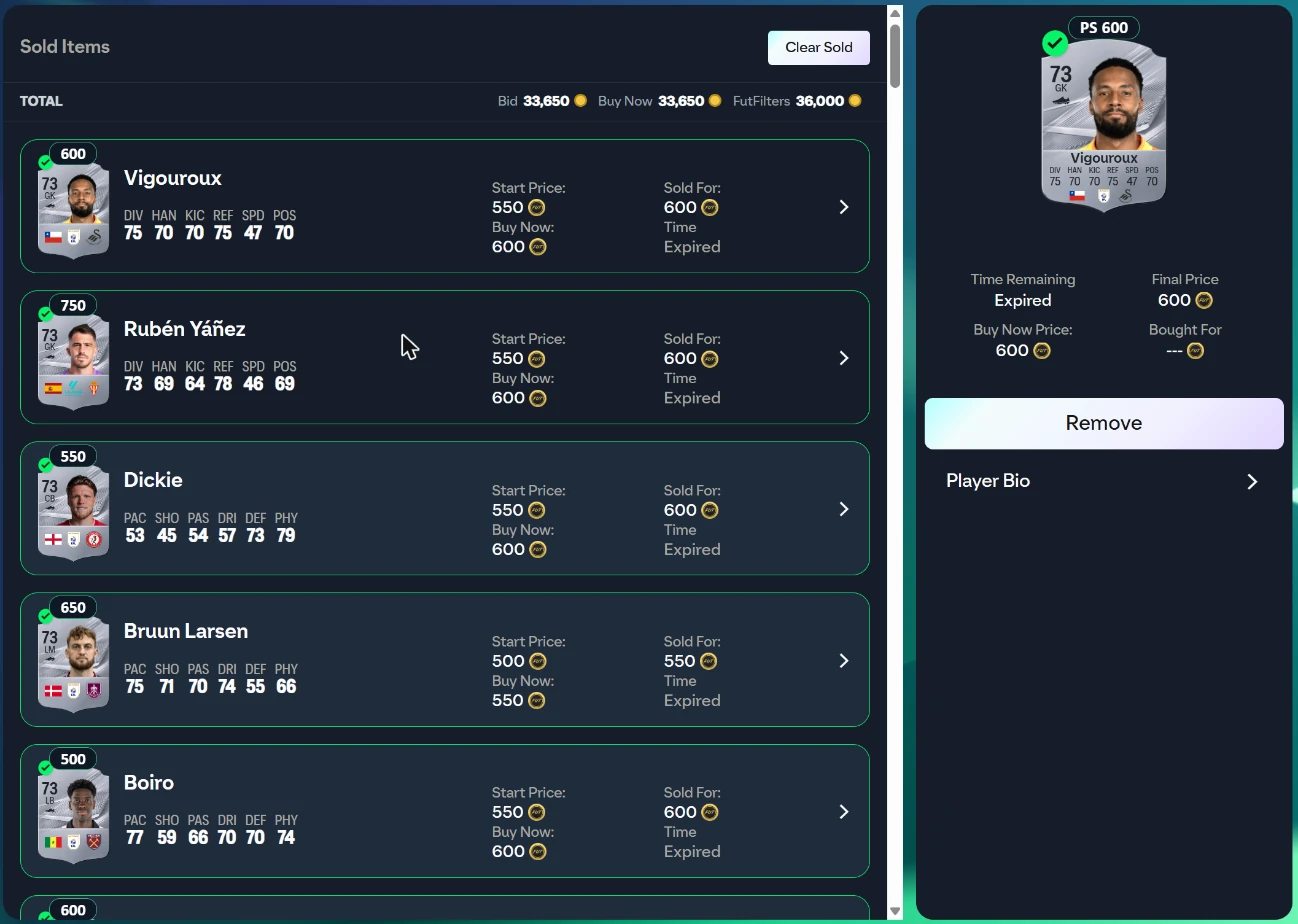
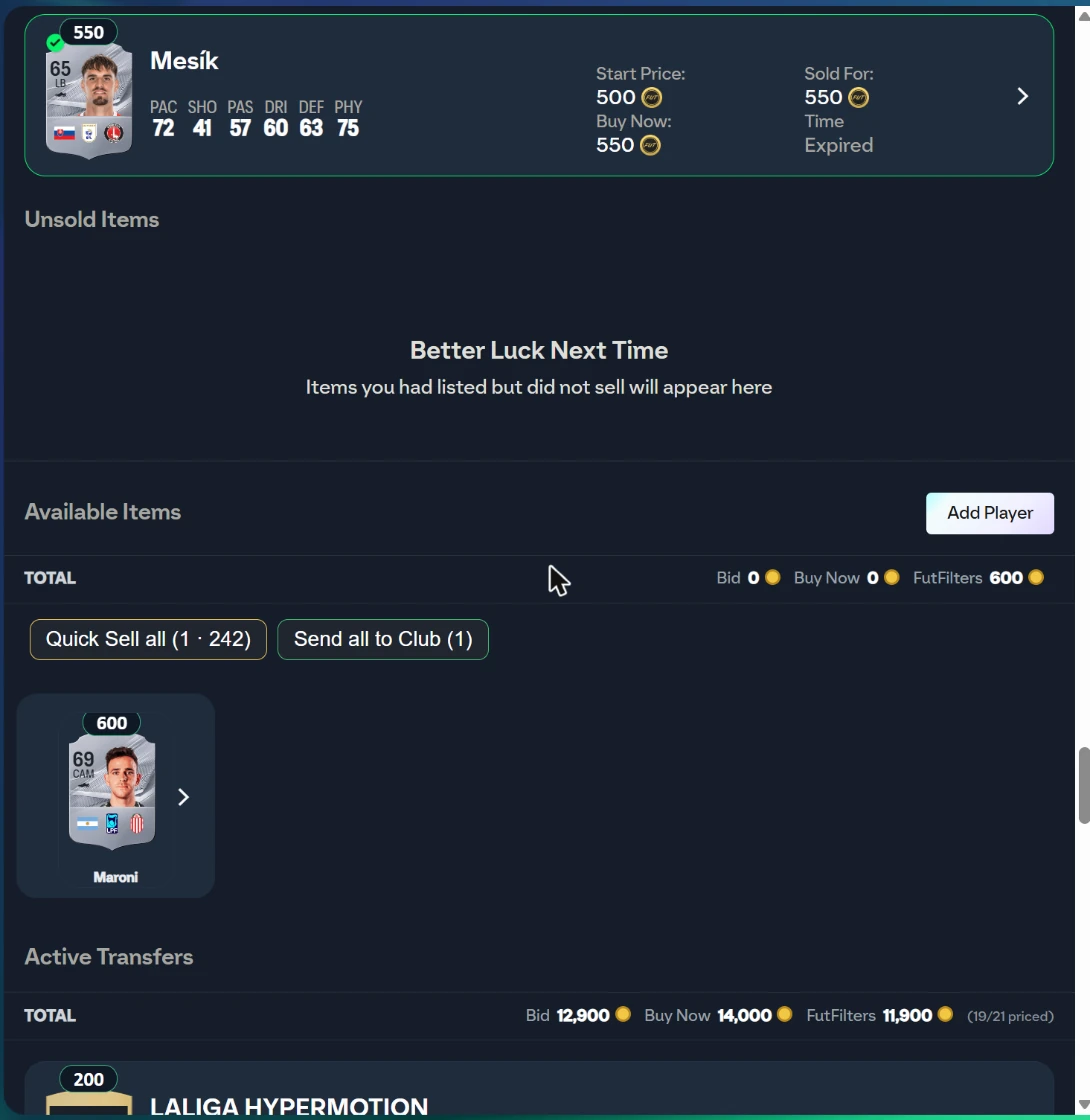
- Añade una fila "TOTAL" bajo el encabezado de cada sección de la Transfer List (Sold, Unsold, Available, Active): el Bid total, el Buy Now total y el precio total de la base de datos de futfilters.com de los jugadores de esa sección. Solo lectura, no mueve las filas de EA.
- Transfer List: Unsold / Available en cuadrícula compacta
- En la página Transfer List muestra las secciones Unsold Items y Available Items como una cuadrícula de cartas, cinco por fila, con el nombre del objeto debajo y sin precios ni flechas. Pulsa una carta para seleccionarla como siempre. Sold Items y Active Transfers conservan su lista normal. Por defecto: activado.
- Transfer List: botones Quick Sell / Enviar al Club en Unsold y Available
- Añade botones junto a los títulos Unsold Items y Available Items: "Quick Sell de todo" (EA pide confirmación antes; los jugadores con precio de mercado superior a 1.000 se excluyen), "Enviar todo al Club" y "Enviar jugadores al Club" (solo jugadores). Actúan sobre toda la sección con las llamadas y mensajes de EA; los duplicados que no se pueden mover se omiten. Por defecto: activado.
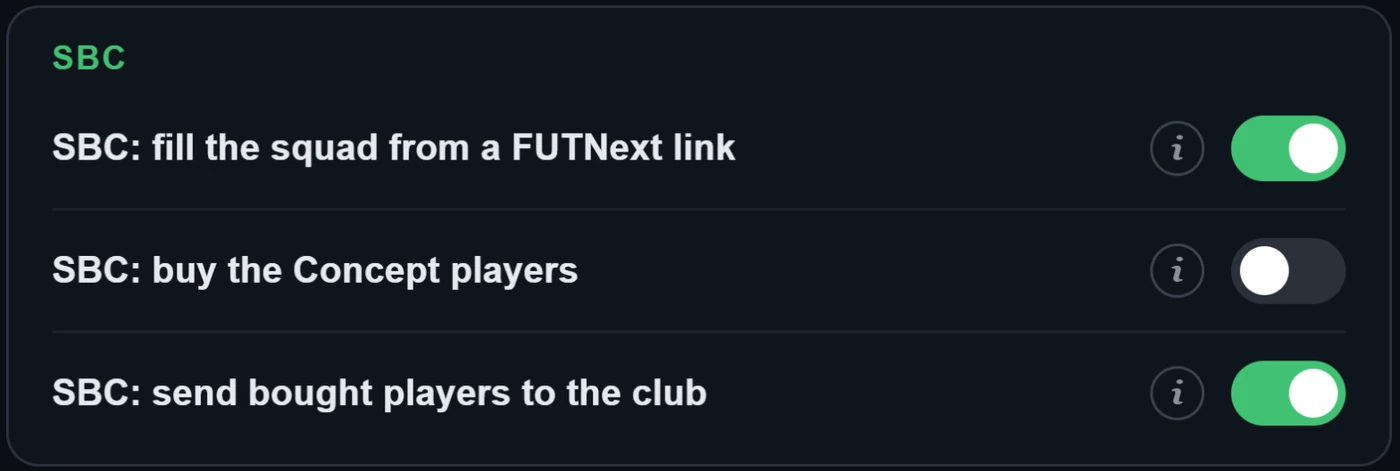
- SBC: rellenar el equipo desde un enlace de FUTNext
- Añade una caja "FUTNext" bajo el botón "Clear Squad" de una página de equipo de SBC. Pega un enlace de FUTNext (futnext.com?sbcId=…&players=…) o solo la lista de IDs de jugadores y el equipo se rellena al instante: primero con las cartas que tienes en tu club y, para las que no tienes, con jugadores Concept (marcadores de EA para planificar; no se pueden enviar). El equipo se guarda, nunca se envía. Lo que no se encuentre se indica. Cuando futfilters.com tiene las soluciones más nuevas de FUTNext para el desafío (se recogen cada 6 horas), un desplegable bajo la caja muestra las 5 más recientes con su precio y antigüedad: elige una y el equipo se rellena al instante.
- SBC: enviar al club los jugadores comprados
- Mientras estás dentro de un SBC (la página del equipo y sus búsquedas de jugadores), los jugadores que compras se mueven a tu club (Unassigned -> My Club) en vez de a la Transfer List. Los jugadores que ya esperaban en Unassigned cuando abriste el SBC no se tocan. El script Autofill se aparta durante un SBC para que ambos no compitan por el mismo jugador.
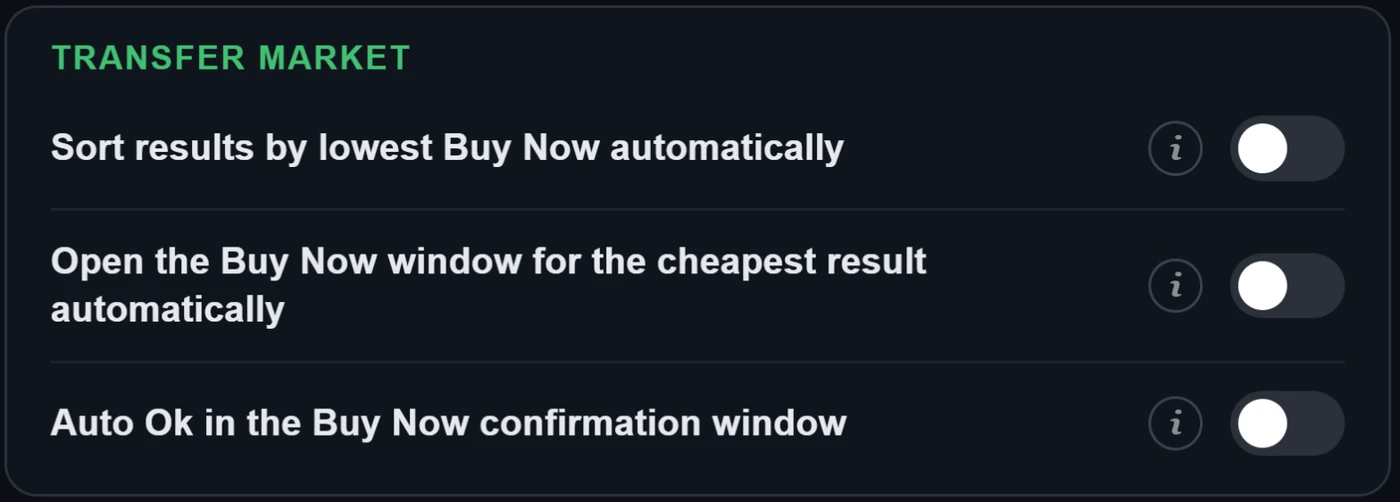
- Ordenar resultados por el Buy Now más bajo automáticamente
- Ejecuta por sí solo el atajo "Sort results by lowest Buy Now" cada vez que aparece o cambia una lista de resultados (Transfer Market o búsqueda de jugadores de SBC).
- Abrir automáticamente la ventana Buy Now del resultado más barato
- Selecciona al primer jugador de la lista (el más barato de verdad si la ordenación automática está activada) y abre por sí sola la ventana de confirmación "Get Now" de EA, como el atajo "Buy now". Si "Ok automático" está desactivado, la ventana queda en tus manos.
- Ok automático en la ventana de confirmación de Buy Now
- ACTIVADO, también pulsa Ok en la ventana de confirmación "Get Now" y completa la compra, tanto con el atajo "Buy now" como con la ventana abierta automáticamente. La automatización total tiene un alto riesgo de baneo de la cuenta de EA. Por defecto: desactivado.
5. Herramientas de Transfer List y Club
Lo que Webapp Extra añade en las páginas propias de EA. No se lista ni se vende nada hasta que lo confirmes.
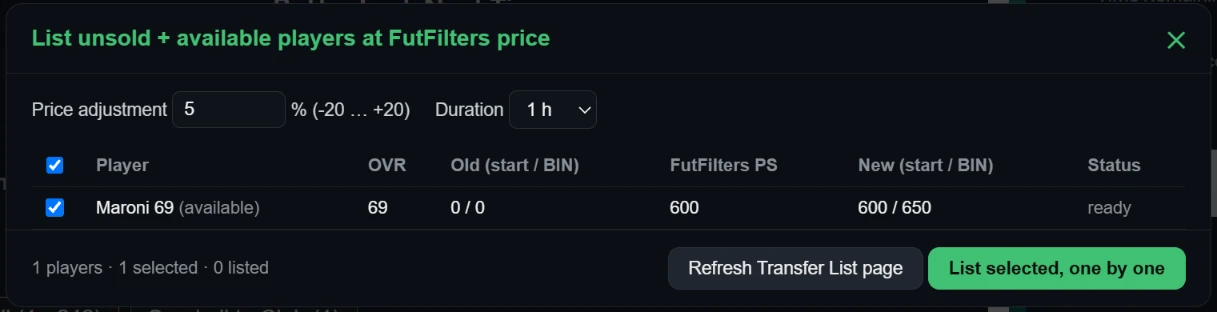
Añade un botón en la página Transfer List para los jugadores que no se vendieron o no están listados: los lista uno a uno al precio de la base de datos de futfilters.com, ajustado con el porcentaje que elijas (-20 … +20, por defecto +5) y redondeado al escalón de precios de EA. No se lista nada hasta que pulses "List selected"; antes se muestra una tabla. El mismo botón aparece también en la página Unassigned (tras abrir sobres) para los jugadores negociables que esperan allí.
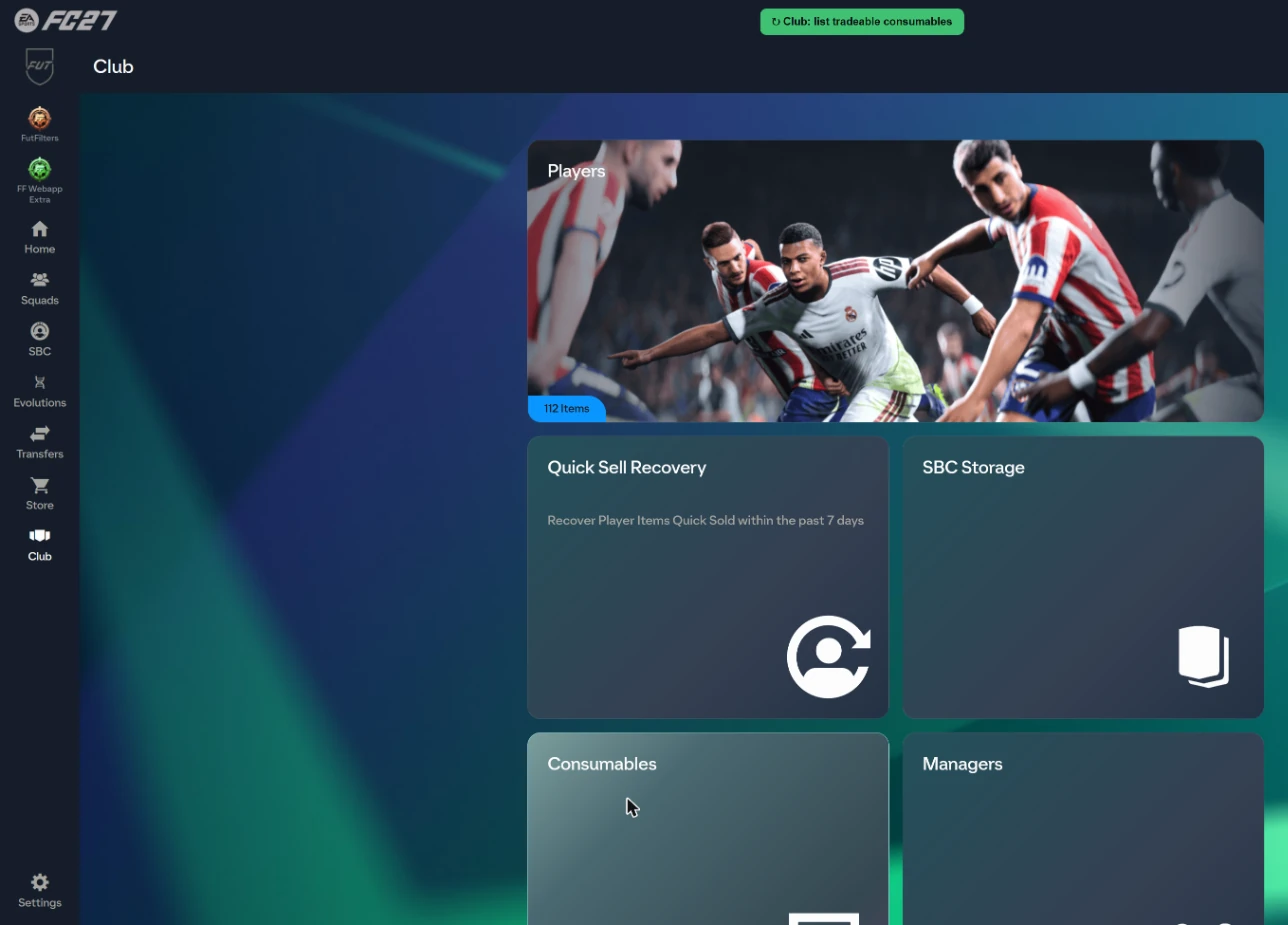

6. El registro del autobuyer
Cada jugador comprado y perdido se envía a tu registro en futfilters.com con el beneficio estimado.
- Ábrelo desde el panel de Settings ("Open the log on the website") o en futfilters.com/logs con la sesión iniciada.
- ¿Usas varias cuentas de EA o navegadores? Dale a cada uno un "Account name" corto en Settings para distinguirlos en el registro.
- Sesiones: se inicia una sesión nueva cada vez que arrancas Auto Search. Las últimas 30 sesiones se guardan en el navegador ("Previous sessions" en Settings).
- Una compra perdida muestra como motivo el mensaje propio de EA, por ejemplo "Bid status changed" (alguien fue más rápido) o "Too many actions" (el límite temporal de EA).
- Las cartas vendidas de tu Transfer List también se registran. La página muestra "Sold" y "Realised profit" (precio de venta x 0,95 - lo que costó la carta, leído de la propia carta) junto al beneficio estimado de las compras.
Preguntas frecuentes
¿Qué es FutFilters y cuáles son los dos ayudantes?
FutFilters (futfilters.com) es una base de datos de filtros de snipe del Transfer Market con datos de precios en vivo para EA FC. El panel FutFilters lleva esos filtros a la EA FC Web App y rellena la búsqueda por ti. FF Webapp Extra añade precios en las cartas y herramientas de comodidad en las pantallas de Transfer List, Club, SBC y sobres.
¿Dónde encuentro mi código API?
En futfilters.com, con la sesión iniciada: "My Account" -> "API code". En la Web App abre el panel FutFilters, pulsa el icono de engranaje, haz clic en la línea API code, pega el código y pulsa Save.
¿Qué navegador necesito?
Un navegador Chromium de escritorio (Chrome o Edge). Instala la extensión de Chrome desde la Chrome Web Store, o el userscript con Tampermonkey. Ambos están en la página de Descargas.
El panel dice "PC filters hidden". ¿Por qué?
Tu cuenta es de PlayStation / Xbox y los precios de PC son otro mercado, así que el ayudante solo muestra los filtros que coinciden con la plataforma de tu cuenta. Una cuenta de PC ve los filtros de PC en su lugar.
¿FutFilters compra jugadores por mí?
Por defecto no: un clic en un filtro solo rellena el formulario de búsqueda. Auto Search repite la búsqueda, y "Auto-click Buy Now" y "Auto-click Ok" pueden completar una compra, pero todos son interruptores independientes en Settings y los de compra vienen desactivados por defecto.
¿Me pueden banear?
Automatizar las compras va contra los términos de servicio de EA, así que siempre hay un riesgo, y crece con la automatización completa (Auto-click Ok, Multi-buy, Automation). No podemos prometer seguridad. Mantén desactivados los interruptores de compra si tienes dudas, deja los intervalos de Auto Search aleatorios (los predeterminados lo son) y nunca dejes la cuenta sin vigilar.
¿Qué hace "Automation"?
WHEN ON: when the Transfer List is 90% full Auto Search stops and the players in it are listed one by one at the FutFilters price for 1 hour (with the Relist % of FF Webapp Extra, +5% if you never set one). When listing is done the sales are checked periodically and sold items are cleared; when the number of free slots set below (default 15) is reached Auto Search starts again with the same filter. WARNING: this is full automation, it lists without anyone looking and is a risky way to use the helper; be careful before leaving it unattended. Players priced above the limit below are never listed automatically.
La Transfer List está llena y Auto Search se detuvo.
Es lo previsto: Auto Search se detiene cuando la Transfer List no tiene huecos libres, para que una compra no pueda fallar. Lista, vende o limpia algunos objetos (el botón "List at FutFilters price" ayuda) y vuelve a iniciar Auto Search; con Automation activado se reanuda solo al llegar al número de huecos libres que hayas fijado.
¿Cuántos dispositivos puedo usar?
Tu cuenta tiene un límite de dispositivos (se muestra en "Device usage" en Settings). Switching to a different computer? You can reset it from your futfilters.com panel.
¿Qué rellena My filters automáticamente?
Auto-fill only sets: Country/Region, League, Quality, Rarity, Position and Buy Now Price Max. Club, chemistry style, rating and the other fields are NOT filled in automatically; set them yourself in the search form.
¿Qué es la etiqueta de precio en las cartas?
Añade encima de cada carta el último precio de la base de datos de jugadores de futfilters.com. Una cuenta de PlayStation / Xbox muestra solo el precio de PS y una de PC solo el de PC (en verde); si no se puede leer la plataforma, se muestran ambos. Un precio atenuado tiene más de 2 días; al pasar el ratón verás el valor exacto, el mínimo de EA y la fecha. Solo aparece en listas cargadas después de activar el script. Las Chemistry Styles, los entrenadores y las Manager Leagues también muestran su precio (anuncio más barato, de fut.gg).
¿Cómo funciona "List unsold + available players at FutFilters price"?
Añade un botón en la página Transfer List para los jugadores que no se vendieron o no están listados: los lista uno a uno al precio de la base de datos de futfilters.com, ajustado con el porcentaje que elijas (-20 … +20, por defecto +5) y redondeado al escalón de precios de EA. No se lista nada hasta que pulses "List selected"; antes se muestra una tabla. El mismo botón aparece también en la página Unassigned (tras abrir sobres) para los jugadores negociables que esperan allí.
¿Qué es Multi-buy?
1 (default): if a search shows several matches only the most profitable one is bought (profit by the FutFilters price: value x 0.95 - price). 2-5: up to that many players are bought in that search, one after another, most profitable first. The number counts Buy Now attempts and starts again with every new search; with a short Auto Search interval you may not get through all of them before the next search comes. WARNING: multi-buy is a risky way to use the helper; coins are spent on several players at once, you can exceed your budget and fill the Unassigned pile (5 items). Be careful when you use it.
¿Puedo dejar Auto Search funcionando por la noche?
Sí, pero mantén el navegador despierto: Chrome ralentiza una pestaña oculta, minimizada o tapada por otra ventana. Desde la versión 1.47.40 los temporizadores del asistente están protegidos contra eso, y estos ajustes también ayudan. 1) En Chrome abre chrome://settings/performance y desactiva Memory Saver, o añade la web de la EA Web App (www.ea.com) a "Always keep these sites active" (en un portátil desactiva también Energy Saver y déjalo enchufado). 2) No minimices la ventana ni la tapes con otra; evita que se suspendan la pantalla o el ordenador (Windows: Configuración > Sistema > Energía). 3) Usa un perfil de navegador por cuenta de EA. 4) La Transfer List necesita huecos libres (activa Automation y se lista y reanuda sola). 5) Por la mañana revisa el registro de sesión: una sesión larga debe mostrar muchas búsquedas (unas 10-20 por minuto con el intervalo por defecto); si hay pocas, la pestaña fue limitada. Usarlo de noche sin supervisión aumenta el riesgo de sanción, mira "¿Me pueden banear".
¿Qué hace el Filter test?
Busca un filtro unas 8 veces sin comprar nada y muestra cuántos anuncios tiene el mercado con el Max Buy del filtro y con precios cercanos, sus precios y el beneficio estimado; si el mercado se ha movido, sugiere un Max Buy mejor. Pulsa el icono del matraz en la fila de un filtro; "Copy to My filters" en el resultado guarda el filtro al precio sugerido.
Auto Search se pausó con "Too many actions". ¿Qué es eso?
EA responde "Too many actions have been taken, and use of this feature has been temporarily disabled" cuando una cuenta hace demasiado en el Transfer Market, y entonces rechaza búsquedas y compras durante un tiempo. En Settings puedes fijar un número de minutos (0 = desactivado): si el mensaje aparece más de 5 veces en las últimas 20 búsquedas, Auto Search se detiene ese tiempo y luego continúa solo con el mismo filtro.
¿Qué es el "Realised profit" del registro?
Cada carta vendida de tu Transfer List se registra. El beneficio realizado es el precio de venta x 0,95 (impuesto de EA) menos lo que costó la carta, que el asistente lee de la propia carta mientras aún no está vendida. El beneficio estimado junto a cada compra es una estimación de nuestro catálogo de precios; el beneficio realizado es lo que realmente ocurrió.
¿Por qué cambia solo el Max Buy de un filtro?
El Max Buy es el precio de mercado del filtro menos el 5 % de impuesto de EA y un 10 % de margen. Cuando varias cuentas ejecutan el Filter test y coinciden en que no hay anuncios a ese precio pero sí suficientes rentables algo más arriba, FutFilters reduce el margen de ese filtro a entre el 5 % y el 10 % durante 24 horas, y el filtro muestra un icono de engranaje. El cambio es pequeño (dos puntos porcentuales cada vez), solo se aplica mientras el filtro sigue dando beneficio y se desvanece solo si nuevas pruebas no lo confirman. Si tú elegiste un descuento menor en el selector Snipe profit del sitio, se usa el menor.
¿Puedo usar varias cuentas de EA?
Sí, cada perfil del navegador guarda sus propios ajustes. Shown next to this browser's events and warnings in the Autobuyer log, so you can tell your accounts apart when you run several. Left empty it uses the club name shown in the Web App (or a short code for this browser if that cannot be read). The name is sent to futfilters.com with the log events; if you prefer, type a short nickname instead.
El panel dejó de funcionar tras una actualización.
De vez en cuando se retiran las versiones antiguas. Si el panel indica que la versión del script ya no es compatible, reinstala la última versión desde la página de Descargas (Tampermonkey no la actualiza automáticamente). La extensión de Chrome se actualiza a través de la Web Store.
¿Cómo cambio el idioma del panel?
The panel's language. "Automatic" follows the language on your futfilters.com account; pin it here to match your EA Web App's language -- no need to visit the website.
¿Dónde está la caja SBC FUTNext?
Añade una caja "FUTNext" bajo el botón "Clear Squad" de una página de equipo de SBC. Pega un enlace de FUTNext (futnext.com?sbcId=…&players=…) o solo la lista de IDs de jugadores y el equipo se rellena al instante: primero con las cartas que tienes en tu club y, para las que no tienes, con jugadores Concept (marcadores de EA para planificar; no se pueden enviar). El equipo se guarda, nunca se envía. Lo que no se encuentre se indica. Cuando futfilters.com tiene las soluciones más nuevas de FUTNext para el desafío (se recogen cada 6 horas), un desplegable bajo la caja muestra las 5 más recientes con su precio y antigüedad: elige una y el equipo se rellena al instante.
Sigo teniendo una duda.
Abre futfilters.com/support o envía un mensaje desde la sección de Contacto del sitio.