
دليل إعداد FutFilters
التثبيت واللوحات والإعدادات، مع لقطة شاشة لكل خطوة.
1. البدء
يعمل مساعدان معًا في EA FC Web App: لوحة FutFilters (فلاتر snipe، وAuto Search، وسجل autobuyer) وFF Webapp Extra (أسعار على البطاقات، وعرض بنقرة واحدة، وأدوات Transfer List وClub).
- أنشئ حسابك على futfilters.com أو سجّل الدخول إليه، ثم انسخ رمز API الشخصي من "My Account" -> "API code".
- ثبّت إضافة Chrome من Chrome Web Store (انظر صفحة التنزيلات)، أو ثبّت userscript عبر Tampermonkey.
- افتح EA FC Web App وسجّل الدخول إلى EA كالمعتاد. ستظهر الأيقونتان "FutFilters" و"FF Webapp Extra" في القائمة اليسرى.
- افتح لوحة FutFilters، ثم أيقونة الترس (Settings) والصق رمز API مرة واحدة ("API code" -> انقر للتعديل -> Save).
- اختر فلترًا في اللوحة وانقر عليه: يُملأ نموذج بحث Transfer Market نيابةً عنك.
2. لوحة FutFilters
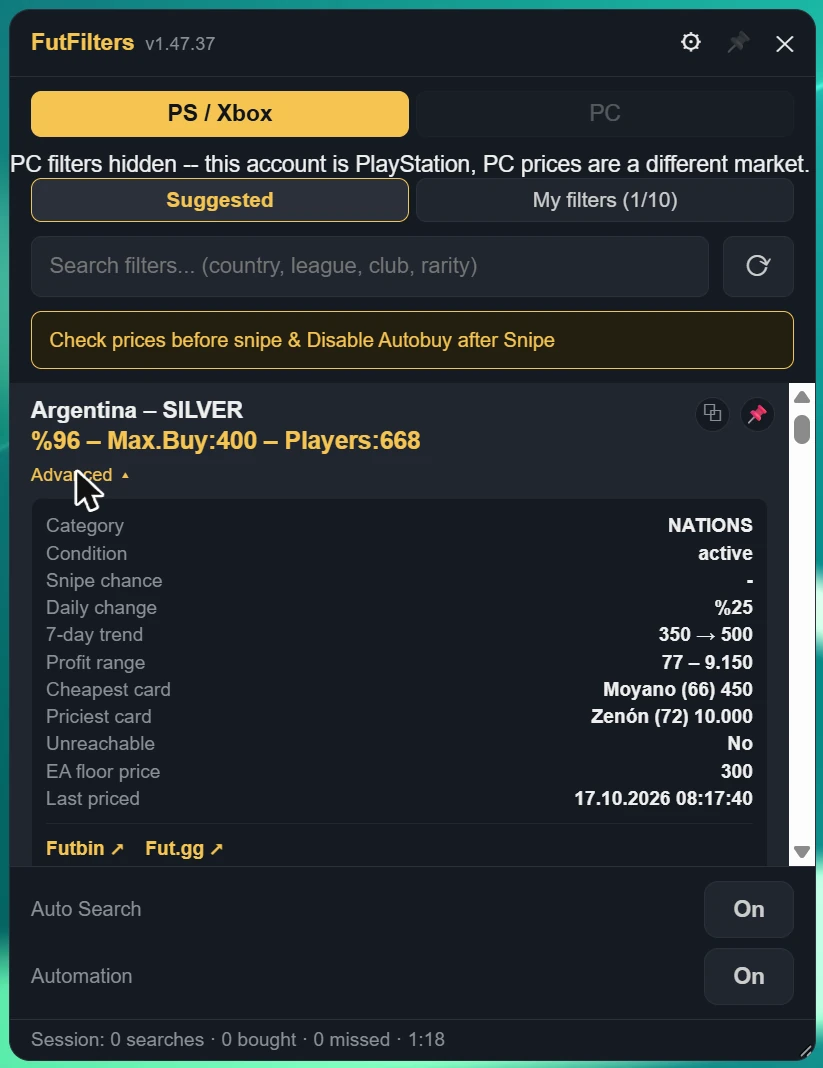
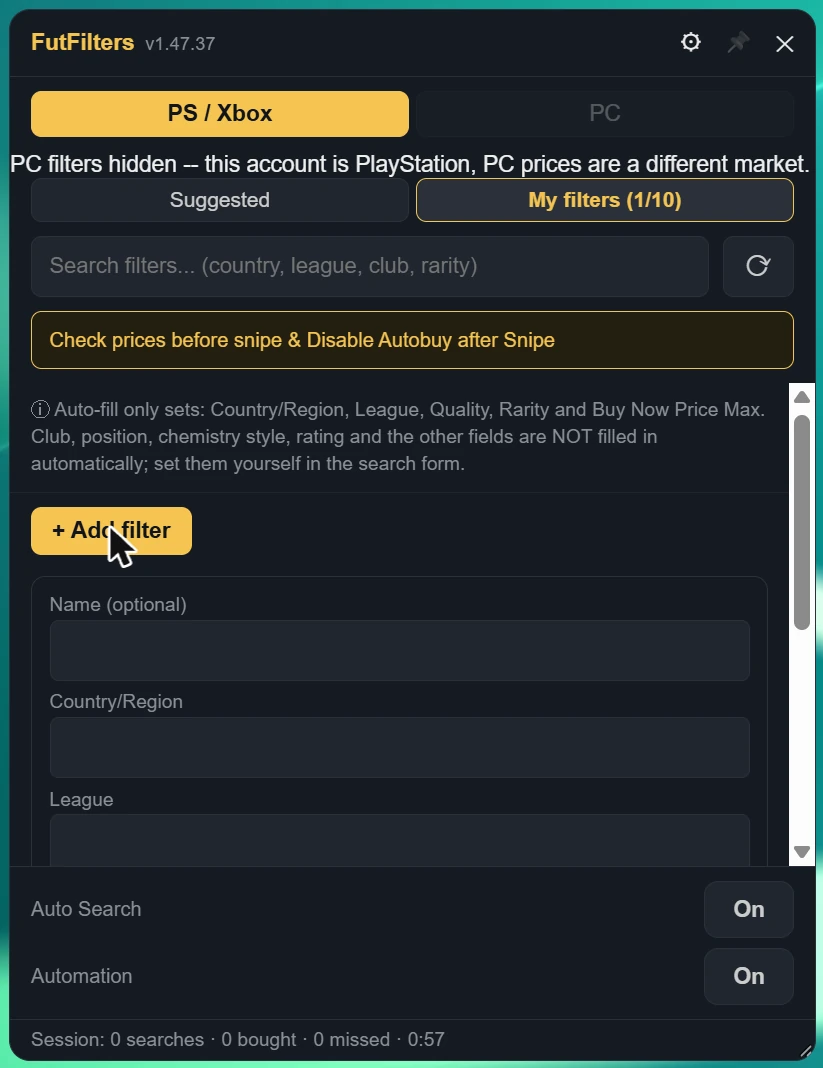
تعرض اللوحة الفلاتر التي سعّرناها، وتبيّن مدى ربحية كل فلتر، وتملأ بحث Transfer Market عند النقر على أحدها.
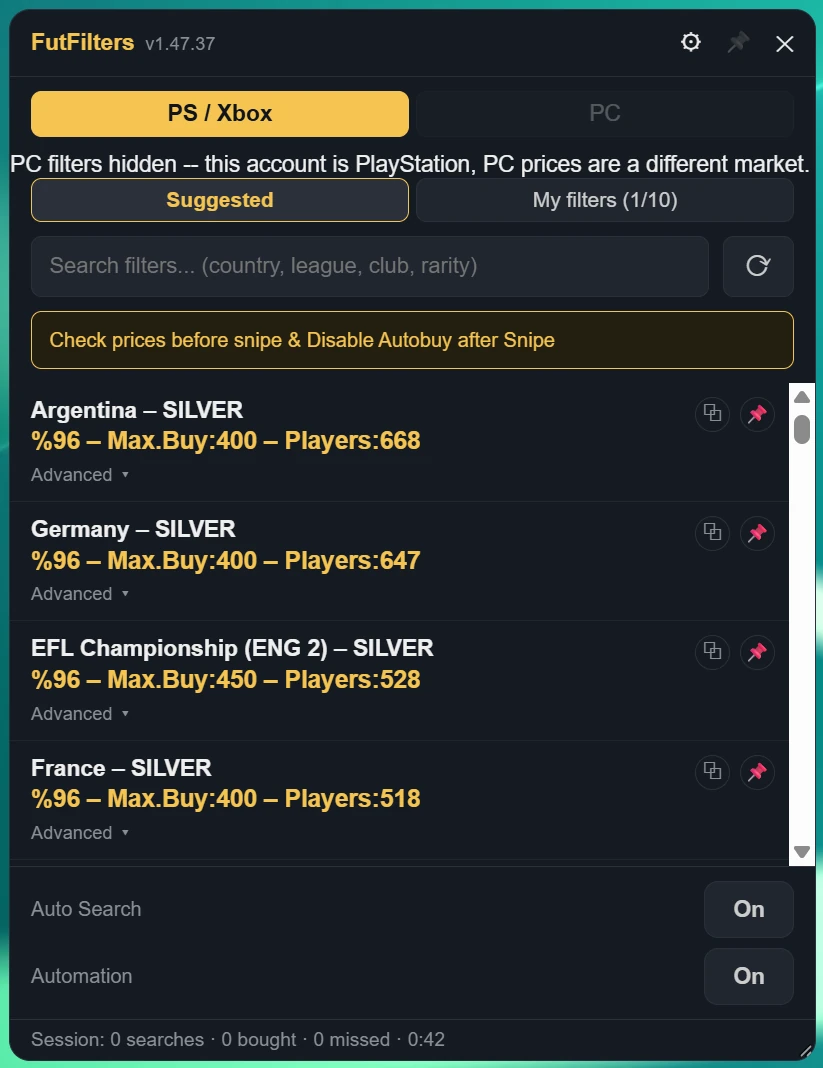
- PS / Xbox وPC سوقان منفصلان. إذا ظهرت لك رسالة "PC filters hidden" فحسابك PlayStation / Xbox وأسعار PC سوق مختلف، لذلك تُعرض الفلاتر المطابقة فقط.
- مربع البحث: اكتب دولة أو دوريًا أو ناديًا أو ندرة لتضييق القائمة؛ ويعيد زر التحديث تحميلها.
- مفتاحا Auto Search وAutomation في أسفل اللوحة؛ والسطر تحتهما هو الجلسة الحالية (عمليات البحث، المشتريات، الفائتة، الوقت).
- تُبقي أيقونة الدبوس في الرأس اللوحة مفتوحة عند النقر في مكان آخر من الصفحة؛ واسحب الزاوية السفلية اليمنى لتغيير حجمها.
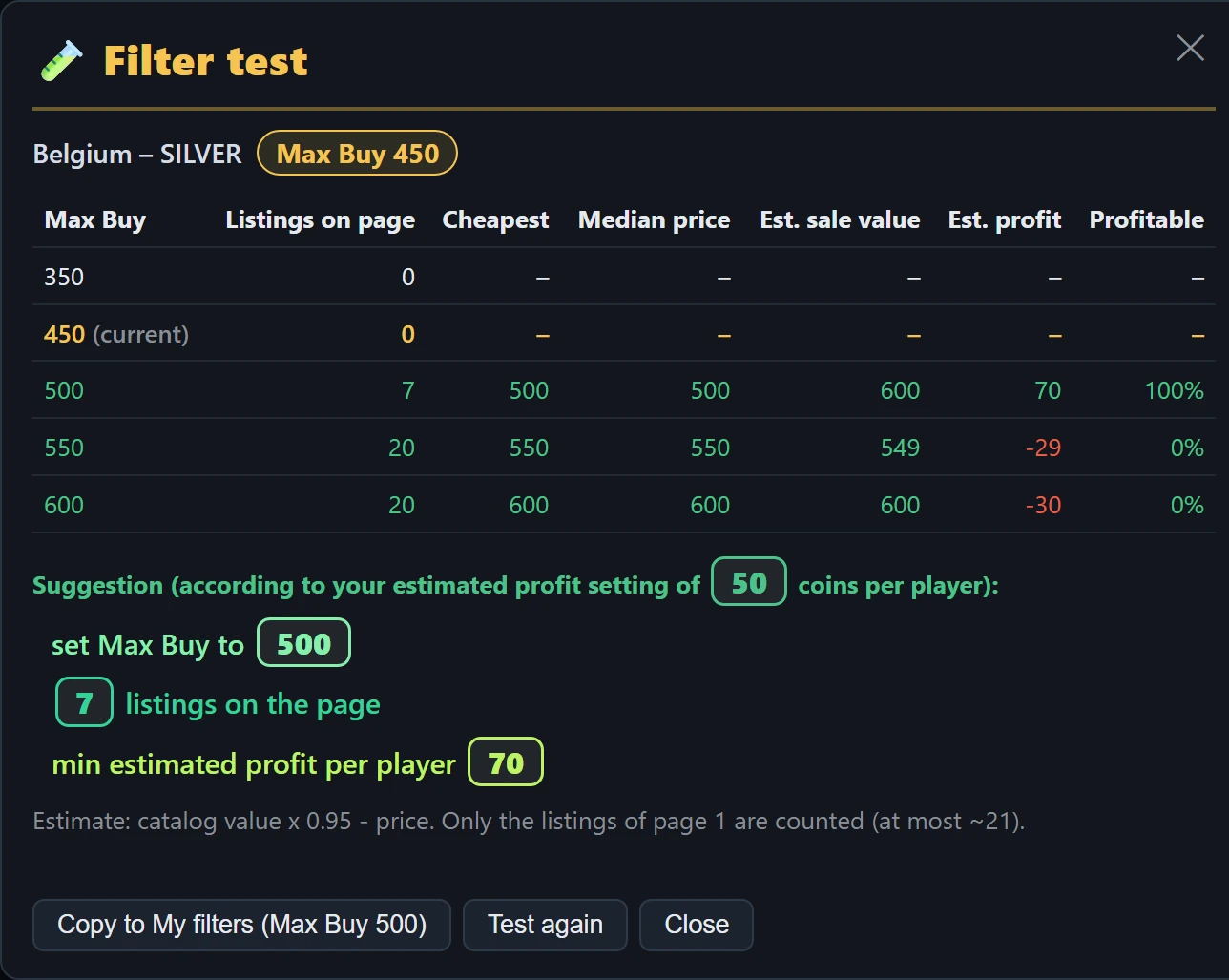
- يقترح الاقتراح الموجود أسفل الجدول Max Buy أفضل عندما يتغير السوق (مثلًا عندما لا يوجد إعلان عند السعر الحالي لكن توجد إعلانات رابحة كافية على درجة أعلى)، أو يقول أن تُبقيه كما هو، أو أن تترك الفلتر الآن.
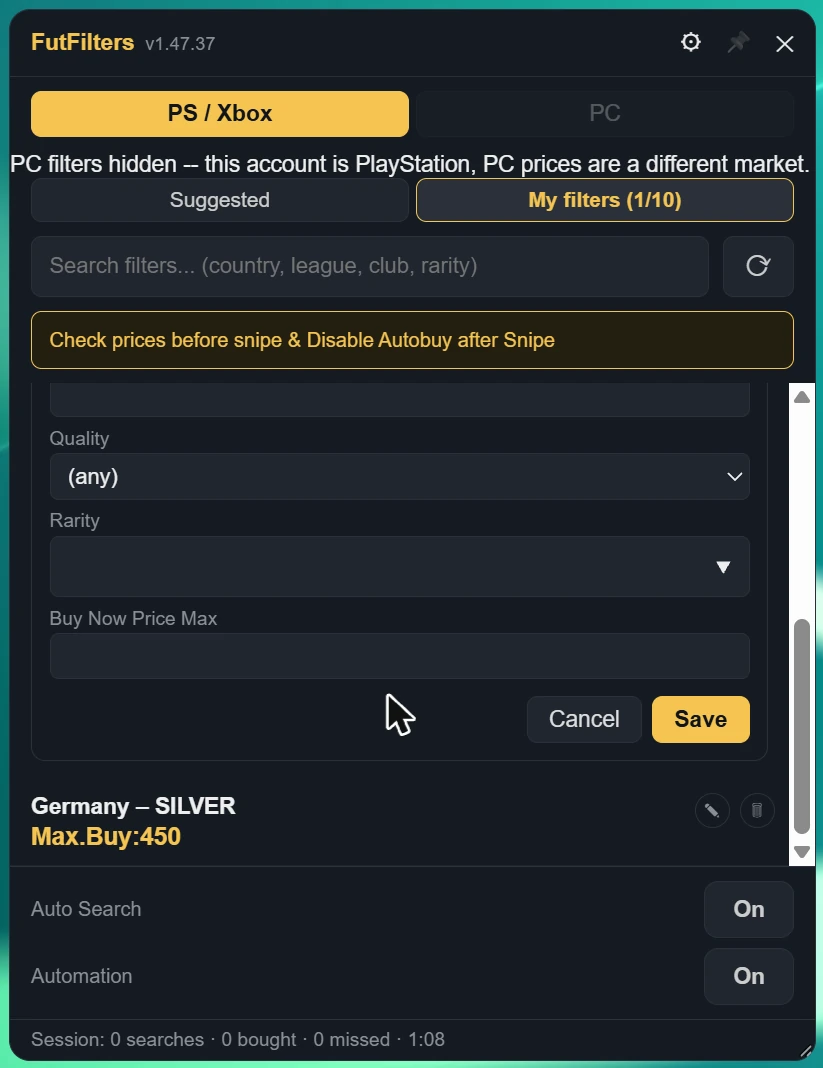
- "Copy to My filters" يضيف الفلتر إلى My filters بالـ Max Buy المقترح. وعند اختبار فلتر من My filters يغيّر الزر الـ Max Buy الخاص به بدلًا من ذلك.
- يُحفظ كل اختبار مكتمل في تبويب Tested المجاور لـ My filters في اللوحة وفي صفحة اللوحة بالموقع: الفلتر مع Max Buy الذي اقترحه الاختبار وتاريخ الاختبار ووقته. انقر صفًا لملء الفلتر بهذا السعر، أو انسخه إلى My filters.
- عند انتهاء الاختبار تُرسل نتيجته إلى FutFilters كبيانات سوق مجهولة (يمكنك إيقاف ذلك من Settings؛ وعندها يبقى الاختبار في قائمة Tested الخاصة بك فقط). عندما تُبلغ عدة حسابات أن Max Buy لفلتر ما لم يعد يناسب السوق، يعدّل FutFilters سعر ذلك الفلتر لمدة 24 ساعة (خصم 5-10% بدل 10%)؛ ويُظهر الفلتر المعدَّل أيقونة ترس بجانب Max Buy الخاص به.
- أثناء تشغيل الاختبار يوقف Auto Search ويحجب كل خيارات الشراء التلقائي (Auto-click Buy Now وAuto-click Ok وMulti-buy ومفاتيح الشراء التلقائي في Webapp Extra)، فلا يُشترى شيء أبدًا. أعد تشغيل Auto Search عند الانتهاء. لا تجرِ اختبارات كثيرة متتالية: كل اختبار نحو 8 عمليات بحث.
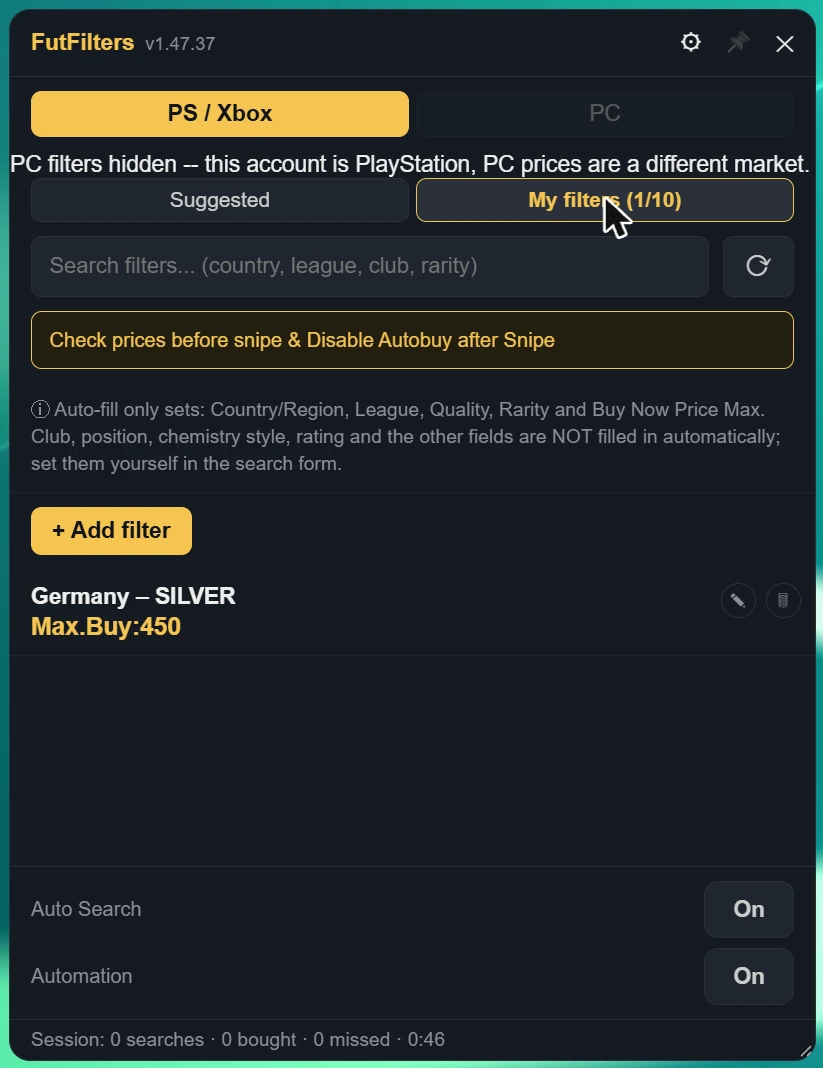
Auto-fill only sets: Country/Region, League, Quality, Rarity, Position and Buy Now Price Max. Club, chemistry style, rating and the other fields are NOT filled in automatically; set them yourself in the search form.
3. إعدادات FutFilters
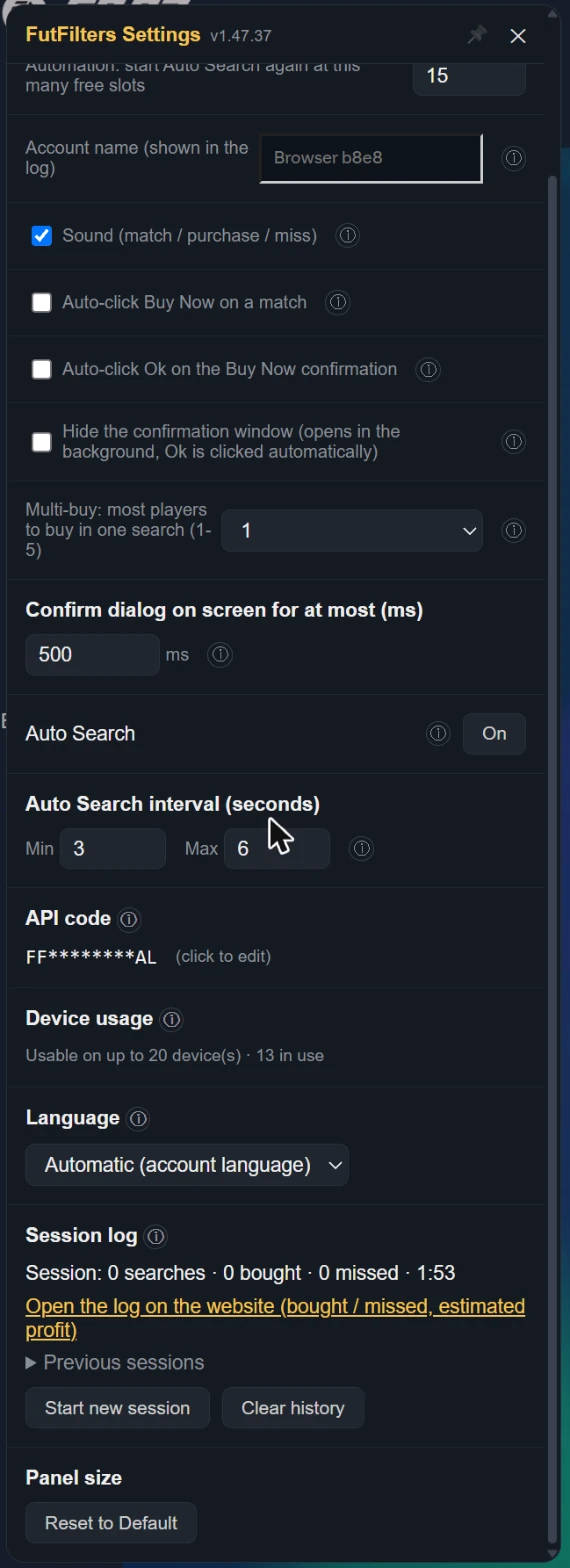
انقر أيقونة الترس في رأس اللوحة. مرّر المؤشر فوق (i) بجانب أي إعداد في اللوحة لقراءة الوصف نفسه الوارد أدناه.
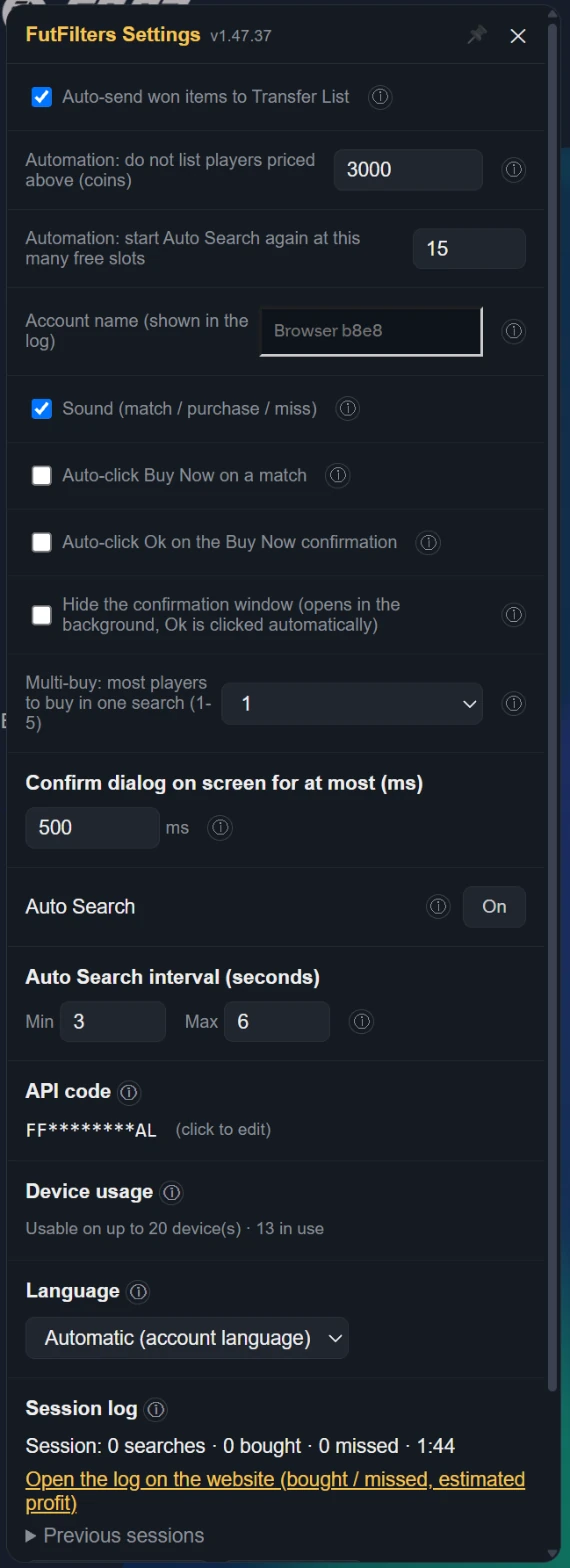
| Auto-send won items to Transfer List | When a purchased/won item shows up on the Club > Unassigned page or the Search Results page, automatically clicks "Send to Transfer List". Only relocates the item to the Transfer List tab -- it does not list it for sale, set a price, or move any coins; only runs while one of those pages is open. Default: on. EA caps the Unassigned pile at 5 items and refuses new purchases when it is full, so on other pages too (Transfers, Transfer List, Club...) purchased items are sent without leaving the page (if the Transfer List is full it retries when space frees). If that method stops working it falls back to opening the Home "Unassigned Items" tile. |
|---|---|
| Automation: do not list players priced above (coins) | WHEN ON: when the Transfer List is 90% full Auto Search stops and the players in it are listed one by one at the FutFilters price for 1 hour (with the Relist % of FF Webapp Extra, +5% if you never set one). When listing is done the sales are checked periodically and sold items are cleared; when the number of free slots set below (default 15) is reached Auto Search starts again with the same filter. WARNING: this is full automation, it lists without anyone looking and is a risky way to use the helper; be careful before leaving it unattended. Players priced above the limit below are never listed automatically. |
| Automation: start Auto Search again at this many free slots | يبدأ Auto Search من جديد، بالفلتر نفسه، عندما يتوفر هذا العدد من خانات Transfer List الفارغة (الافتراضي 15). |
| Account name (shown in the log) | Shown next to this browser's events and warnings in the Autobuyer log, so you can tell your accounts apart when you run several. Left empty it uses the club name shown in the Web App (or a short code for this browser if that cannot be read). The name is sent to futfilters.com with the log events; if you prefer, type a short nickname instead. |
| Sound (match / purchase / miss) | A beep when a listing matches, a "cha-ching" on a successful purchase, a low "thud" on a missed player, and the alert when Auto Search stops. Turn it off for no sound at all. Default: on. |
| When EA keeps answering "Too many actions": pause Auto Search for (minutes, 0 = off) | When too many actions are taken EA answers "Too many actions have been taken…" and switches the Transfer Market off for a while; an Auto Search that keeps going only wastes time and is risky for the account. WHEN ON: if that message is seen more than 5 times within the last 20 searches, Auto Search stops for the number of minutes set here and then carries on by itself with the same filter. 0 = off. Works on an English EA account. |
| Skip cards with an estimated profit below (coins, 0 = off) | Estimated profit = the card's catalog value x 0.95 - price. A low-profit card takes a Transfer List slot for an hour. 0 = buy every match (as before). Cards the catalog does not know are still bought. While on, a card whose value is not cached yet can delay the click by up to 0.45 s. |
| Send filter test results to FutFilters | When a test finishes, its result (listings, prices, estimated profit, suggestion) is sent to FutFilters as anonymous market data. When it is off the result is still saved to your own Tested list, just not shared. When several accounts report that a filter's Max Buy no longer fits the market, the server adjusts that filter's price (a 5-10% discount) for 24 hours; an adjusted filter shows a ⚙ next to it. |
| Auto-click Buy Now on a match | When the watch finds a match, automatically selects the row and clicks "Buy Now for X" -- this opens EA's own "Get Now" confirmation dialog. If "Auto-confirm" below is off, the dialog stays yours to act on. |
|---|---|
| Auto-click Ok on the Buy Now confirmation | WHEN ON, also clicks Ok in the "Get Now" confirmation dialog and completes the purchase. This is full automation -- high EA account ban risk. Default: off. Only meaningful while auto Buy Now is on. |
| Hide the confirmation window (opens in the background, Ok is clicked automatically) | The Buy Now confirmation window (Cancel / Ok) is not shown on screen; EA still opens it and the script clicks Ok in the background. Only works while "Auto-click Ok on the Buy Now confirmation" is on and only for the helper's own attempt: windows you open yourself stay visible. A hidden window that gets stuck is closed with Cancel. Default: off. |
| Multi-buy: most players to buy in one search (1-5) | 1 (default): if a search shows several matches only the most profitable one is bought (profit by the FutFilters price: value x 0.95 - price). 2-5: up to that many players are bought in that search, one after another, most profitable first. The number counts Buy Now attempts and starts again with every new search; with a short Auto Search interval you may not get through all of them before the next search comes. WARNING: multi-buy is a risky way to use the helper; coins are spent on several players at once, you can exceed your budget and fill the Unassigned pile (5 items). Be careful when you use it. |
| Confirm dialog on screen for at most (ms) | Only applies while "Auto-click Ok" is ON. If the "Get Now" dialog is still open this long after it first appeared (the Ok click did not register) it is closed with Cancel, so it cannot sit there and collide with the next search. Default: 500 ms. With Auto-click Ok off the dialog is always shown and left to you. |
| Auto Search | You can also turn Auto Search on/off from here -- does nothing while watch is off. Default: off. |
| Auto Search interval (seconds) | Each cycle waits a random amount of time between these two values -- deliberately variable, since a fixed interval is the most obvious bot tell there is. |
| API code | Changing the code switches to a different futfilters.com account/code -- filters and preferences reload accordingly. |
| Device usage | Switching to a different computer? You can reset it from your futfilters.com panel. |
| Language | The panel's language. "Automatic" follows the language on your futfilters.com account; pin it here to match your EA Web App's language -- no need to visit the website. |
| Session log | Every time you start Auto Search a new session begins (there is also one from when you open the page; you can press "Start new session" yourself too). Stopping Auto Search does not end it: it keeps counting until the next one starts. Searches counts manual and automatic Search clicks; bought counts purchased items that land in the Unassigned pile. The last 30 sessions are kept in this browser. |
4. إعدادات FF Webapp Extra
افتح أيقونة "FF Webapp Extra" في القائمة اليسرى. لكل ميزة مفتاحها الخاص وزر (i) يعرض وصفها. عطّل ما لا تستخدمه.
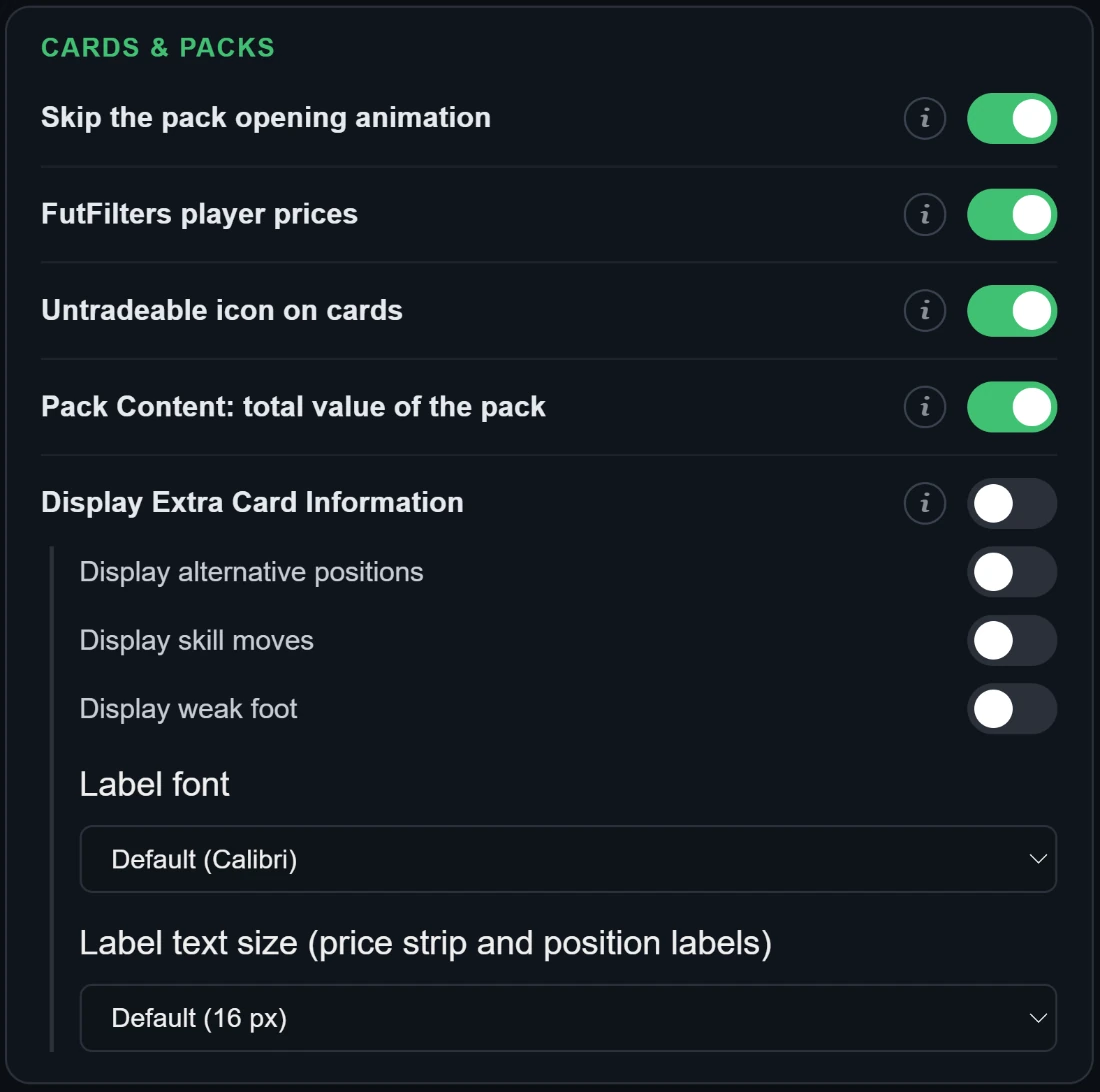
- تخطي رسوم فتح الحزم
- يخفي رسوم القصاصات/الألعاب النارية التي تظهر عند فتح الحزمة وينتقل مباشرة إلى النتيجة.
- أسعار لاعبي FutFilters
- يضيف فوق كل بطاقة لاعب آخر سعر من قاعدة بيانات لاعبي futfilters.com. حساب PlayStation / Xbox يعرض سعر PS فقط، وحساب PC يعرض سعر PC فقط (بالأخضر)؛ وإذا تعذّرت قراءة المنصة يظهر السعران معًا. السعر الباهت أقدم من يومين؛ مرّر المؤشر فوقه لترى القيمة الدقيقة والحد الأدنى من EA والتاريخ. يظهر فقط في القوائم التي تُحمَّل بعد تشغيل السكربت. تعرض Chemistry Styles والمدربون وManager Leagues سعرها أيضًا (أقل إعلان، من fut.gg).
- أيقونة «غير قابل للتداول» على البطاقات
- يضع أيقونة واضحة «غير قابل للتداول» في الزاوية العلوية اليسرى لكل بطاقة لاعب أو عنصر غير قابلة للتداول (النادي، Unassigned، التشكيلات، الحزم) لتراها بنظرة واحدة. الافتراضي: مفعّل.
- Pack Content: القيمة الإجمالية للحزمة
- في نافذة "Pack Content" في المتجر (حزمة تعاينها أو تفتحها) يضيف سطرًا في الأسفل بالقيمة الإجمالية للحزمة: اللاعبون بأسعار FutFilters (سوق PS / PC لحسابك)؛ والمستهلكات والمدربون وباقي العناصر واللاعبون بلا سعر بقيمة Quick Sell. سعر كل بطاقة يأتي من "أسعار لاعبي FutFilters"، لذلك أبقِ ذلك الخيار مفعّلًا أيضًا. إذا كانت قيمة الحزمة أعلى من سعرها بالعملات، يظهر سطر أخضر يقول إن فتحها يستحق (القيم قبل ضريبة البيع 5% من EA). الحزمة التي سبق أن عاينتها في قائمة المتجر تعرض القيمة نفسها فوق زر "View Pack". كما تُحتسب Chemistry Styles الموجودة في الحزمة بسعر السوق. تُحتسب عناصر العملات بقيمتها الاسمية. الحزمة داخل الحزمة (مثل حزمة Silver أو Gold) تُحتسب بسعرها بالعملات في المتجر وليس بعائد متوقع.
- عرض معلومات إضافية على البطاقة
- يضيف تسميات صغيرة على الحافة اليمنى للبطاقة (معلومات لا تعرضها EA افتراضيًا).
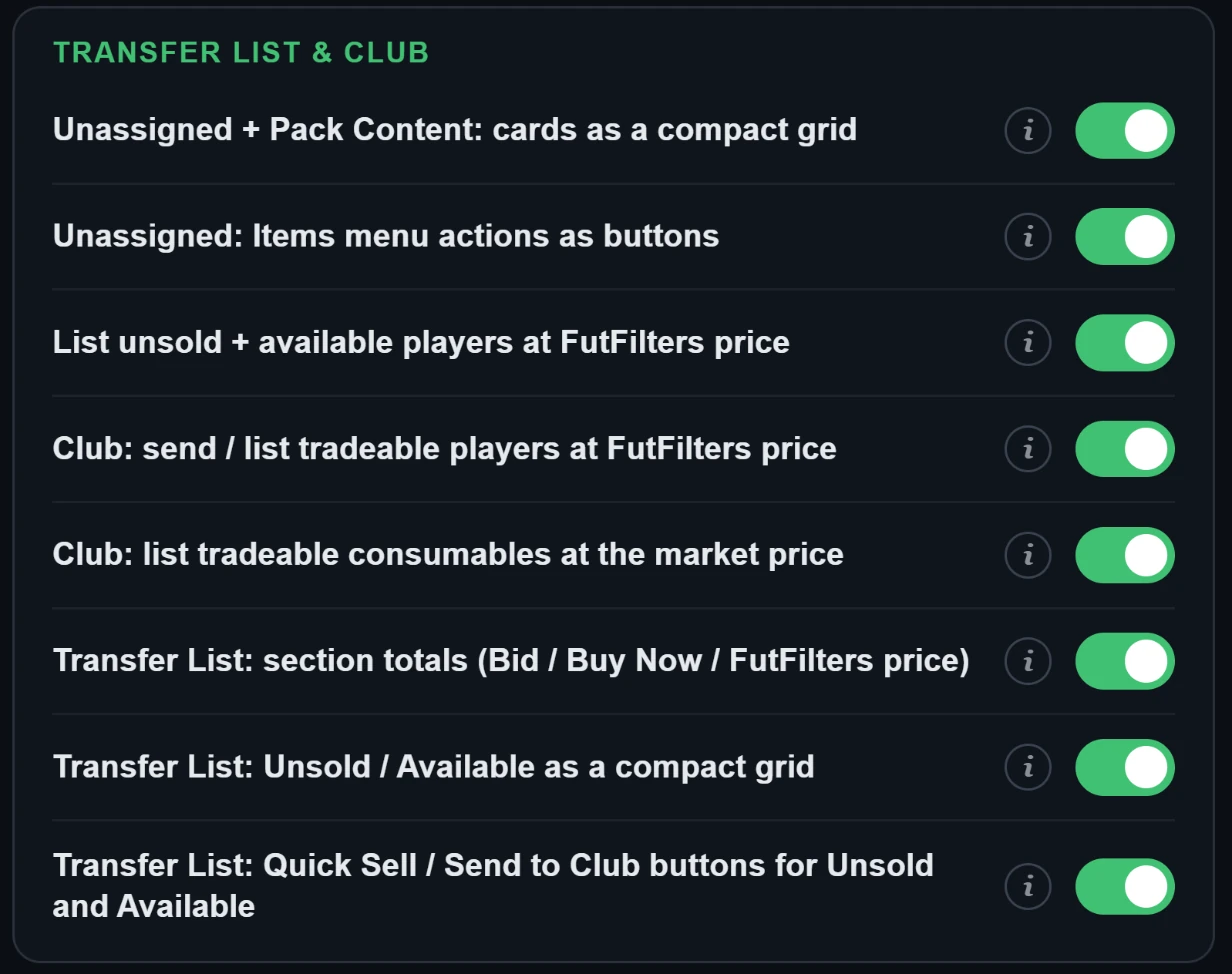
- Unassigned + Pack Content: البطاقات في شبكة مضغوطة
- في صفحة Unassigned (البطاقات التي خرجت للتو من حزمة) وفي نافذة Pack Content بالمتجر (حزم المعاينة أو المفتوحة) يعرض البطاقات مع اسم العنصر تحتها فقط، خمس بجانب بعض ثم ينتقل إلى السطر التالي، دون إحصاءات أو أسهم. انقر على بطاقة لتحديدها كالمعتاد. الافتراضي: مفعّل.
- Unassigned: إجراءات قائمة Items كأزرار
- في صفحة Unassigned، يضع إجراءات قائمة Items (النقاط الثلاث) كأزرار بجانب عنوان «Items»: تخزين الكل في النادي، الإرسال إلى قائمة الانتقالات، والبيع السريع مع القيمة الإجمالية. البيع السريع ما زال يطلب أولًا تأكيد EA نفسه. الافتراضي: مفعّل. وهناك زران آخران ينقلان اللاعبين فقط (دون المستهلكات أو العناصر الأخرى) إلى النادي أو إلى قائمة الانتقالات. اللاعبون القابلون للتداول في Duplicates مشمولون أيضًا في زر Transfer List.
- عرض اللاعبين غير المباعين + المتاحين بسعر FutFilters
- يضيف زرًا في صفحة Transfer List للاعبين الذين لم يُباعوا أو غير المعروضين: يعرض كل لاعب على حدة بالسعر الموجود في قاعدة بيانات لاعبي futfilters.com، معدَّلًا بالنسبة التي تختارها (من -20 إلى +20، الافتراضي +5) ومقرَّبًا إلى خطوة سعر EA. لا يُعرض شيء حتى تضغط "List selected"؛ يظهر جدول أولًا. يظهر الزر نفسه أيضًا في صفحة Unassigned (بعد فتح الحزم) للاعبين القابلين للتداول المنتظرين هناك.
- Club: إرسال / عرض اللاعبين القابلين للتداول بسعر FutFilters
- يضيف زرًا في My Club > Players: يفحص النادي بحثًا عن لاعبين قابلين للتداول ويعرضهم في جدول مع سعر FutFilters (يمكن اختيار كل لاعب على حدة، ولا أحد محدد افتراضيًا). يرسل المحددين دفعة واحدة إلى Transfer List أو يعرضهم مباشرة من النادي بسعر FutFilters (مع نسبتك).
- Club: عرض المستهلكات القابلة للبيع بسعر السوق
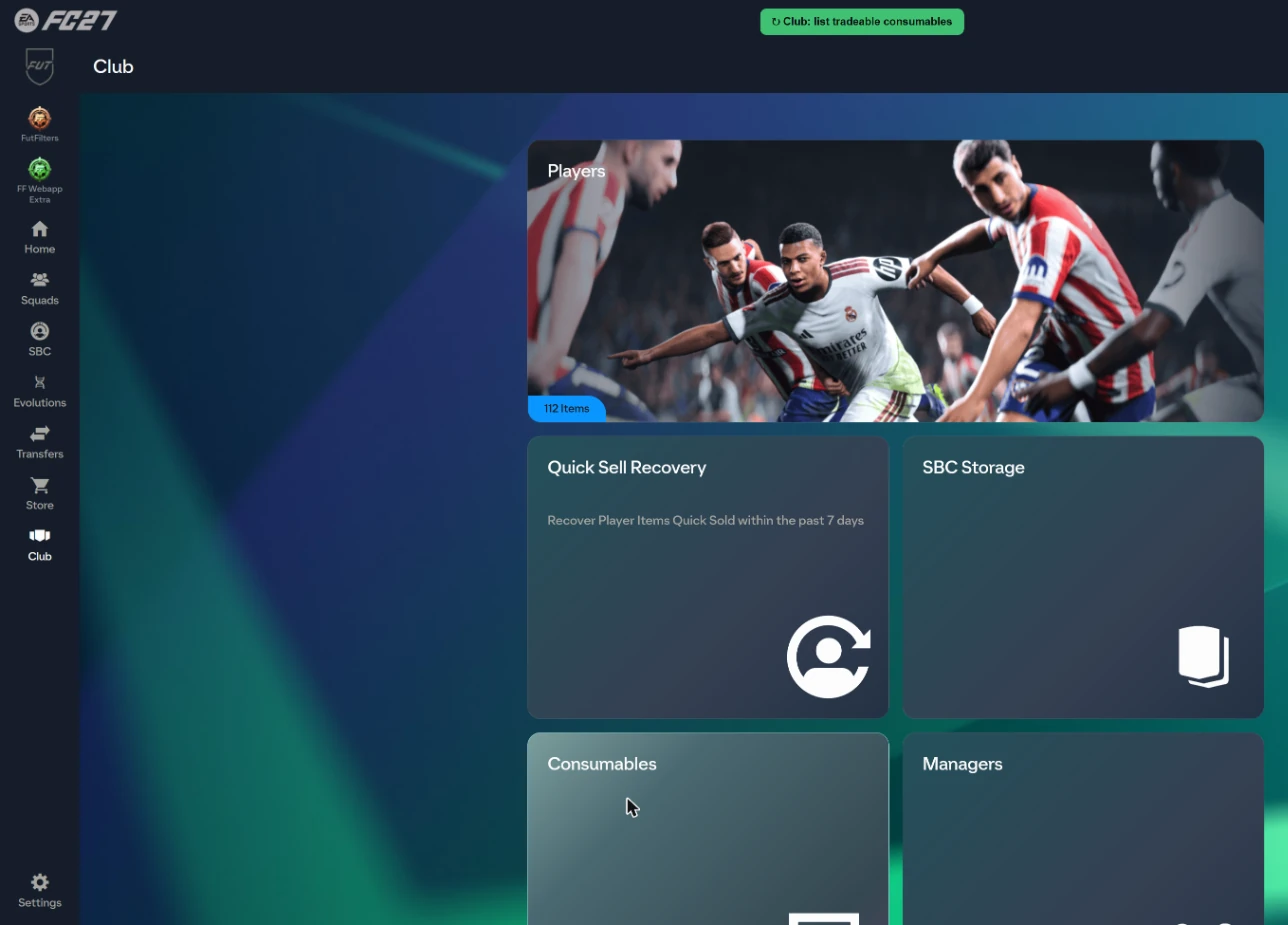
- يضيف زرًا في My Club > Consumables: يفحص كل مجموعات المستهلكات في النادي (Chemistry Styles وManager Leagues وHealing ...) ويعرض القابلة للبيع في جدول مع سعر السوق (سعر futfilters.com لـ Chemistry Styles وManager Leagues، وأقل Buy Now في Transfer Market لبقية العناصر)، وسعر البداية / Buy Now بعد تعديل النسبة، وعدد الوحدات المراد عرضها من كل مجموعة (الكل افتراضيًا). لا يُعرض شيء قبل الضغط على "List selected"؛ تُعرض الوحدات واحدة تلو الأخرى بنفس استدعاء "List on Transfer Market" من EA. الافتراضي: مفعّل.
- Transfer List: مجاميع الأقسام (Bid / Buy Now / سعر FutFilters)
- يضيف صف "TOTAL" تحت عنوان كل قسم في Transfer List (Sold وUnsold وAvailable وActive): مجموع Bid ومجموع Buy Now ومجموع أسعار قاعدة بيانات futfilters.com للاعبي ذلك القسم. للقراءة فقط ولا يحرّك صفوف EA.
- Transfer List: Unsold / Available في شبكة مضغوطة
- في صفحة Transfer List يعرض قسمي Unsold Items وAvailable Items كشبكة بطاقات، خمس في كل صف، مع اسم العنصر تحت كل بطاقة ودون أسعار أو أسهم. انقر على بطاقة لتحديدها كالمعتاد. يبقى Sold Items وActive Transfers بقائمتهما العادية. الافتراضي: مفعّل.
- Transfer List: أزرار Quick Sell / الإرسال إلى النادي لـ Unsold وAvailable
- يضيف أزرارًا بجانب عنواني Unsold Items وAvailable Items: "Quick Sell للكل" (تطلب EA التأكيد أولًا؛ يُستثنى اللاعبون الذين يتجاوز سعر السوق لديهم 1,000)، و"إرسال الكل إلى النادي" و"إرسال اللاعبين إلى النادي" (اللاعبون فقط). تعمل على القسم كله بمكالمات EA ورسائلها؛ تُتجاهل النسخ المكررة التي لا يمكن نقلها. الافتراضي: مفعّل.
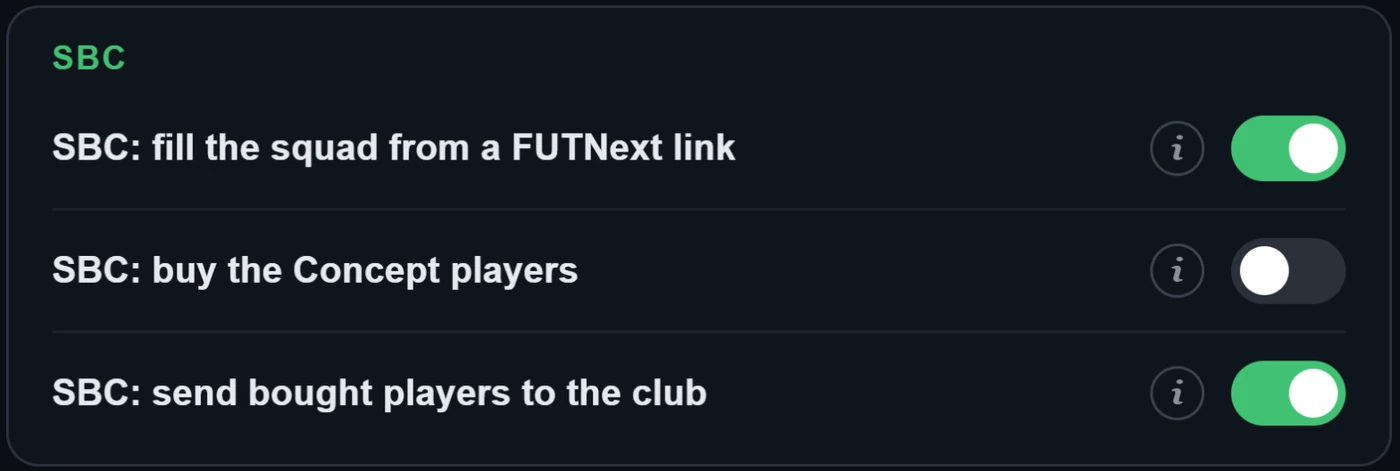
- SBC: ملء التشكيلة من رابط FUTNext
- يضيف مربع "FUTNext" تحت زر "Clear Squad" في صفحة تشكيلة SBC. الصق رابط FUTNext (futnext.com?sbcId=…&players=…) أو قائمة معرّفات اللاعبين فقط، فتُملأ التشكيلة فورًا: أولًا بالبطاقات التي تملكها في ناديك، وبلاعبي Concept لمن لا تملكهم (عناصر نائبة من EA للتخطيط، لا يمكن تسليمها). تُحفظ التشكيلة ولا تُسلَّم أبدًا. وما لا يُعثر عليه يُعرض في قائمة. عندما يكون لدى futfilters.com أحدث حلول FUTNext لهذا التحدي (تُجمع كل 6 ساعات)، تعرض قائمة منسدلة أسفل الصندوق أحدث 5 حلول مع سعرها وعمرها: اختر واحدًا فتُملأ التشكيلة فورًا.
- SBC: إرسال اللاعبين المشتَرين إلى النادي
- أثناء وجودك داخل SBC (صفحة التشكيلة وعمليات بحث اللاعبين فيها) يُنقل اللاعبون الذين تشتريهم إلى ناديك (Unassigned -> My Club) بدلًا من Transfer List. اللاعبون الذين كانوا ينتظرون في Unassigned عند فتح SBC لا يُمسّون. يتراجع سكربت Autofill أثناء SBC حتى لا يتنافس الاثنان على اللاعب نفسه.
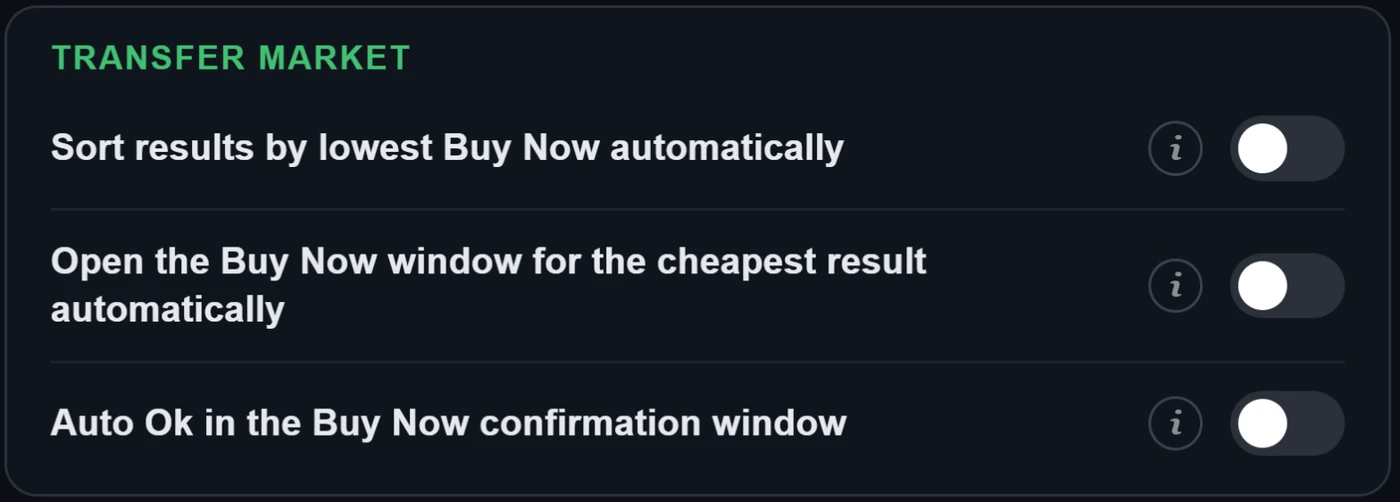
- ترتيب النتائج تلقائيًا حسب أقل Buy Now
- يشغّل اختصار "Sort results by lowest Buy Now" تلقائيًا كلما ظهرت قائمة نتائج بحث (Transfer Market أو بحث لاعبي SBC) أو تغيّرت.
- فتح نافذة Buy Now تلقائيًا لأرخص نتيجة
- يحدّد أول لاعب في قائمة النتائج (وهو الأرخص فعلًا إذا كان الترتيب التلقائي مفعّلًا) ويفتح نافذة تأكيد "Get Now" من EA تلقائيًا، مثل اختصار "Buy now". وإذا كان "Ok التلقائي" أدناه معطّلًا فتبقى النافذة بيدك.
- Ok تلقائي في نافذة تأكيد Buy Now
- عند التفعيل يضغط أيضًا Ok في نافذة تأكيد "Get Now" ويُتمّ الشراء، سواء لاختصار "Buy now" أو للنافذة المفتوحة تلقائيًا. الأتمتة الكاملة تحمل خطرًا كبيرًا لحظر حساب EA. الافتراضي: معطّل.
5. أدوات Transfer List وClub
ما يضيفه Webapp Extra إلى صفحات EA نفسها. لا يُعرض شيء ولا يُباع قبل أن تؤكد.
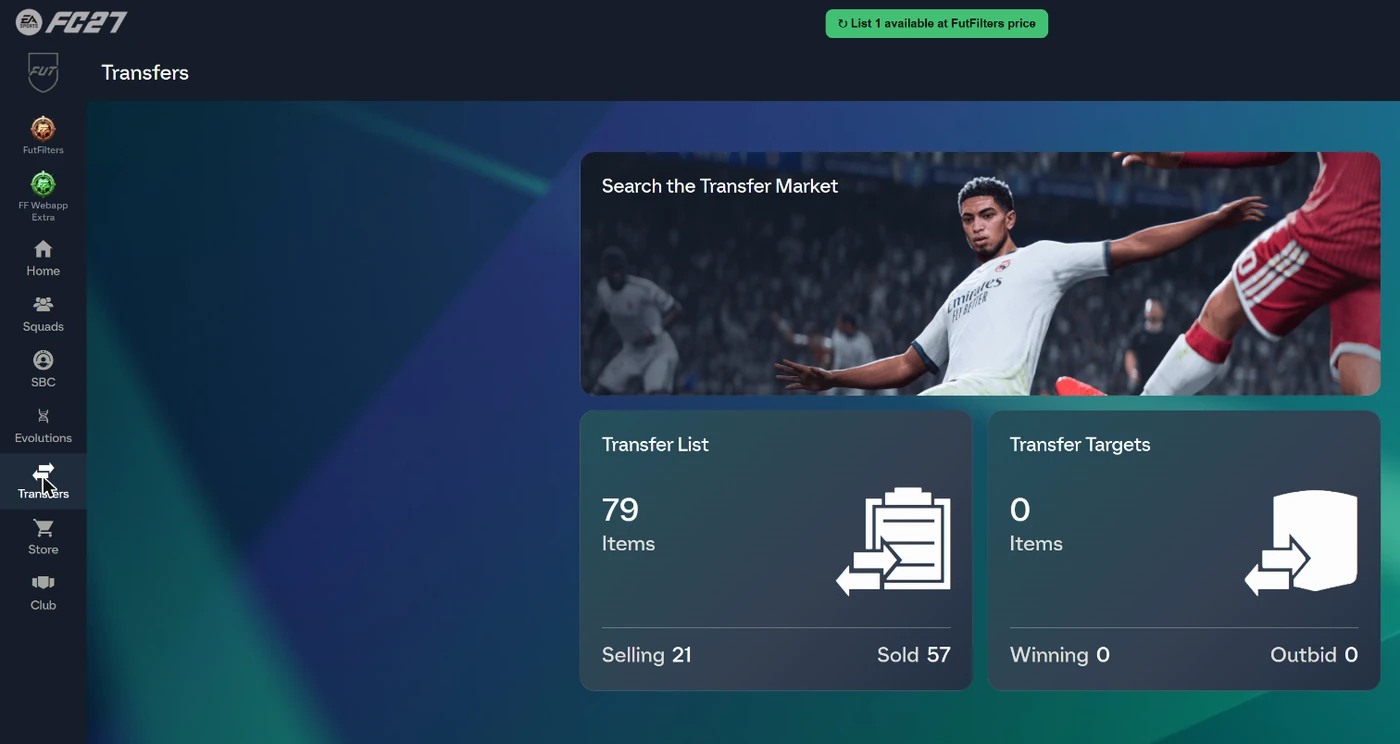
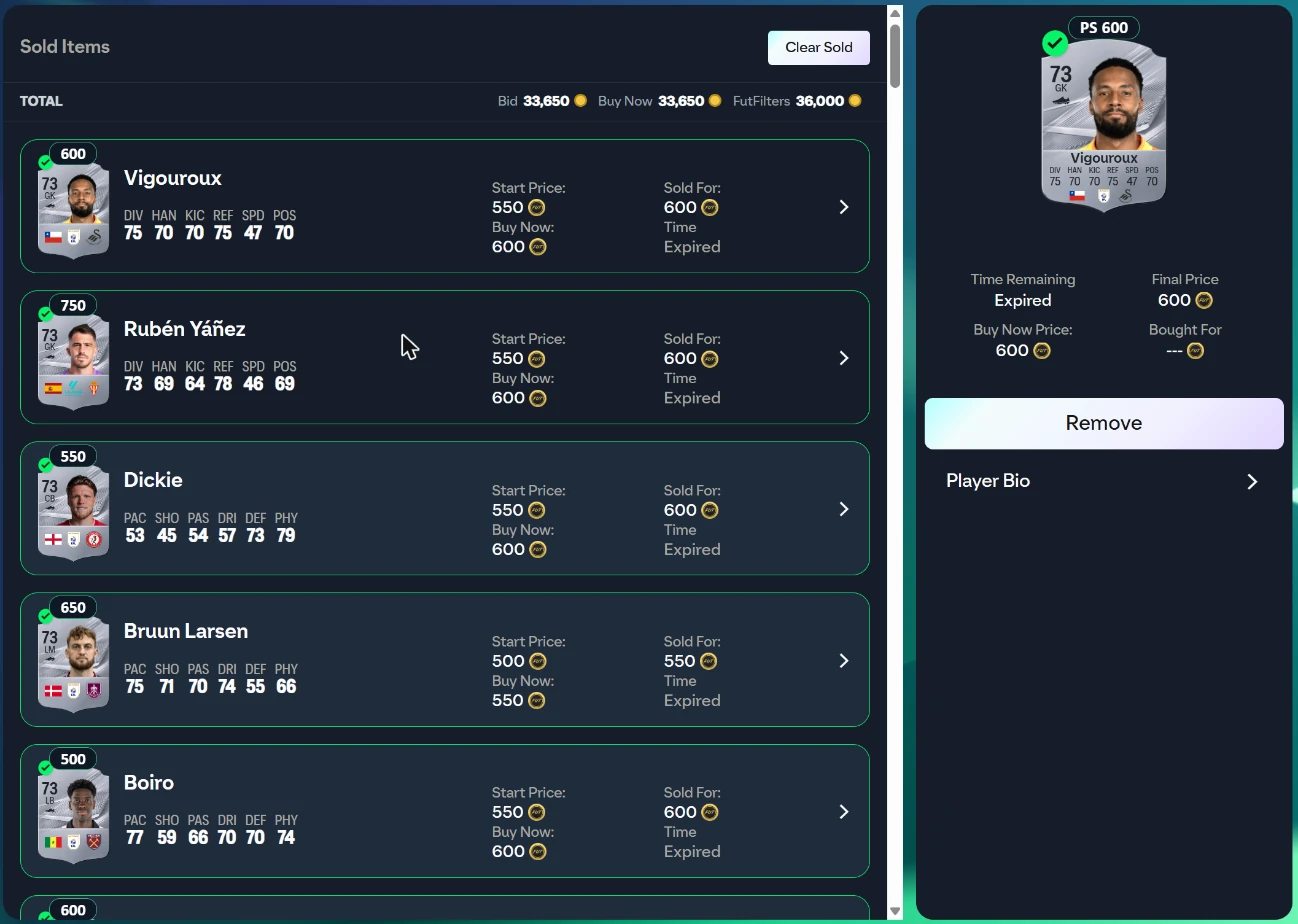
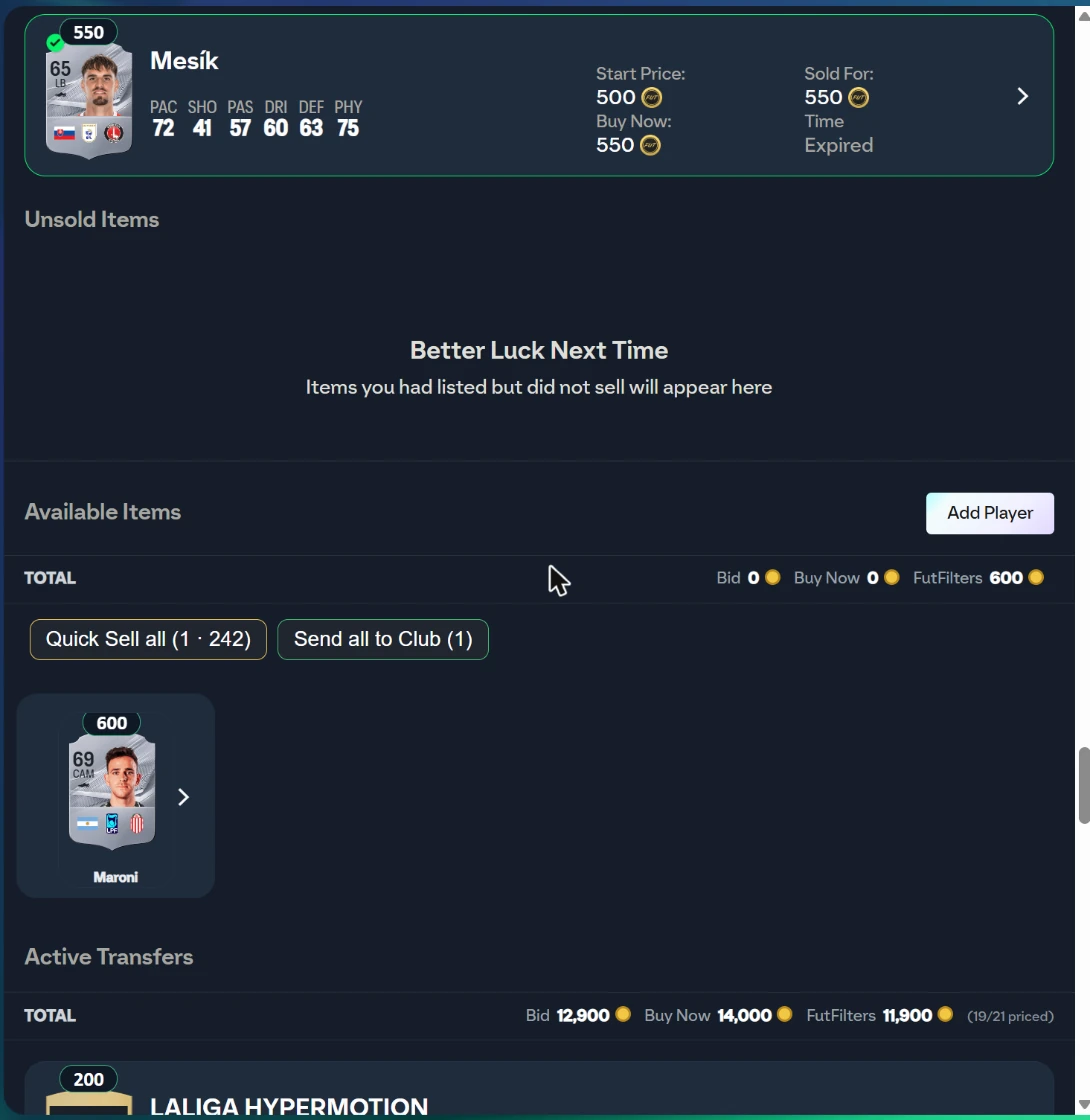
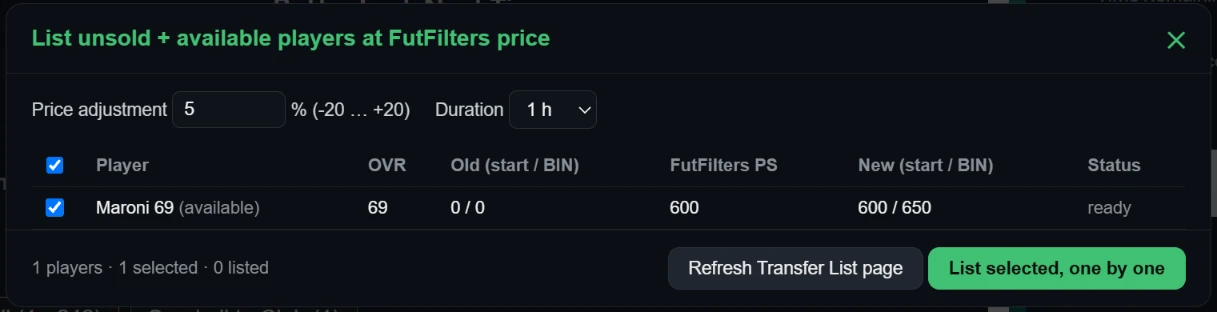
يضيف زرًا في صفحة Transfer List للاعبين الذين لم يُباعوا أو غير المعروضين: يعرض كل لاعب على حدة بالسعر الموجود في قاعدة بيانات لاعبي futfilters.com، معدَّلًا بالنسبة التي تختارها (من -20 إلى +20، الافتراضي +5) ومقرَّبًا إلى خطوة سعر EA. لا يُعرض شيء حتى تضغط "List selected"؛ يظهر جدول أولًا. يظهر الزر نفسه أيضًا في صفحة Unassigned (بعد فتح الحزم) للاعبين القابلين للتداول المنتظرين هناك.

6. سجل autobuyer
يُرسل كل لاعب جرى شراؤه أو فاتك إلى سجلك على futfilters.com مع الربح التقديري.
- افتحه من لوحة Settings ("Open the log on the website") أو من futfilters.com/logs بعد تسجيل الدخول.
- هل تشغّل عدة حسابات EA أو متصفحات؟ أعطِ كل واحد "Account name" قصيرًا في Settings لتميّز بينها في السجل.
- الجلسات: تبدأ جلسة جديدة كل مرة تشغّل فيها Auto Search. تُحفظ آخر 30 جلسة في المتصفح ("Previous sessions" في Settings).
- تُظهر عملية الشراء الفائتة رسالة EA نفسها كسبب، مثل "Bid status changed" (كان شخص آخر أسرع) أو "Too many actions" (حدّ EA المؤقت).
- تُسجَّل أيضًا البطاقات المباعة من Transfer List الخاصة بك. تعرض الصفحة "Sold" و"Realised profit" (سعر البيع x 0.95 - تكلفة البطاقة، تُقرأ من البطاقة نفسها) بجانب الربح المقدّر للمشتريات.
الأسئلة الشائعة
ما هو FutFilters، وما المساعدان؟
FutFilters (futfilters.com) قاعدة بيانات لفلاتر snipe في Transfer Market مع بيانات أسعار حية لـ EA FC. تنقل لوحة FutFilters هذه الفلاتر إلى EA FC Web App وتملأ البحث نيابةً عنك. ويضيف FF Webapp Extra أسعارًا على البطاقات وأدوات تسهّل العمل في شاشات Transfer List وClub وSBC والحزم.
أين أجد رمز API؟
على futfilters.com بعد تسجيل الدخول: "My Account" -> "API code". في Web App افتح لوحة FutFilters، واضغط أيقونة الترس، وانقر سطر API code، والصق الرمز واضغط Save.
أي متصفح أحتاج؟
متصفح Chromium لسطح المكتب (Chrome أو Edge). ثبّت إضافة Chrome من Chrome Web Store، أو userscript عبر Tampermonkey. كلاهما في صفحة التنزيلات.
تقول اللوحة "PC filters hidden". لماذا؟
حسابك PlayStation / Xbox، وأسعار PC سوق مختلف، لذلك يعرض المساعد الفلاتر المطابقة لمنصة حسابك فقط. أما حساب PC فيرى فلاتر PC بدلًا منها.
هل يشتري FutFilters اللاعبين نيابةً عني؟
افتراضيًا لا: النقر على فلتر يملأ نموذج البحث فقط. يكرر Auto Search البحث، ويمكن لـ "Auto-click Buy Now" و"Auto-click Ok" إتمام عملية شراء، لكنها كلها مفاتيح منفصلة في Settings، ومفاتيح الشراء معطّلة افتراضيًا.
هل يمكن أن أتعرض للحظر؟
أتمتة عمليات الشراء تخالف شروط خدمة EA، لذلك هناك دائمًا خطر، ويزداد مع الأتمتة الكاملة (Auto-click Ok وMulti-buy وAutomation). لا يمكننا وعدك بالأمان. أبقِ مفاتيح الشراء معطّلة إن لم تكن متأكدًا، وأبقِ فواصل Auto Search عشوائية (وهذا هو الافتراضي)، ولا تترك الحساب دون مراقبة أبدًا.
ماذا تفعل "Automation"؟
WHEN ON: when the Transfer List is 90% full Auto Search stops and the players in it are listed one by one at the FutFilters price for 1 hour (with the Relist % of FF Webapp Extra, +5% if you never set one). When listing is done the sales are checked periodically and sold items are cleared; when the number of free slots set below (default 15) is reached Auto Search starts again with the same filter. WARNING: this is full automation, it lists without anyone looking and is a risky way to use the helper; be careful before leaving it unattended. Players priced above the limit below are never listed automatically.
Transfer List ممتلئة وتوقف Auto Search.
هذا مقصود: يتوقف Auto Search عندما لا تكون في Transfer List خانات فارغة، حتى لا تفشل أي عملية شراء. اعرض بعض العناصر أو بعها أو امسحها (يساعدك زر "List at FutFilters price") ثم شغّل Auto Search مجددًا؛ ومع تفعيل Automation يستأنف من تلقاء نفسه عند عدد الخانات الفارغة الذي حددته.
كم جهازًا يمكنني استخدامه؟
لحسابك حد للأجهزة (يظهر تحت "Device usage" في Settings). Switching to a different computer? You can reset it from your futfilters.com panel.
ماذا تملأ My filters تلقائيًا؟
Auto-fill only sets: Country/Region, League, Quality, Rarity, Position and Buy Now Price Max. Club, chemistry style, rating and the other fields are NOT filled in automatically; set them yourself in the search form.
ما شارة السعر على البطاقات؟
يضيف فوق كل بطاقة لاعب آخر سعر من قاعدة بيانات لاعبي futfilters.com. حساب PlayStation / Xbox يعرض سعر PS فقط، وحساب PC يعرض سعر PC فقط (بالأخضر)؛ وإذا تعذّرت قراءة المنصة يظهر السعران معًا. السعر الباهت أقدم من يومين؛ مرّر المؤشر فوقه لترى القيمة الدقيقة والحد الأدنى من EA والتاريخ. يظهر فقط في القوائم التي تُحمَّل بعد تشغيل السكربت. تعرض Chemistry Styles والمدربون وManager Leagues سعرها أيضًا (أقل إعلان، من fut.gg).
كيف يعمل "List unsold + available players at FutFilters price"؟
يضيف زرًا في صفحة Transfer List للاعبين الذين لم يُباعوا أو غير المعروضين: يعرض كل لاعب على حدة بالسعر الموجود في قاعدة بيانات لاعبي futfilters.com، معدَّلًا بالنسبة التي تختارها (من -20 إلى +20، الافتراضي +5) ومقرَّبًا إلى خطوة سعر EA. لا يُعرض شيء حتى تضغط "List selected"؛ يظهر جدول أولًا. يظهر الزر نفسه أيضًا في صفحة Unassigned (بعد فتح الحزم) للاعبين القابلين للتداول المنتظرين هناك.
ما هو Multi-buy؟
1 (default): if a search shows several matches only the most profitable one is bought (profit by the FutFilters price: value x 0.95 - price). 2-5: up to that many players are bought in that search, one after another, most profitable first. The number counts Buy Now attempts and starts again with every new search; with a short Auto Search interval you may not get through all of them before the next search comes. WARNING: multi-buy is a risky way to use the helper; coins are spent on several players at once, you can exceed your budget and fill the Unassigned pile (5 items). Be careful when you use it.
هل يمكنني ترك Auto Search يعمل طوال الليل؟
نعم، لكن أبقِ المتصفح مستيقظًا: يبطّئ Chrome علامة تبويب مخفية أو مصغّرة أو مغطاة بنافذة أخرى. منذ الإصدار 1.47.40 أصبحت مؤقّتات المساعد محميّة من ذلك، وهذه الإعدادات تساعد أيضًا. 1) افتح في Chrome الصفحة chrome://settings/performance وأيقاف Memory Saver، أو أضف موقع EA Web App (www.ea.com) إلى "Always keep these sites active" (على اللابتوب أوقف Energy Saver أيضًا وأبقِه موصولًا بالشاحن). 2) لا تصغّر النافذة ولا تغطّها بنافذة أخرى؛ امنع الشاشة أو الحاسوب من النوم (Windows: Settings > System > Power). 3) استخدم ملف متصفح منفصلًا لكل حساب EA. 4) تحتاج Transfer List إلى أماكن فارغة (شغّل Automation ليقوم بالعرض والاستئناف تلقائيًا). 5) في الصباح افحص سجل الجلسات: يجب أن تظهر في الجلسة الطويلة عمليات بحث كثيرة (نحو 10-20 في الدقيقة بالفاصل الافتراضي)؛ وإذا كانت قليلة فهذا يعني أن التبويب كان مُبطّأًا. الاستخدام الليلي دون إشراف يزيد خطر الحظر، انظر "هل يمكن أن أتعرض للحظر".
ماذا يفعل Filter test؟
يبحث بالفلتر نحو 8 مرات دون شراء أي شيء، ويعرض كم إعلانًا في السوق عند Max Buy الخاص بالفلتر وعند أسعار قريبة، وأسعارها، والربح المقدّر، ثم يقترح Max Buy أفضل إذا تغيّر السوق. اضغط أيقونة الدورق في صف الفلتر؛ و"Copy to My filters" في النتيجة يحفظ الفلتر بالسعر المقترح.
توقف Auto Search بسبب "Too many actions". ما هذا؟
يرد EA بالرسالة "Too many actions have been taken, and use of this feature has been temporarily disabled" عندما يفعل الحساب أكثر من اللازم في Transfer Market، ثم يرفض عمليات البحث والشراء لفترة. في Settings يمكنك تحديد عدد دقائق (0 = إيقاف): إذا ظهرت الرسالة أكثر من 5 مرات خلال آخر 20 عملية بحث، يتوقف Auto Search لهذه المدة ثم يتابع من تلقاء نفسه بالفلتر نفسه.
ما هو "Realised profit" في السجل؟
تُسجَّل كل بطاقة تُباع من Transfer List الخاصة بك. الربح المحقق هو سعر البيع x 0.95 (ضريبة EA) ناقص تكلفة البطاقة، التي يقرأها المساعد من البطاقة نفسها وهي لم تُبع بعد. الربح المقدّر بجانب كل عملية شراء تخمين من كتالوج الأسعار لدينا؛ أما الربح المحقق فهو ما حدث فعلًا.
لماذا يتغير Max Buy لفلتر ما من تلقاء نفسه؟
Max Buy هو سعر السوق للفلتر مطروحًا منه ضريبة EA البالغة 5% وهامش 10%. عندما تُجري عدة حسابات Filter test وتتفق على أنه لا توجد إعلانات عند ذلك السعر بينما توجد إعلانات رابحة كافية أعلى منه قليلًا، يخفّض FutFilters هامش ذلك الفلتر إلى ما بين 5% و10% لمدة 24 ساعة، ويظهر على الفلتر أيقونة ترس. التغيير صغير (نقطتان مئويتان في كل مرة)، ولا يُطبَّق إلا ما دام الفلتر يحقق ربحًا، ويزول من تلقاء نفسه ما لم تؤكده اختبارات جديدة. وإذا اخترت بنفسك خصمًا أصغر في محدد Snipe profit بالموقع فيُستخدم الأصغر.
هل يمكنني تشغيل عدة حسابات EA؟
نعم، يحتفظ كل ملف تعريف متصفح بإعداداته الخاصة. Shown next to this browser's events and warnings in the Autobuyer log, so you can tell your accounts apart when you run several. Left empty it uses the club name shown in the Web App (or a short code for this browser if that cannot be read). The name is sent to futfilters.com with the log events; if you prefer, type a short nickname instead.
توقفت اللوحة عن العمل بعد تحديث.
تُسحب الإصدارات القديمة من وقت لآخر. إذا أظهرت اللوحة أن إصدار السكربت لم يعد مدعومًا، فأعد تثبيت أحدث إصدار من صفحة التنزيلات (لا يحدّثه Tampermonkey تلقائيًا). أما إضافة Chrome فتتحدّث عبر Web Store.
كيف أغيّر لغة اللوحة؟
The panel's language. "Automatic" follows the language on your futfilters.com account; pin it here to match your EA Web App's language -- no need to visit the website.
أين مربع SBC FUTNext؟
يضيف مربع "FUTNext" تحت زر "Clear Squad" في صفحة تشكيلة SBC. الصق رابط FUTNext (futnext.com?sbcId=…&players=…) أو قائمة معرّفات اللاعبين فقط، فتُملأ التشكيلة فورًا: أولًا بالبطاقات التي تملكها في ناديك، وبلاعبي Concept لمن لا تملكهم (عناصر نائبة من EA للتخطيط، لا يمكن تسليمها). تُحفظ التشكيلة ولا تُسلَّم أبدًا. وما لا يُعثر عليه يُعرض في قائمة. عندما يكون لدى futfilters.com أحدث حلول FUTNext لهذا التحدي (تُجمع كل 6 ساعات)، تعرض قائمة منسدلة أسفل الصندوق أحدث 5 حلول مع سعرها وعمرها: اختر واحدًا فتُملأ التشكيلة فورًا.
ما زال لدي سؤال.
افتح futfilters.com/support، أو أرسل رسالة من قسم "اتصل بنا" في الموقع.