
FutFilters सेटअप गाइड
इंस्टॉल, पैनल और सेटिंग्स, हर स्टेप के लिए एक स्क्रीनशॉट.
1. शुरुआत
EA FC Web App में दो हेल्पर साथ मिलकर काम करते हैं: FutFilters पैनल (स्नाइप फ़िल्टर, Auto Search, ऑटोबायर लॉग) और FF Webapp Extra (कार्ड पर कीमतें, वन-क्लिक लिस्टिंग, Transfer List और Club के टूल).
- futfilters.com पर अपना खाता बनाएँ या साइन इन करें और "My Account" -> "API code" से अपना निजी API कोड कॉपी करें.
- Chrome Web Store से Chrome एक्सटेंशन इंस्टॉल करें (Downloads पेज देखें), या Tampermonkey के साथ यूज़रस्क्रिप्ट इंस्टॉल करें.
- EA FC Web App खोलें और EA में हमेशा की तरह साइन इन करें. बाएँ मेनू में दो आइकन "FutFilters" और "FF Webapp Extra" दिखाई देंगे.
- FutFilters पैनल खोलें, फिर गियर आइकन (Settings) दबाएँ और अपना API कोड एक बार पेस्ट करें ("API code" -> एडिट करने के लिए क्लिक करें -> Save).
- पैनल में कोई फ़िल्टर चुनकर उस पर क्लिक करें: Transfer Market का सर्च फ़ॉर्म अपने-आप भर जाता है.
2. FutFilters पैनल
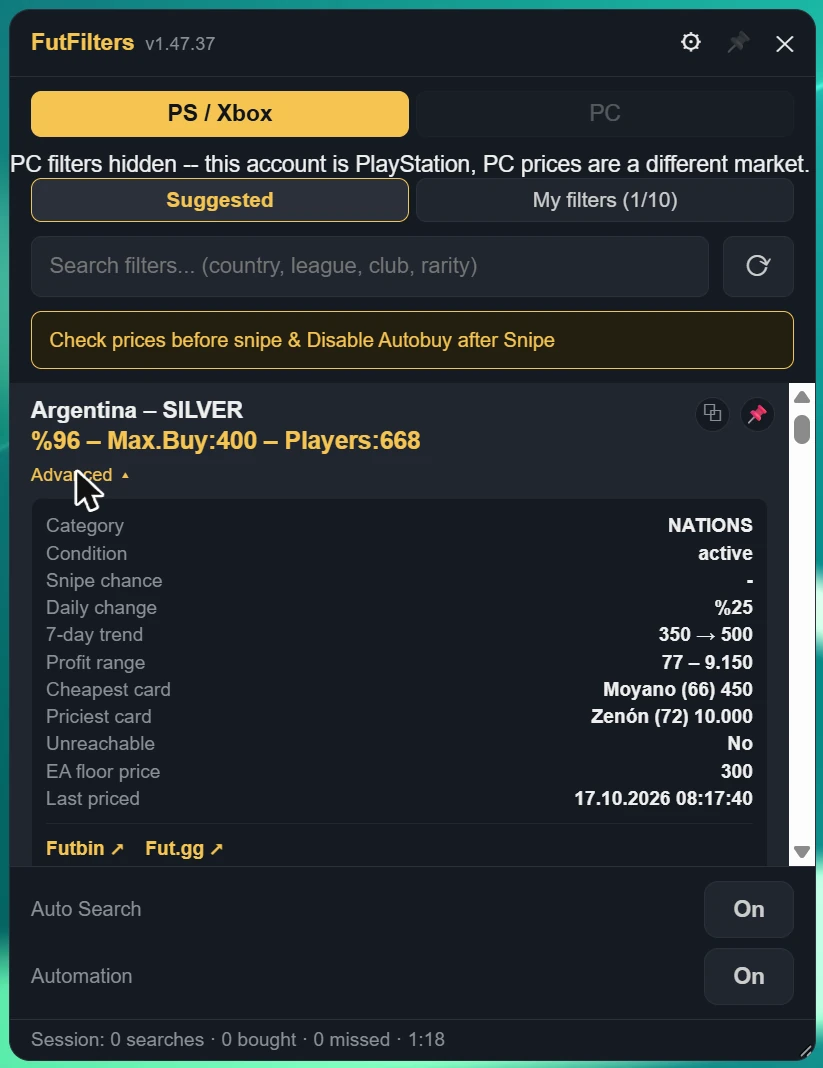
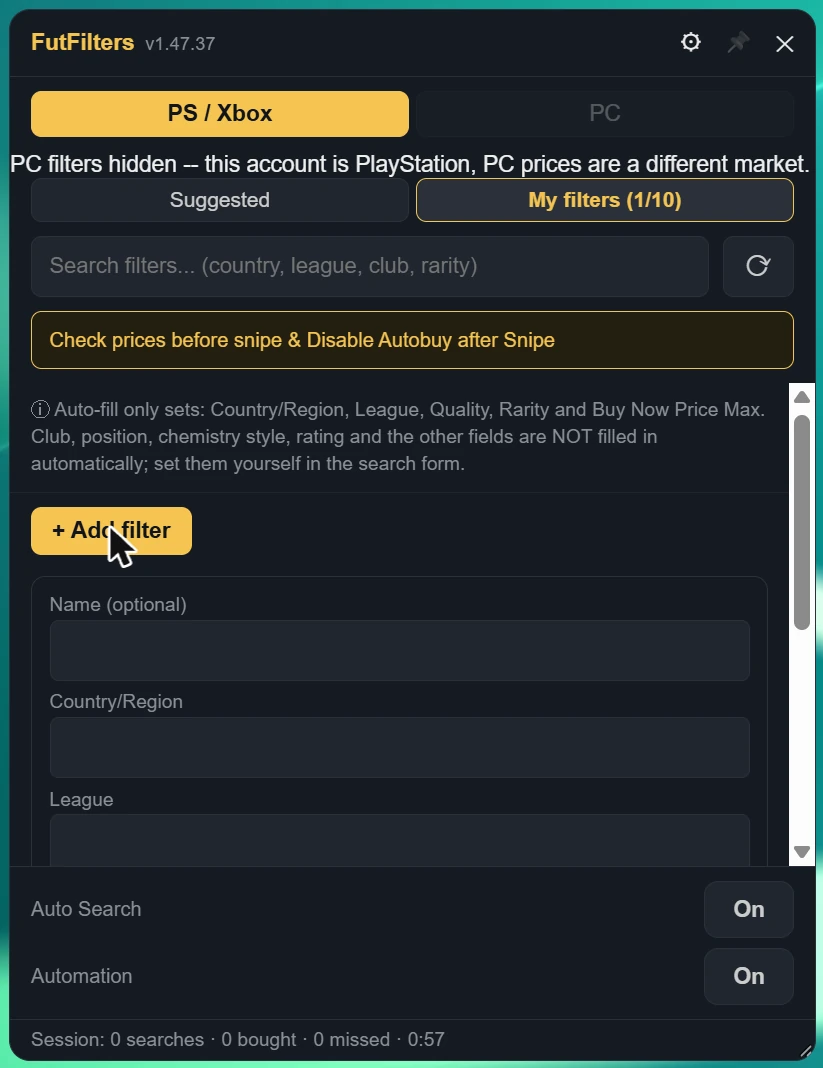
पैनल में वे फ़िल्टर दिखते हैं जिनकी हमने कीमत तय की है, हर फ़िल्टर कितना मुनाफ़े वाला है यह भी दिखता है, और किसी फ़िल्टर पर क्लिक करते ही Transfer Market का सर्च भर जाता है.
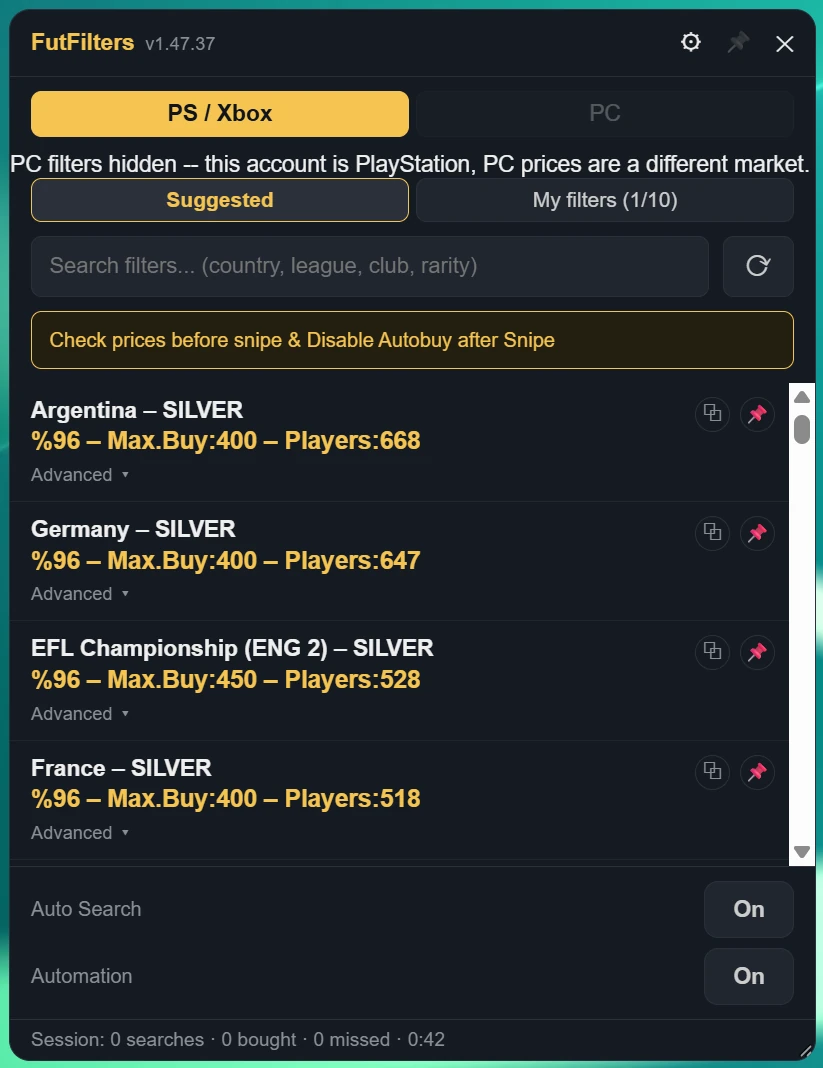
- PS / Xbox और PC अलग-अलग मार्केट हैं. अगर आपको "PC filters hidden" दिखे, तो आपका खाता PlayStation / Xbox का है और PC की कीमतें एक अलग मार्केट की हैं, इसलिए सिर्फ़ मेल खाने वाले फ़िल्टर दिखाए जाते हैं.
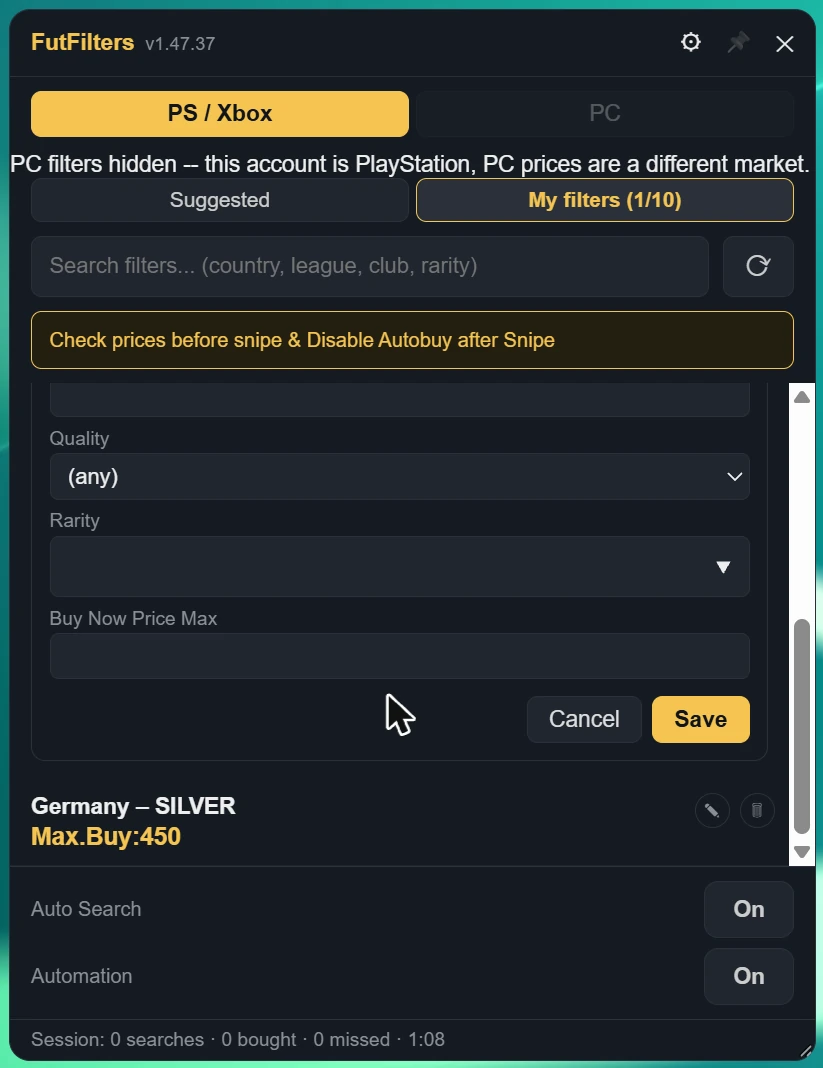
- सर्च बॉक्स: सूची को छोटा करने के लिए देश, लीग, क्लब या रेरिटी लिखें; रिफ़्रेश बटन सूची को दोबारा लोड करता है.
- Auto Search और Automation के स्विच पैनल के नीचे होते हैं; उनके नीचे वाली लाइन मौजूदा सेशन है (सर्च, खरीदे, छूटे, समय).
- हेडर में पिन आइकन पेज पर कहीं और क्लिक करने पर भी पैनल को खुला रखता है; नीचे-दाएँ कोने को खींचकर आप उसका आकार बदल सकते हैं.
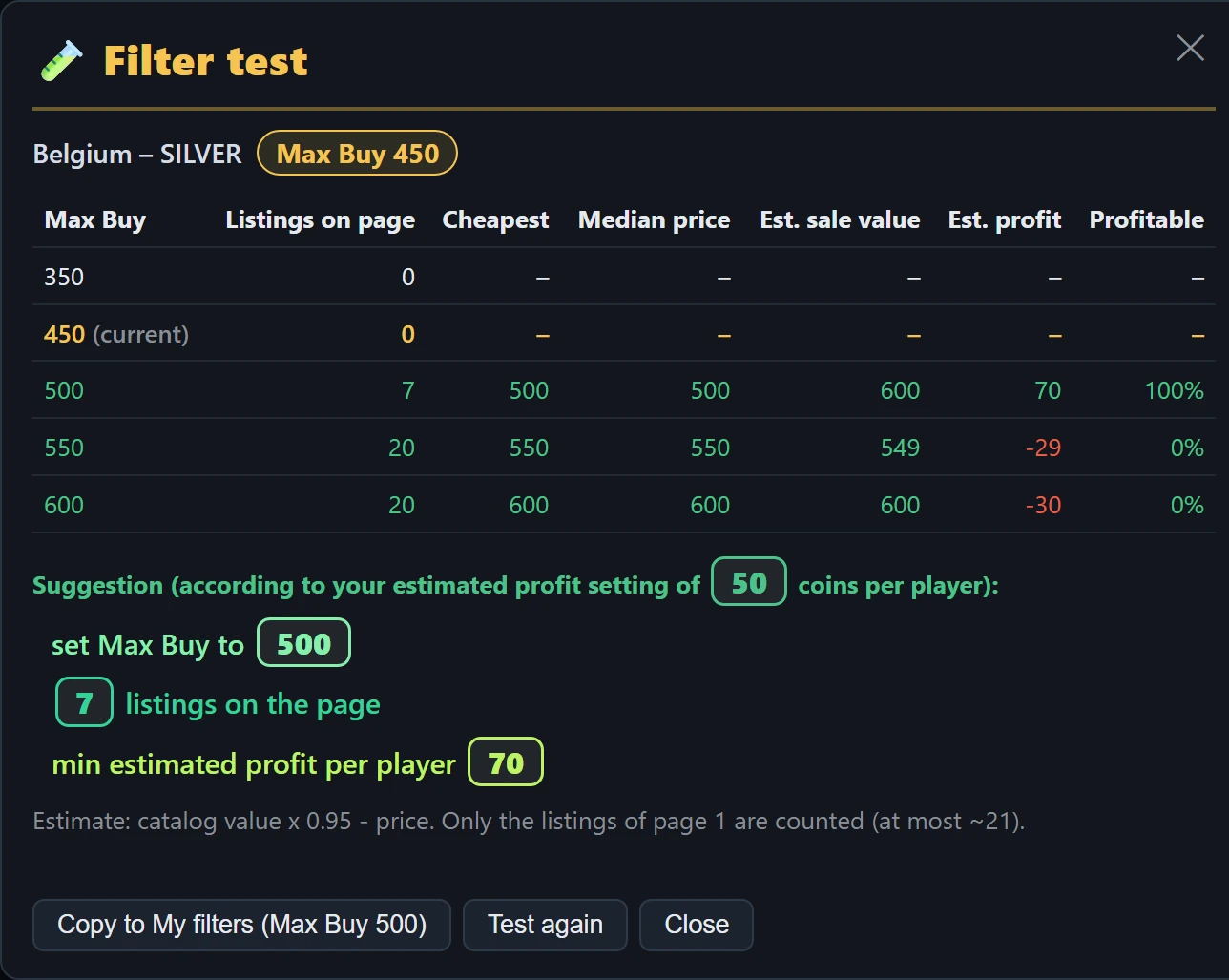
- तालिका के नीचे का सुझाव बाज़ार बदलने पर बेहतर Max Buy बताता है (जैसे जब मौजूदा कीमत पर कोई लिस्टिंग नहीं है पर एक कदम ऊपर पर्याप्त मुनाफ़े वाली हैं), या कहता है कि उसे वैसा ही रखें, या फ़िल्टर को फ़िलहाल छोड़ दें।
- "Copy to My filters" फ़िल्टर को सुझाए गए Max Buy के साथ My filters में जोड़ता है। My filters के किसी फ़िल्टर का टेस्ट करने पर यह बटन उसका Max Buy बदल देता है।
- पूरा हुआ हर टेस्ट Tested टैब में सेव होता है, जो पैनल में और साइट के पैनल पेज पर My filters के बगल में है: फ़िल्टर, टेस्ट का सुझाया Max Buy और टेस्ट की तारीख़ व समय के साथ। किसी पंक्ति पर क्लिक करके फ़िल्टर को उसी कीमत पर भरें, या उसे My filters में कॉपी करें।
- टेस्ट पूरा होने पर उसका नतीजा गुमनाम बाज़ार डेटा के रूप में FutFilters को भेजा जाता है (इसे Settings में बंद कर सकते हैं; तब टेस्ट सिर्फ़ आपकी अपनी Tested सूची में रहता है)। जब कई अकाउंट बताते हैं कि किसी फ़िल्टर का Max Buy अब बाज़ार से मेल नहीं खाता, तो FutFilters उस फ़िल्टर की कीमत 24 घंटे के लिए बदल देता है (10% की जगह 5-10% की छूट); बदले हुए फ़िल्टर के Max Buy के पास गियर आइकन दिखता है।
- टेस्ट चलते समय Auto Search रुक जाता है और सभी ऑटोमैटिक खरीद विकल्प (Auto-click Buy Now, Auto-click Ok, Multi-buy और Webapp Extra के ऑटो-खरीद स्विच) बंद रहते हैं, इसलिए कभी कुछ नहीं खरीदा जाता। पूरा होने पर Auto Search फिर शुरू करें। लगातार कई टेस्ट न चलाएँ: हर टेस्ट लगभग 8 खोजें होता है।
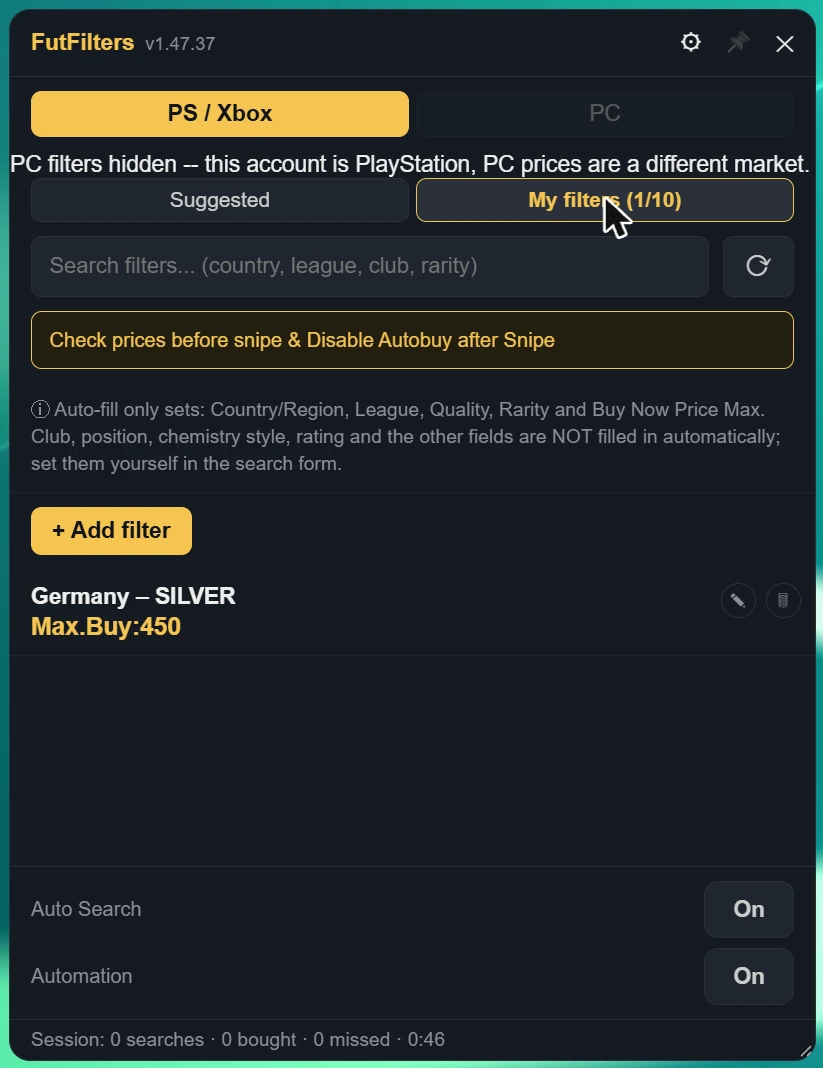
Auto-fill only sets: Country/Region, League, Quality, Rarity, Position and Buy Now Price Max. Club, chemistry style, rating and the other fields are NOT filled in automatically; set them yourself in the search form.
3. FutFilters Settings
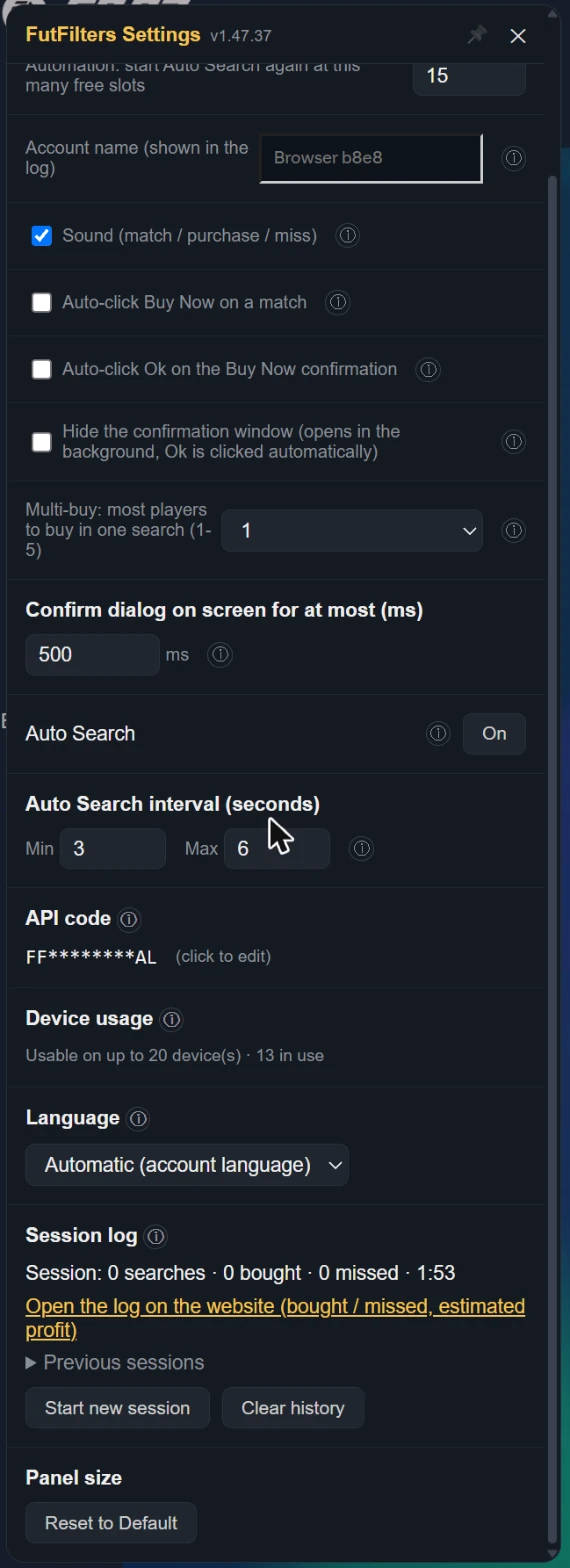
पैनल के हेडर में गियर आइकन पर क्लिक करें. पैनल में किसी सेटिंग के बगल में (i) पर होवर करें, आपको वही विवरण दिखेगा जो नीचे दिया गया है.
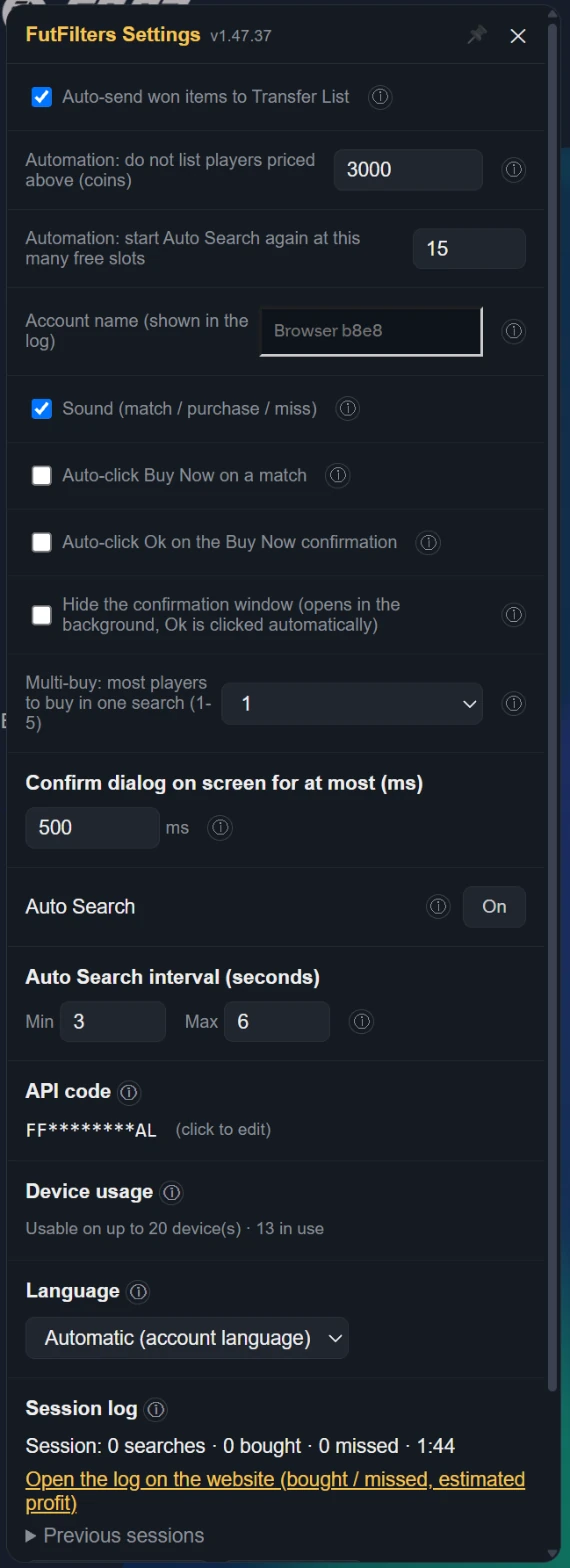
| Auto-send won items to Transfer List | When a purchased/won item shows up on the Club > Unassigned page or the Search Results page, automatically clicks "Send to Transfer List". Only relocates the item to the Transfer List tab -- it does not list it for sale, set a price, or move any coins; only runs while one of those pages is open. Default: on. EA caps the Unassigned pile at 5 items and refuses new purchases when it is full, so on other pages too (Transfers, Transfer List, Club...) purchased items are sent without leaving the page (if the Transfer List is full it retries when space frees). If that method stops working it falls back to opening the Home "Unassigned Items" tile. |
|---|---|
| Automation: do not list players priced above (coins) | WHEN ON: when the Transfer List is 90% full Auto Search stops and the players in it are listed one by one at the FutFilters price for 1 hour (with the Relist % of FF Webapp Extra, +5% if you never set one). When listing is done the sales are checked periodically and sold items are cleared; when the number of free slots set below (default 15) is reached Auto Search starts again with the same filter. WARNING: this is full automation, it lists without anyone looking and is a risky way to use the helper; be careful before leaving it unattended. Players priced above the limit below are never listed automatically. |
| Automation: start Auto Search again at this many free slots | जैसे ही Transfer List के इतने स्लॉट खाली हो जाते हैं (डिफ़ॉल्ट 15), Auto Search उसी फ़िल्टर के साथ दोबारा शुरू हो जाता है. |
| Account name (shown in the log) | Shown next to this browser's events and warnings in the Autobuyer log, so you can tell your accounts apart when you run several. Left empty it uses the club name shown in the Web App (or a short code for this browser if that cannot be read). The name is sent to futfilters.com with the log events; if you prefer, type a short nickname instead. |
| Sound (match / purchase / miss) | A beep when a listing matches, a "cha-ching" on a successful purchase, a low "thud" on a missed player, and the alert when Auto Search stops. Turn it off for no sound at all. Default: on. |
| When EA keeps answering "Too many actions": pause Auto Search for (minutes, 0 = off) | When too many actions are taken EA answers "Too many actions have been taken…" and switches the Transfer Market off for a while; an Auto Search that keeps going only wastes time and is risky for the account. WHEN ON: if that message is seen more than 5 times within the last 20 searches, Auto Search stops for the number of minutes set here and then carries on by itself with the same filter. 0 = off. Works on an English EA account. |
| Skip cards with an estimated profit below (coins, 0 = off) | Estimated profit = the card's catalog value x 0.95 - price. A low-profit card takes a Transfer List slot for an hour. 0 = buy every match (as before). Cards the catalog does not know are still bought. While on, a card whose value is not cached yet can delay the click by up to 0.45 s. |
| Send filter test results to FutFilters | When a test finishes, its result (listings, prices, estimated profit, suggestion) is sent to FutFilters as anonymous market data. When it is off the result is still saved to your own Tested list, just not shared. When several accounts report that a filter's Max Buy no longer fits the market, the server adjusts that filter's price (a 5-10% discount) for 24 hours; an adjusted filter shows a ⚙ next to it. |
| Auto-click Buy Now on a match | When the watch finds a match, automatically selects the row and clicks "Buy Now for X" -- this opens EA's own "Get Now" confirmation dialog. If "Auto-confirm" below is off, the dialog stays yours to act on. |
|---|---|
| Auto-click Ok on the Buy Now confirmation | WHEN ON, also clicks Ok in the "Get Now" confirmation dialog and completes the purchase. This is full automation -- high EA account ban risk. Default: off. Only meaningful while auto Buy Now is on. |
| Hide the confirmation window (opens in the background, Ok is clicked automatically) | The Buy Now confirmation window (Cancel / Ok) is not shown on screen; EA still opens it and the script clicks Ok in the background. Only works while "Auto-click Ok on the Buy Now confirmation" is on and only for the helper's own attempt: windows you open yourself stay visible. A hidden window that gets stuck is closed with Cancel. Default: off. |
| Multi-buy: most players to buy in one search (1-5) | 1 (default): if a search shows several matches only the most profitable one is bought (profit by the FutFilters price: value x 0.95 - price). 2-5: up to that many players are bought in that search, one after another, most profitable first. The number counts Buy Now attempts and starts again with every new search; with a short Auto Search interval you may not get through all of them before the next search comes. WARNING: multi-buy is a risky way to use the helper; coins are spent on several players at once, you can exceed your budget and fill the Unassigned pile (5 items). Be careful when you use it. |
| Confirm dialog on screen for at most (ms) | Only applies while "Auto-click Ok" is ON. If the "Get Now" dialog is still open this long after it first appeared (the Ok click did not register) it is closed with Cancel, so it cannot sit there and collide with the next search. Default: 500 ms. With Auto-click Ok off the dialog is always shown and left to you. |
| Auto Search | You can also turn Auto Search on/off from here -- does nothing while watch is off. Default: off. |
| Auto Search interval (seconds) | Each cycle waits a random amount of time between these two values -- deliberately variable, since a fixed interval is the most obvious bot tell there is. |
| API code | Changing the code switches to a different futfilters.com account/code -- filters and preferences reload accordingly. |
| Device usage | Switching to a different computer? You can reset it from your futfilters.com panel. |
| Language | The panel's language. "Automatic" follows the language on your futfilters.com account; pin it here to match your EA Web App's language -- no need to visit the website. |
| Session log | Every time you start Auto Search a new session begins (there is also one from when you open the page; you can press "Start new session" yourself too). Stopping Auto Search does not end it: it keeps counting until the next one starts. Searches counts manual and automatic Search clicks; bought counts purchased items that land in the Unassigned pile. The last 30 sessions are kept in this browser. |
4. FF Webapp Extra की सेटिंग्स
बाएँ मेनू में "FF Webapp Extra" आइकन खोलें. हर सुविधा का अपना स्विच है और विवरण वाला एक (i) बटन है. जो इस्तेमाल नहीं करते, उसे बंद कर दें.
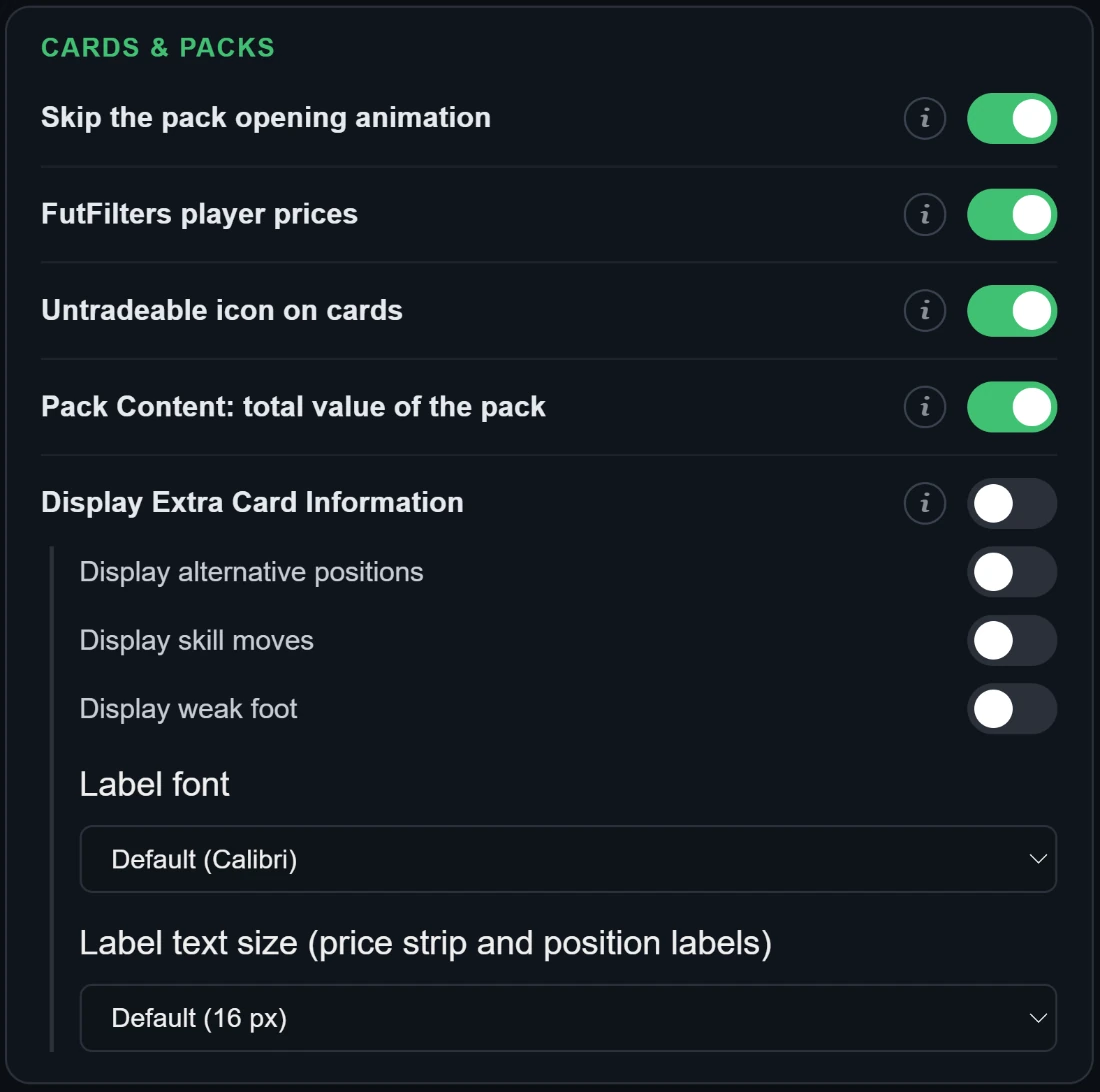
- पैक खोलने का एनिमेशन छोड़ें
- पैक खुलते समय चलने वाला कॉन्फ़ेटी/आतिशबाज़ी का एनिमेशन छिपाता है और सीधे नतीजे पर पहुँचाता है।
- FutFilters खिलाड़ी कीमतें
- हर खिलाड़ी कार्ड के ऊपर futfilters.com के खिलाड़ी डेटाबेस की आख़िरी कीमत जोड़ता है। PlayStation / Xbox खाते में सिर्फ़ PS कीमत, PC खाते में सिर्फ़ PC कीमत (हरी) दिखती है; प्लेटफ़ॉर्म न पढ़ा जा सके तो दोनों दिखती हैं। धुँधली कीमत 2 दिन से पुरानी है; ऊपर ले जाने पर सटीक मान, EA की न्यूनतम सीमा और तारीख़ दिखती है। यह सिर्फ़ स्क्रिप्ट चालू करने के बाद लोड हुई सूचियों में दिखती है। Chemistry Styles, मैनेजर और Manager Leagues पर भी कीमत दिखती है (सबसे सस्ती लिस्टिंग, fut.gg से)।
- कार्ड पर अव्यापार्य (untradeable) आइकन
- हर untradeable खिलाड़ी और आइटम कार्ड के ऊपरी-बाएँ कोने पर साफ़ "ट्रेड नहीं हो सकता" आइकन लगाता है (क्लब, Unassigned, स्क्वाड, पैक), ताकि वे एक नज़र में दिखें। डिफ़ॉल्ट: चालू।
- Pack Content: पैक का कुल मूल्य
- Store की "Pack Content" विंडो में (जो पैक आप प्रीव्यू या ओपन करते हैं) सबसे नीचे पैक का कुल मूल्य दिखाने वाली एक लाइन जोड़ता है: खिलाड़ी FutFilters कीमतों पर (आपके अकाउंट का PS / PC मार्केट); कंज़्यूमेबल, मैनेजर और अन्य आइटम तथा बिना कीमत वाले खिलाड़ी Quick Sell मूल्य पर। हर कार्ड की कीमत "FutFilters खिलाड़ी कीमतें" से आती है, इसलिए उसे भी चालू रखें। अगर पैक की कीमत उसके कॉइन दाम से ज़्यादा है तो एक हरी लाइन बताती है कि उसे खोलना फायदेमंद है (मूल्य EA के 5% सेलिंग टैक्स से पहले के हैं)। Store सूची में जिस पैक का आप पहले प्रीव्यू देख चुके हैं, वह अपने "View Pack" बटन के ऊपर वही मूल्य दिखाता है। पैक में मौजूद Chemistry Styles की भी बाज़ार कीमत से गिनती होती है। कॉइन आइटम अपने अंकित मूल्य पर गिने जाते हैं। पैक के अंदर निकला पैक (जैसे Silver या Gold पैक) अपेक्षित रिटर्न पर नहीं, बल्कि Store के कॉइन दाम पर गिना जाता है।
- कार्ड की अतिरिक्त जानकारी दिखाएँ
- कार्ड के दाएँ किनारे पर छोटे लेबल जोड़ता है (वह जानकारी जो EA डिफ़ॉल्ट रूप से नहीं दिखाता)।
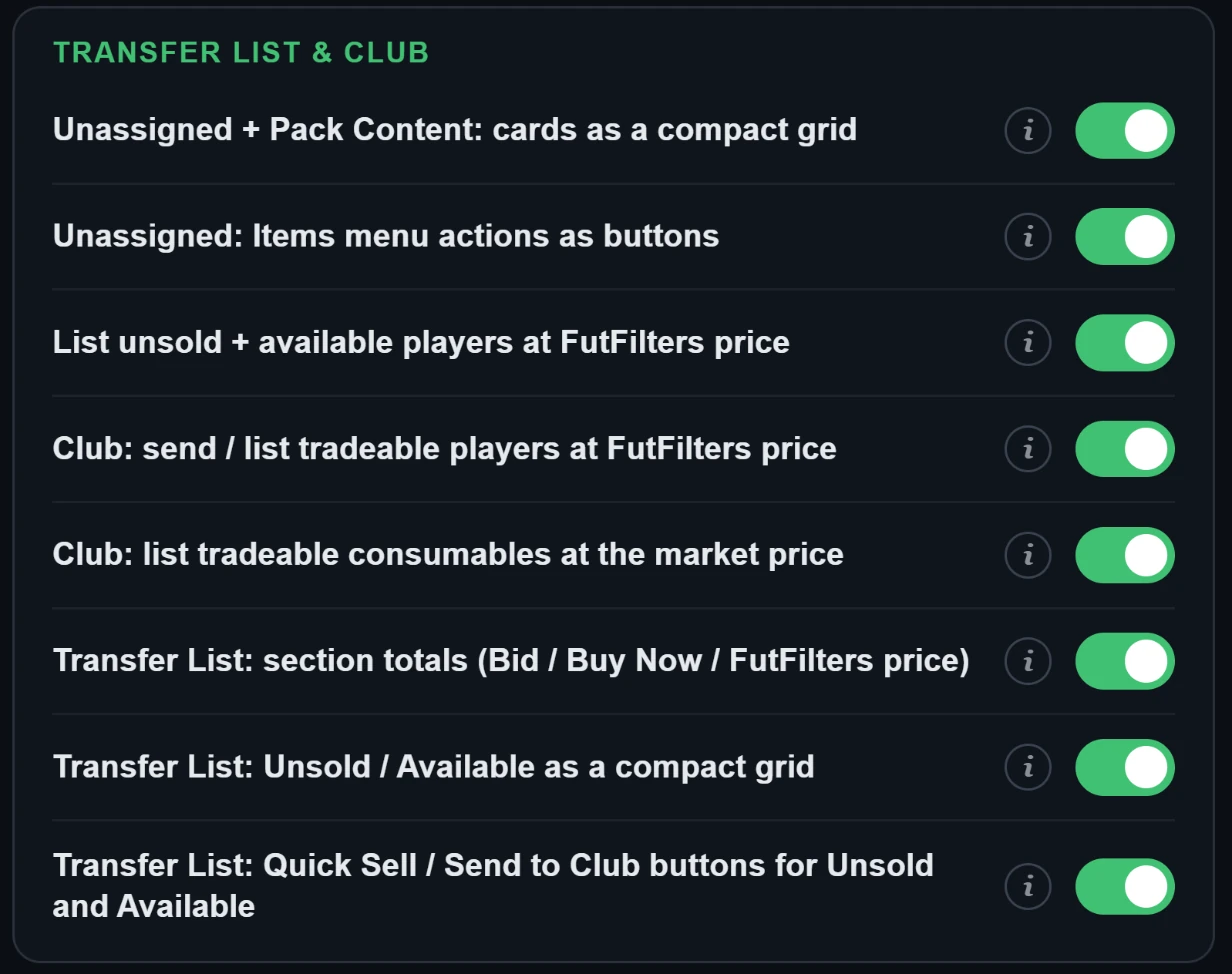
- Unassigned + Pack Content: कार्ड कॉम्पैक्ट ग्रिड में
- Unassigned पेज (पैक से अभी निकले कार्ड) और Store की Pack Content विंडो (प्रीव्यू या खोले गए पैक) में कार्ड और उनके नीचे सिर्फ़ आइटम का नाम दिखाता है, स्टैट्स और तीर के बिना, पाँच-पाँच साथ-साथ और फिर अगली पंक्ति में। कार्ड पर क्लिक करने से वह हमेशा की तरह चुना जाता है। डिफ़ॉल्ट: चालू।
- Unassigned: Items मेनू की क्रियाएँ बटन के रूप में
- Unassigned पेज पर Items मेनू (तीन बिंदु) की क्रियाओं को "Items" शीर्षक के पास बटन के रूप में रखता है: सब कुछ क्लब में रखें, ट्रांसफ़र लिस्ट में भेजें और कुल मूल्य के साथ Quick Sell। Quick Sell पहले की तरह पहले EA की अपनी पुष्टि माँगता है। डिफ़ॉल्ट: चालू। दो और बटन सिर्फ़ खिलाड़ियों को (कंज़्यूमेबल या दूसरे आइटम नहीं) क्लब या ट्रांसफ़र लिस्ट में भेजते हैं। Duplicates में रखे बिकने योग्य खिलाड़ी भी Transfer List बटन में शामिल हैं।
- न बिके + उपलब्ध खिलाड़ियों को FutFilters कीमत पर लिस्ट करें
- Transfer List पेज पर उन खिलाड़ियों के लिए बटन जोड़ता है जो बिके नहीं या लिस्ट नहीं हैं: हर खिलाड़ी को futfilters.com खिलाड़ी डेटाबेस की कीमत पर, आपके चुने प्रतिशत (-20 … +20, डिफ़ॉल्ट +5) से समायोजित करके और EA के कीमत-चरण में पूर्णांकित करके एक-एक कर लिस्ट करता है। "List selected" दबाने तक कुछ लिस्ट नहीं होता; पहले एक तालिका दिखती है। वही बटन पैक खोलने के बाद Unassigned पेज पर भी दिखता है, वहाँ इंतज़ार कर रहे ट्रेड करने योग्य खिलाड़ियों के लिए।
- Club: बेचने योग्य खिलाड़ियों को FutFilters कीमत पर भेजें / लिस्ट करें
- My Club > Players पर एक बटन जोड़ता है: क्लब में बेचने योग्य खिलाड़ी ढूँढकर FutFilters कीमत के साथ तालिका में दिखाता है (हर खिलाड़ी अलग चुना जा सकता है, डिफ़ॉल्ट रूप से कोई चयनित नहीं)। चुने हुए खिलाड़ियों को एक साथ Transfer List में भेजता है या सीधे क्लब से FutFilters कीमत पर (आपके प्रतिशत के साथ) लिस्ट करता है।
- Club: बिकने योग्य कंज़्यूमेबल बाज़ार भाव पर लिस्ट करें
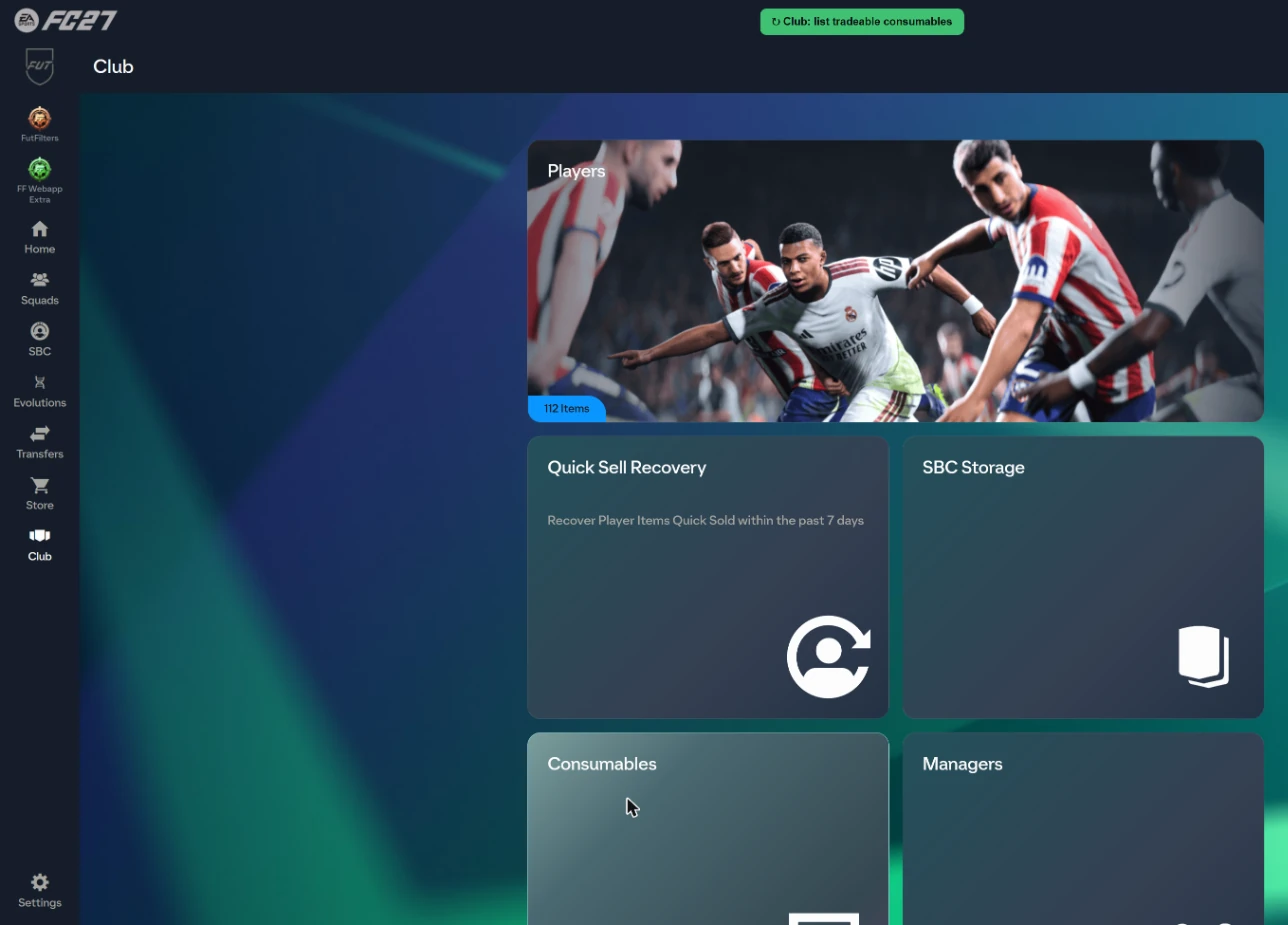
- My Club > Consumables पर एक बटन जोड़ता है: यह क्लब के सभी कंज़्यूमेबल स्टैक (Chemistry Styles, Manager Leagues, Healing ...) स्कैन करता है और बिकने योग्य को तालिका में दिखाता है, बाज़ार भाव के साथ (Chemistry Styles और Manager Leagues के लिए futfilters.com का भाव, बाकी के लिए Transfer Market का सबसे कम Buy Now), आपके % समायोजन के बाद start / Buy Now भाव, और हर स्टैक की कितनी यूनिट लिस्ट करनी हैं (डिफ़ॉल्ट: सभी)। "List selected" दबाए बिना कुछ लिस्ट नहीं होता; यूनिट एक-एक करके, EA के "List on Transfer Market" वाली ही कॉल से लिस्ट होती हैं। डिफ़ॉल्ट: चालू।
- Transfer List: सेक्शन के कुल (Bid / Buy Now / FutFilters कीमत)
- Transfer List के हर सेक्शन (Sold, Unsold, Available, Active) के शीर्षक के नीचे "TOTAL" पंक्ति जोड़ता है: उस सेक्शन के खिलाड़ियों का कुल Bid, कुल Buy Now और futfilters.com डेटाबेस की कुल कीमत। केवल पढ़ता है, EA की पंक्तियाँ नहीं हिलाता।
- Transfer List: Unsold / Available कॉम्पैक्ट ग्रिड में
- Transfer List पेज पर Unsold Items और Available Items सेक्शन को कार्डों की ग्रिड में दिखाता है, पाँच-पाँच, हर कार्ड के नीचे आइटम का नाम और कीमत या तीर के बिना। कार्ड पर क्लिक करने से वह हमेशा की तरह चुना जाता है। Sold Items और Active Transfers सामान्य सूची में रहते हैं। डिफ़ॉल्ट: चालू।
- Transfer List: Unsold और Available के लिए Quick Sell / Club में भेजें बटन
- Unsold Items और Available Items के शीर्षक के पास बटन जोड़ता है: "सब Quick Sell करें" (पहले EA पुष्टि माँगता है; 1,000 से ऊपर बाज़ार भाव वाले खिलाड़ी छोड़ दिए जाते हैं), "सब Club में भेजें" और "खिलाड़ियों को Club में भेजें" (सिर्फ़ खिलाड़ी)। ये पूरे सेक्शन पर EA की अपनी कॉल और संदेशों के साथ चलते हैं; जो डुप्लिकेट भेजे नहीं जा सकते वे छोड़ दिए जाते हैं। डिफ़ॉल्ट: चालू।
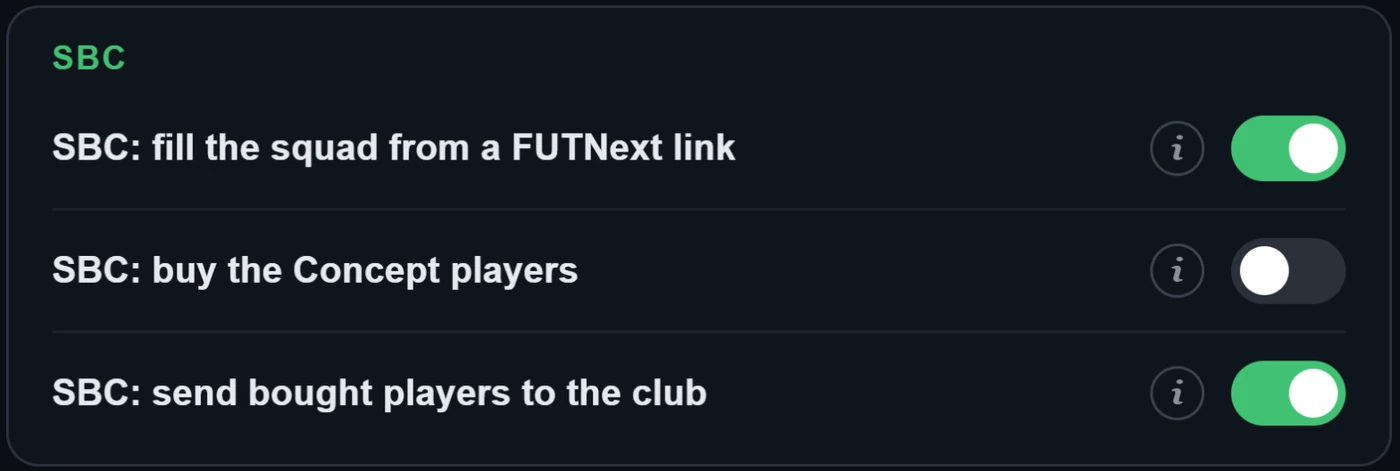
- SBC: FUTNext लिंक से स्क्वाड भरें
- SBC स्क्वाड पेज पर "Clear Squad" बटन के नीचे "FUTNext" बॉक्स जोड़ता है। FUTNext लिंक (futnext.com?sbcId=…&players=…) या सिर्फ़ खिलाड़ी ID की सूची चिपकाएँ और स्क्वाड तुरंत भर जाता है: पहले आपके क्लब के अपने कार्ड से, और जो आपके पास नहीं हैं उनके लिए Concept खिलाड़ी से (योजना के लिए EA के प्लेसहोल्डर, इन्हें सबमिट नहीं किया जा सकता)। स्क्वाड सेव होता है, सबमिट कभी नहीं होता। जो नहीं मिलते उनकी सूची दिखती है। जब futfilters.com के पास इस चैलेंज के लिए FUTNext के सबसे नए समाधान होते हैं (हर 6 घंटे में इकट्ठे होते हैं), तो बॉक्स के नीचे ड्रॉपडाउन में 5 सबसे नए समाधान कीमत और उम्र के साथ दिखते हैं: एक चुनें और स्क्वाड तुरंत भर जाता है।
- SBC: खरीदे गए खिलाड़ियों को क्लब में भेजें
- जब आप किसी SBC के अंदर हों (स्क्वाड पेज और उसकी खिलाड़ी खोज), तब खरीदे गए खिलाड़ी Transfer List की जगह आपके क्लब (Unassigned -> My Club) में भेजे जाते हैं। SBC खोलते समय जो खिलाड़ी Unassigned में पहले से इंतज़ार कर रहे थे उन्हें छुआ नहीं जाता। SBC के दौरान Autofill स्क्रिप्ट पीछे हट जाती है ताकि दोनों एक ही खिलाड़ी के लिए न टकराएँ।
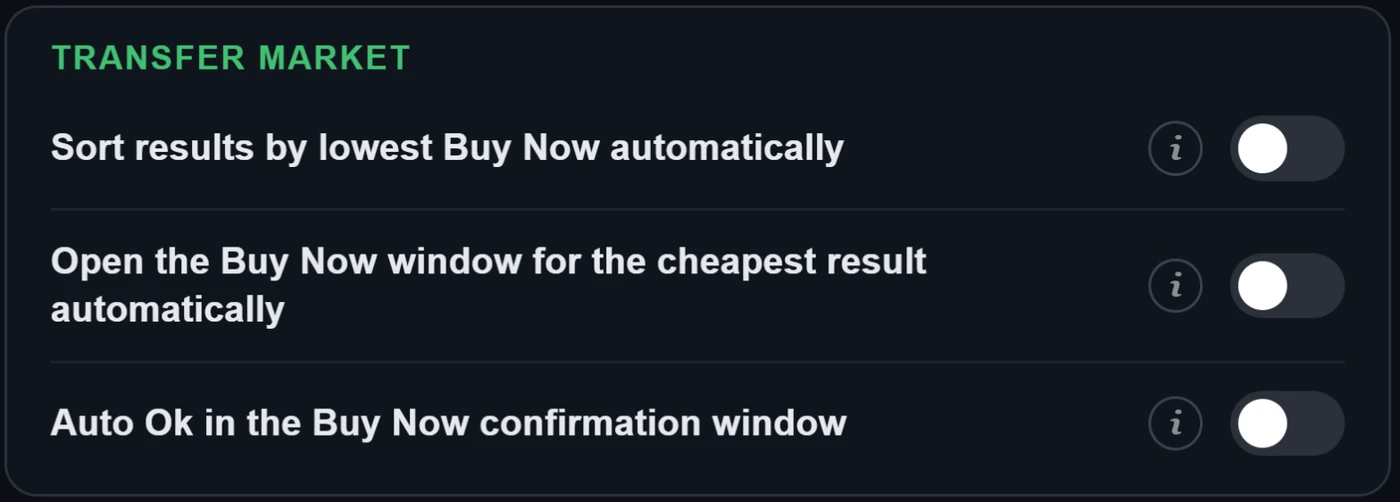
- नतीजों को अपने-आप सबसे कम Buy Now के अनुसार क्रमबद्ध करें
- जब भी कोई खोज-नतीजा सूची (Transfer Market या SBC खिलाड़ी खोज) दिखे या बदले, "Sort results by lowest Buy Now" शॉर्टकट अपने-आप चलाता है।
- सबसे सस्ते नतीजे की Buy Now विंडो अपने-आप खोलें
- सूची के सबसे ऊपर वाले खिलाड़ी को (स्वचालित क्रमबद्धता चालू हो तो असली सबसे सस्ता) चुनकर EA की अपनी "Get Now" पुष्टि विंडो "Buy now" शॉर्टकट की तरह अपने-आप खोलता है। नीचे "ऑटो Ok" बंद हो तो विंडो आपके हाथ में रहती है।
- Buy Now पुष्टि विंडो में ऑटो Ok
- चालू होने पर "Get Now" पुष्टि विंडो में Ok भी दबा देता है और खरीद पूरी कर देता है, "Buy now" शॉर्टकट और अपने-आप खुली विंडो दोनों के लिए। पूरी स्वचालन में EA खाता बैन होने का जोखिम ज़्यादा है। डिफ़ॉल्ट: बंद।
5. Transfer List और Club के टूल
Webapp Extra, EA के अपने पेजों पर क्या जोड़ता है. आप पुष्टि नहीं करते, तब तक कुछ भी लिस्ट या बेचा नहीं जाता.
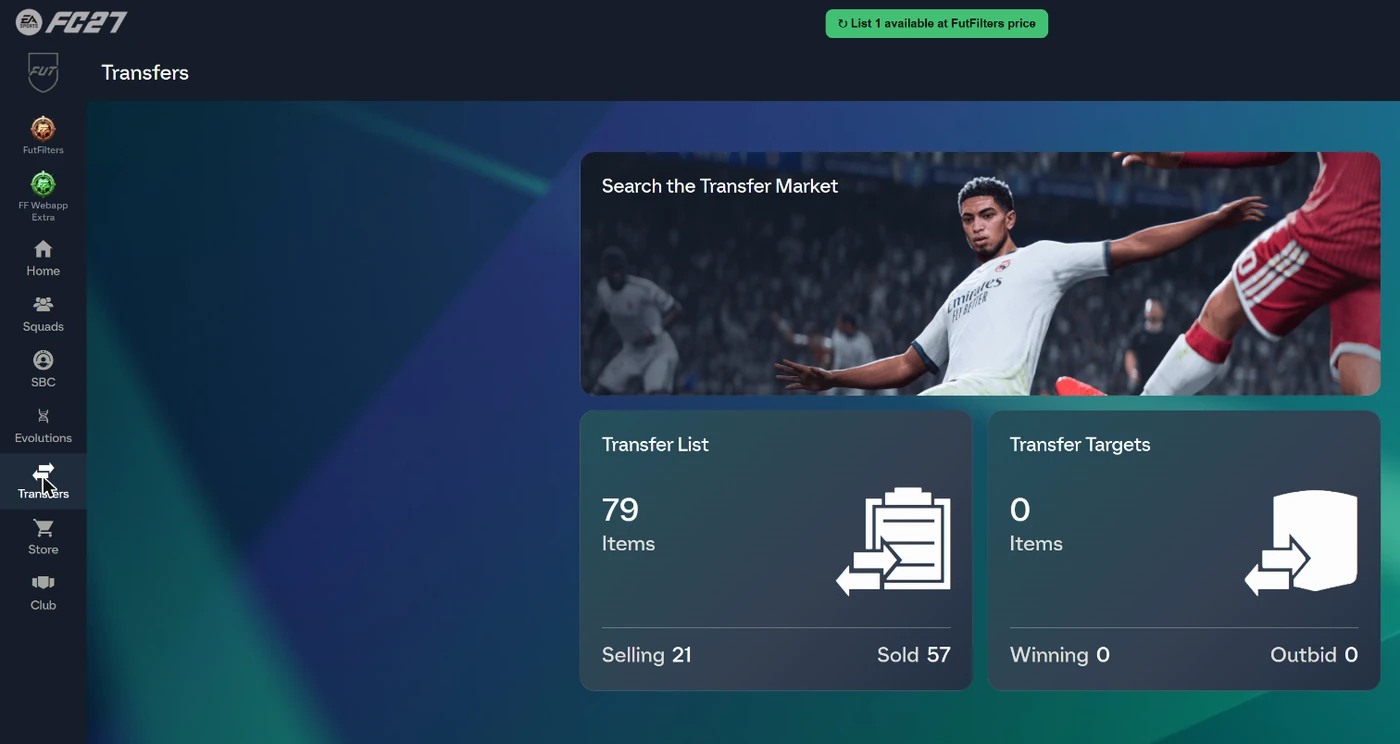
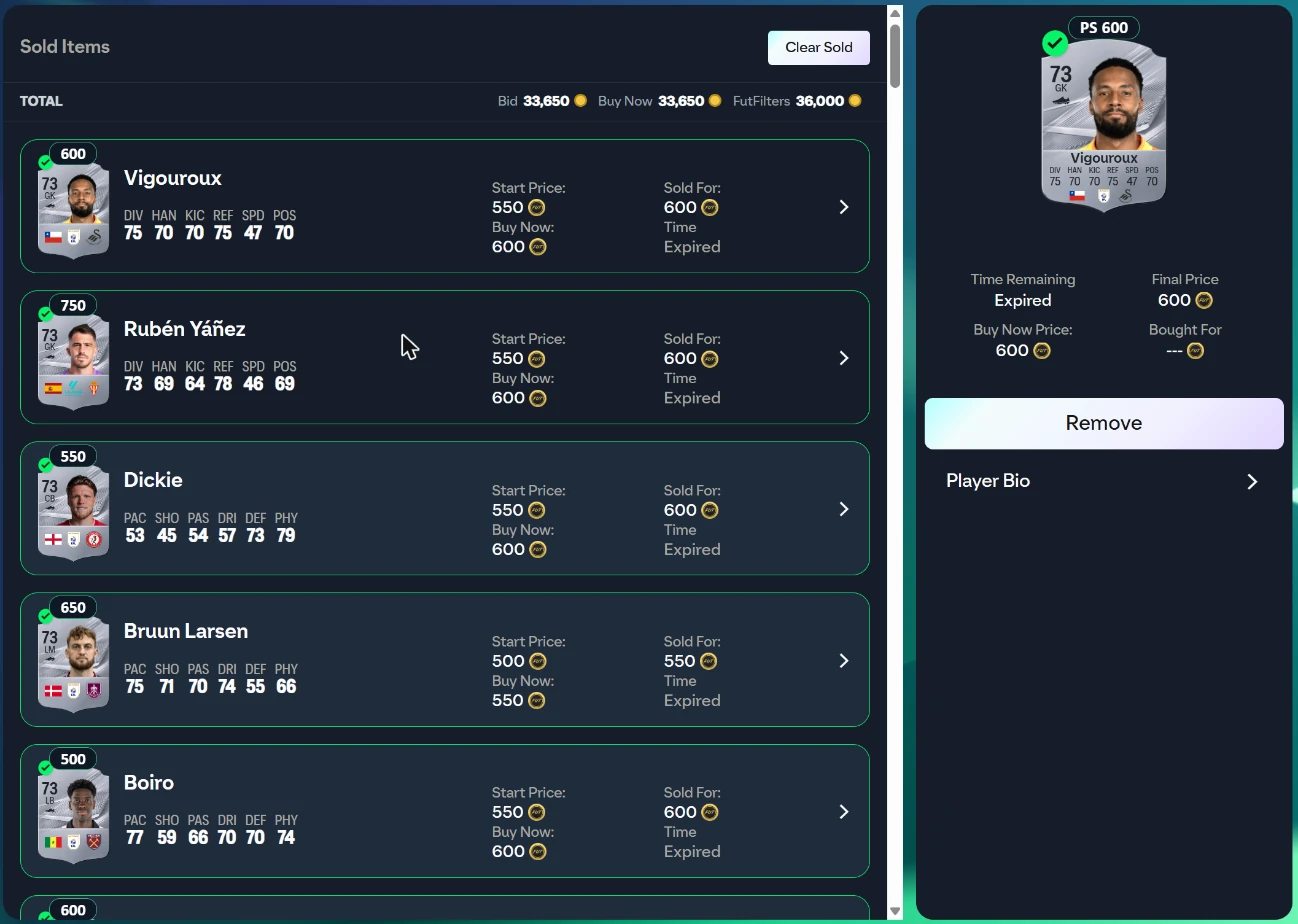
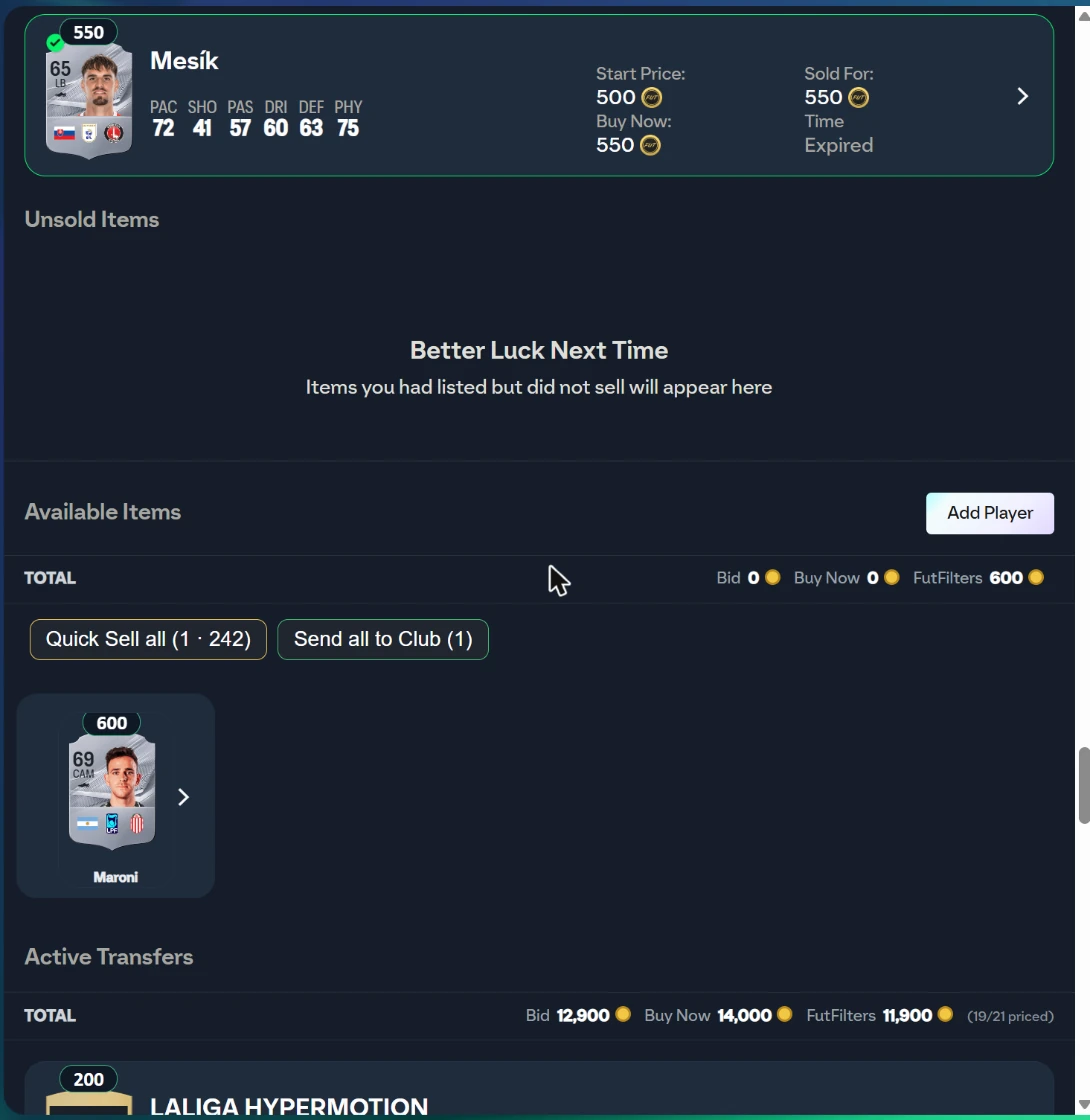
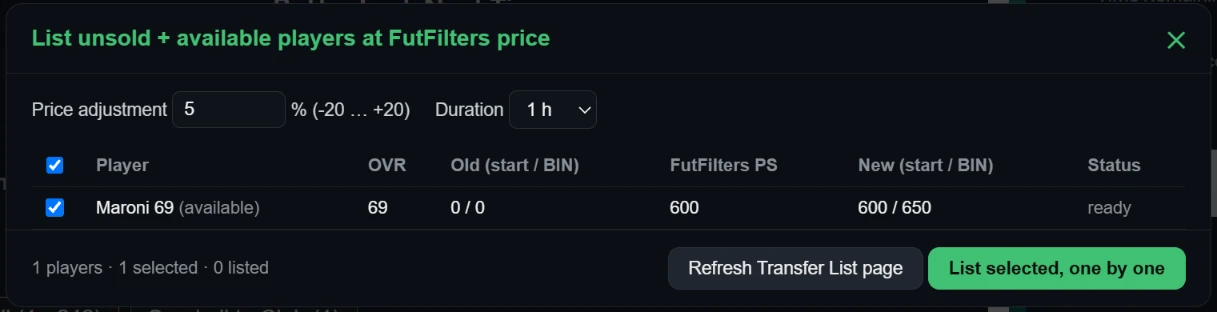
Transfer List पेज पर उन खिलाड़ियों के लिए बटन जोड़ता है जो बिके नहीं या लिस्ट नहीं हैं: हर खिलाड़ी को futfilters.com खिलाड़ी डेटाबेस की कीमत पर, आपके चुने प्रतिशत (-20 … +20, डिफ़ॉल्ट +5) से समायोजित करके और EA के कीमत-चरण में पूर्णांकित करके एक-एक कर लिस्ट करता है। "List selected" दबाने तक कुछ लिस्ट नहीं होता; पहले एक तालिका दिखती है। वही बटन पैक खोलने के बाद Unassigned पेज पर भी दिखता है, वहाँ इंतज़ार कर रहे ट्रेड करने योग्य खिलाड़ियों के लिए।

6. ऑटोबायर लॉग
खरीदा गया और छूटा हुआ हर खिलाड़ी अनुमानित मुनाफ़े के साथ futfilters.com पर आपके लॉग में भेजा जाता है.
- इसे Settings पैनल से खोलें ("Open the log on the website") या साइन इन रहते हुए futfilters.com/logs पर जाएँ.
- कई EA अकाउंट या ब्राउज़र चला रहे हैं? Settings में हर एक को एक छोटा "Account name" दें, ताकि लॉग में आप उन्हें अलग पहचान सकें.
- Sessions: हर बार जब आप Auto Search शुरू करते हैं, एक नया सेशन शुरू होता है. पिछले 30 सेशन ब्राउज़र में रखे जाते हैं (Settings में "Previous sessions").
- छूटी हुई खरीद के कारण के रूप में EA का अपना संदेश दिखता है, जैसे "Bid status changed" (किसी और ने पहले खरीद लिया) या "Too many actions" (EA की अस्थायी सीमा)।
- आपकी Transfer List से बिके कार्ड भी लॉग होते हैं। पेज खरीदों के अनुमानित मुनाफ़े के साथ "Sold" और "Realised profit" (बिक्री मूल्य x 0.95 - कार्ड की लागत, जो कार्ड से ही पढ़ी जाती है) दिखाता है।
अक्सर पूछे जाने वाले सवाल
FutFilters क्या है, और ये दो हेल्पर क्या हैं?
FutFilters (futfilters.com) EA FC के लिए Transfer Market स्नाइप फ़िल्टर का डेटाबेस है, जिसमें लाइव कीमतों का डेटा है. FutFilters पैनल उन फ़िल्टर को EA FC Web App में लाता है और आपके लिए सर्च भर देता है. FF Webapp Extra कार्ड पर कीमतें और Transfer List, Club, SBC और पैक स्क्रीन पर काम आसान करने वाले टूल जोड़ता है.
मेरा API कोड कहाँ मिलेगा?
futfilters.com पर साइन इन करके: "My Account" -> "API code". Web App में FutFilters पैनल खोलें, गियर आइकन दबाएँ, API code वाली लाइन पर क्लिक करें, कोड पेस्ट करें और Save दबाएँ.
मुझे कौन-सा ब्राउज़र चाहिए?
डेस्कटॉप पर कोई Chromium ब्राउज़र (Chrome या Edge). Chrome Web Store से Chrome एक्सटेंशन इंस्टॉल करें, या Tampermonkey के ज़रिए यूज़रस्क्रिप्ट. दोनों Downloads पेज पर हैं.
पैनल में "PC filters hidden" लिखा है. क्यों?
आपका खाता PlayStation / Xbox का है, और PC की कीमतें एक अलग मार्केट की हैं, इसलिए हेल्पर सिर्फ़ वही फ़िल्टर दिखाता है जो आपके खाते के प्लेटफ़ॉर्म से मेल खाते हैं. PC खाते को इसके बजाय PC फ़िल्टर दिखते हैं.
क्या FutFilters मेरे लिए खिलाड़ी ख़रीदता है?
डिफ़ॉल्ट रूप से नहीं: किसी फ़िल्टर पर क्लिक करने से सिर्फ़ सर्च फ़ॉर्म भरता है. Auto Search सर्च को दोहराता है, और "Auto-click Buy Now" और "Auto-click Ok" ख़रीदारी पूरी कर सकते हैं, लेकिन ये सभी Settings में अलग-अलग स्विच हैं और ख़रीदने वाले स्विच डिफ़ॉल्ट रूप से बंद रहते हैं.
क्या मुझे बैन किया जा सकता है?
ख़रीदारी को ऑटोमेट करना EA की सेवा की शर्तों के ख़िलाफ़ है, इसलिए जोखिम हमेशा रहता है, और पूरी ऑटोमेशन (Auto-click Ok, Multi-buy, Automation) के साथ यह बढ़ जाता है. हम सुरक्षा का वादा नहीं कर सकते. अगर आप निश्चित नहीं हैं तो ख़रीदने वाले स्विच बंद रखें, Auto Search के अंतराल रैंडम रखें (डिफ़ॉल्ट ऐसे ही हैं) और अकाउंट को कभी अकेला न छोड़ें.
"Automation" क्या करता है?
WHEN ON: when the Transfer List is 90% full Auto Search stops and the players in it are listed one by one at the FutFilters price for 1 hour (with the Relist % of FF Webapp Extra, +5% if you never set one). When listing is done the sales are checked periodically and sold items are cleared; when the number of free slots set below (default 15) is reached Auto Search starts again with the same filter. WARNING: this is full automation, it lists without anyone looking and is a risky way to use the helper; be careful before leaving it unattended. Players priced above the limit below are never listed automatically.
Transfer List भरी हुई है और Auto Search रुक गया.
यह जानबूझकर किया गया है: जब Transfer List में कोई स्लॉट खाली नहीं होता, तो Auto Search रुक जाता है, ताकि कोई ख़रीदारी विफल न हो. कुछ आइटम लिस्ट करें, बेचें या हटाएँ ("List at FutFilters price" बटन इसमें मदद करता है) और Auto Search फिर से शुरू करें; Automation चालू हो तो वह आपके तय किए खाली स्लॉट की संख्या पर अपने-आप दोबारा शुरू हो जाता है.
मैं कितने डिवाइस इस्तेमाल कर सकता हूँ?
आपके खाते की एक डिवाइस सीमा है (Settings में "Device usage" के नीचे दिखती है). Switching to a different computer? You can reset it from your futfilters.com panel.
My filters क्या अपने-आप भरता है?
Auto-fill only sets: Country/Region, League, Quality, Rarity, Position and Buy Now Price Max. Club, chemistry style, rating and the other fields are NOT filled in automatically; set them yourself in the search form.
कार्ड पर कीमत का बैज क्या है?
हर खिलाड़ी कार्ड के ऊपर futfilters.com के खिलाड़ी डेटाबेस की आख़िरी कीमत जोड़ता है। PlayStation / Xbox खाते में सिर्फ़ PS कीमत, PC खाते में सिर्फ़ PC कीमत (हरी) दिखती है; प्लेटफ़ॉर्म न पढ़ा जा सके तो दोनों दिखती हैं। धुँधली कीमत 2 दिन से पुरानी है; ऊपर ले जाने पर सटीक मान, EA की न्यूनतम सीमा और तारीख़ दिखती है। यह सिर्फ़ स्क्रिप्ट चालू करने के बाद लोड हुई सूचियों में दिखती है। Chemistry Styles, मैनेजर और Manager Leagues पर भी कीमत दिखती है (सबसे सस्ती लिस्टिंग, fut.gg से)।
"List unsold + available players at FutFilters price" कैसे काम करता है?
Transfer List पेज पर उन खिलाड़ियों के लिए बटन जोड़ता है जो बिके नहीं या लिस्ट नहीं हैं: हर खिलाड़ी को futfilters.com खिलाड़ी डेटाबेस की कीमत पर, आपके चुने प्रतिशत (-20 … +20, डिफ़ॉल्ट +5) से समायोजित करके और EA के कीमत-चरण में पूर्णांकित करके एक-एक कर लिस्ट करता है। "List selected" दबाने तक कुछ लिस्ट नहीं होता; पहले एक तालिका दिखती है। वही बटन पैक खोलने के बाद Unassigned पेज पर भी दिखता है, वहाँ इंतज़ार कर रहे ट्रेड करने योग्य खिलाड़ियों के लिए।
Multi-buy क्या है?
1 (default): if a search shows several matches only the most profitable one is bought (profit by the FutFilters price: value x 0.95 - price). 2-5: up to that many players are bought in that search, one after another, most profitable first. The number counts Buy Now attempts and starts again with every new search; with a short Auto Search interval you may not get through all of them before the next search comes. WARNING: multi-buy is a risky way to use the helper; coins are spent on several players at once, you can exceed your budget and fill the Unassigned pile (5 items). Be careful when you use it.
क्या मैं Auto Search को रात भर चलता छोड़ सकता हूँ?
हाँ, पर ब्राउज़र को जागा हुआ रखें: Chrome छिपे, मिनिमाइज़ या दूसरी विंडो से ढके टैब को धीमा कर देता है। वर्ज़न 1.47.40 से हेल्पर के टाइमर इससे सुरक्षित हैं, और ये सेटिंग भी मदद करती हैं। 1) Chrome में chrome://settings/performance खोलकर Memory Saver बंद करें, या EA Web App साइट (www.ea.com) को "Always keep these sites active" में जोड़ें (लैपटॉप पर Energy Saver भी बंद करें और चार्जर लगा रखें)। 2) विंडो मिनिमाइज़ न करें और उसे दूसरी विंडो से न ढकें; स्क्रीन या कंप्यूटर को सोने से रोकें (Windows: Settings > System > Power)। 3) हर EA अकाउंट के लिए अलग ब्राउज़र प्रोफ़ाइल इस्तेमाल करें। 4) Transfer List में खाली जगह चाहिए (Automation चालू करें, वह खुद लिस्ट करता और आगे बढ़ता है)। 5) अगली सुबह सेशन लॉग देखें: लंबे सेशन में बहुत सारी सर्च दिखनी चाहिए (डिफ़ॉल्ट अंतराल पर लगभग 10-20 प्रति मिनट); बहुत कम हों तो टैब धीमा किया गया था। बिना निगरानी के रात में चलाने से बैन का जोख़िम बढ़ता है, देखें "क्या मुझे बैन किया जा सकता है"।
Filter test क्या करता है?
यह बिना कुछ खरीदे किसी फ़िल्टर को लगभग 8 बार खोजता है और दिखाता है कि फ़िल्टर के Max Buy और आस-पास की कीमतों पर मार्केट में कितनी लिस्टिंग हैं, उनकी कीमतें और अनुमानित मुनाफ़ा; बाज़ार बदला हो तो बेहतर Max Buy सुझाता है। फ़िल्टर की पंक्ति पर फ़्लास्क आइकन दबाएँ; नतीजे में "Copy to My filters" फ़िल्टर को सुझाई गई कीमत पर सेव करता है।
Auto Search "Too many actions" के कारण रुक गया। यह क्या है?
जब कोई अकाउंट Transfer Market पर बहुत ज़्यादा काम करता है तो EA "Too many actions have been taken, and use of this feature has been temporarily disabled" कहता है और कुछ समय के लिए खोज व खरीद ठुकरा देता है। Settings में मिनटों की संख्या तय कर सकते हैं (0 = बंद): अगर यह संदेश पिछली 20 खोजों में 5 बार से ज़्यादा दिखे, तो Auto Search उतनी देर रुकता है और फिर उसी फ़िल्टर के साथ अपने आप चल पड़ता है।
लॉग में "Realised profit" क्या है?
आपकी Transfer List से बिका हर कार्ड लॉग होता है। वास्तविक मुनाफ़ा = बिक्री मूल्य x 0.95 (EA का टैक्स) घटा कार्ड की लागत, जिसे हेल्पर कार्ड के बिकने से पहले कार्ड से ही पढ़ लेता है। हर खरीद के साथ दिखा अनुमानित मुनाफ़ा हमारे प्राइस कैटलॉग से लगाया अंदाज़ा है; वास्तविक मुनाफ़ा वही है जो सच में हुआ।
किसी फ़िल्टर का Max Buy अपने आप क्यों बदल जाता है?
Max Buy फ़िल्टर की बाज़ार कीमत में से EA का 5% टैक्स और 10% मार्जिन घटाकर बनता है। जब कई अकाउंट Filter test चलाकर सहमत होते हैं कि उस कीमत पर कोई लिस्टिंग नहीं मिलती पर थोड़ा ऊपर पर्याप्त मुनाफ़े वाली मिलती हैं, तो FutFilters उस फ़िल्टर का मार्जिन 24 घंटे के लिए 5-10% के बीच कर देता है और फ़िल्टर पर गियर आइकन दिखता है। बदलाव छोटा है (हर बार दो प्रतिशत अंक), केवल तब लागू होता है जब फ़िल्टर अब भी मुनाफ़ा देता है, और नए टेस्ट पुष्टि न करें तो अपने आप हट जाता है। अगर आपने साइट के Snipe profit सेलेक्टर में खुद छोटी छूट चुनी है, तो छोटी वाली इस्तेमाल होती है।
क्या मैं कई EA अकाउंट चला सकता हूँ?
हाँ, हर ब्राउज़र प्रोफ़ाइल अपनी सेटिंग्स अलग रखती है. Shown next to this browser's events and warnings in the Autobuyer log, so you can tell your accounts apart when you run several. Left empty it uses the club name shown in the Web App (or a short code for this browser if that cannot be read). The name is sent to futfilters.com with the log events; if you prefer, type a short nickname instead.
अपडेट के बाद पैनल काम करना बंद हो गया.
पुराने वर्शन समय-समय पर बंद कर दिए जाते हैं. अगर पैनल बताए कि स्क्रिप्ट वर्शन अब सपोर्टेड नहीं है, तो Downloads पेज से नवीनतम वर्शन दोबारा इंस्टॉल करें (Tampermonkey उसे अपने-आप अपडेट नहीं करता). Chrome एक्सटेंशन Web Store के ज़रिए अपडेट होता है.
मैं पैनल की भाषा कैसे बदलूँ?
The panel's language. "Automatic" follows the language on your futfilters.com account; pin it here to match your EA Web App's language -- no need to visit the website.
SBC FUTNext बॉक्स कहाँ है?
SBC स्क्वाड पेज पर "Clear Squad" बटन के नीचे "FUTNext" बॉक्स जोड़ता है। FUTNext लिंक (futnext.com?sbcId=…&players=…) या सिर्फ़ खिलाड़ी ID की सूची चिपकाएँ और स्क्वाड तुरंत भर जाता है: पहले आपके क्लब के अपने कार्ड से, और जो आपके पास नहीं हैं उनके लिए Concept खिलाड़ी से (योजना के लिए EA के प्लेसहोल्डर, इन्हें सबमिट नहीं किया जा सकता)। स्क्वाड सेव होता है, सबमिट कभी नहीं होता। जो नहीं मिलते उनकी सूची दिखती है। जब futfilters.com के पास इस चैलेंज के लिए FUTNext के सबसे नए समाधान होते हैं (हर 6 घंटे में इकट्ठे होते हैं), तो बॉक्स के नीचे ड्रॉपडाउन में 5 सबसे नए समाधान कीमत और उम्र के साथ दिखते हैं: एक चुनें और स्क्वाड तुरंत भर जाता है।
मेरा अभी भी एक सवाल है.
futfilters.com/support खोलें, या साइट के Contact सेक्शन से संदेश भेजें.